Tranfer SAPGUI session from Keepass to RDM

Hi!
I have several SAPGUI sessions to migrate from Keepass to RDM.
Unfortunately there is not a simple way to do this. Seems to be not supported.
In KEEPASS when I export the SAPGUI logon session I have all the INFO needed in a clear way. In respect of the SAPGUI application fields
I can undestand\view for example the fields USER, PASSWORD, HOST\IP, SAP CLIENT, SAP System NUMBER, LANGUAGE etc...
In RDM instead these field (when you export a SAPGUI SESSION) is not explicitated\visible.
Is there a way I can use the session exported from KEEPASS and IMPORT (after a kind of Fields map) into RDM.
I Attach 2 export file as example.
These fields are not exported from RDM...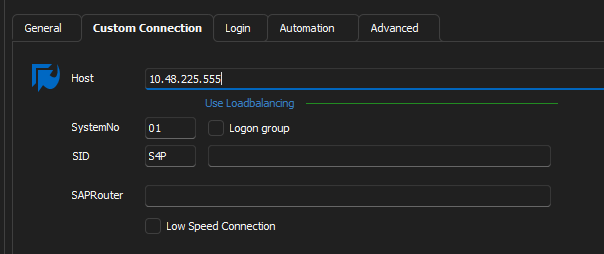
682dd9e9-4714-4463-b945-5e344dee66b3.png
EXPORT-keepass.txt
RDM-exportEntryList.xlsx
All Comments (5)
Hello,
Thank you for reaching out to us regarding this,
- Could you please specify the version of RDM you are currently using?
- What type of data source are you using?
That being said, I'm wondering if you could provide me with an export of a sample entry from KeePass in the CSV format? This will allow me to do some testing on my end and see if I may be able to import the data,
Make sure this does not include any sensitive information,
Best regards,
Samuel Dery
Hi Samuel,
Here the exported file from Keepass in CSV format.
Unfortunately is incomplete and some "Custom field" are not exported making these migration more complex.
I have attached.. but does not have so much sense... Until I can export all the field I need.
SimpleExportKeepass.csv
Maybe in XML format is better... because it contains ALL the data and field.
For importing in RDM we only need to "map" the fields..
I attached a single session of SAPGUI TYPE extracted from KEEPASS in XML format
XMLDatabase.xml
Hello Pico,
I'm jumping in to help Samuel but more from the development side. I have verified the Xml and I can see all the field. Unfortunately there is no easy way to import it for two reasons:
- SAPGUI is an add-on from the good old time (remember that time, you were with me) and this means that the format for now (we want eventually to convert it) is non standard.
- To parse the XML, we need custom code and development and even with a PowerShell script in RDM, this will not be easy
How many entries do you have to migrate?
Regards
David Hervieux
Hi David!
Nice to meet you againg here!
We have to convert several hundred of SAPGUI session (2-300 at least).
Due to the fact that the EXPORT SAPGUI from RDM do not show in clear way all the sapgui fields....Probably the best way for us is to perform a double conversion.
- from keepass to SAPLOGON.ini (not easy, but possible with some code dev)
- Import SAPLOGON.ini into RDM ( I remember that this is possible)