The SSL connection could not be established, see inner exception
The SSL connection could not be established, see inner exception

Suddenly unable to connect to devolutions hub personal data source. Can login to my account but attempting to connect to the data source consistently fails.
Checking my proxy settings (we have a corporate proxy) and setting things manually tests ok, using "system default" fails. Nothing has changed in the proxy environment, all working fine, but for some reason I can't get RDM to use the proxy anymore (it seems). it won't even keep the custom settings
All Comments (8)
Hello,
Thank you for reaching out to us regarding this,
Could you please specify the version of RDM you are currently using?
I'm also wondering if you could provide us with a screenshot of this error message?
Let me know,
Best regards,
Samuel Dery
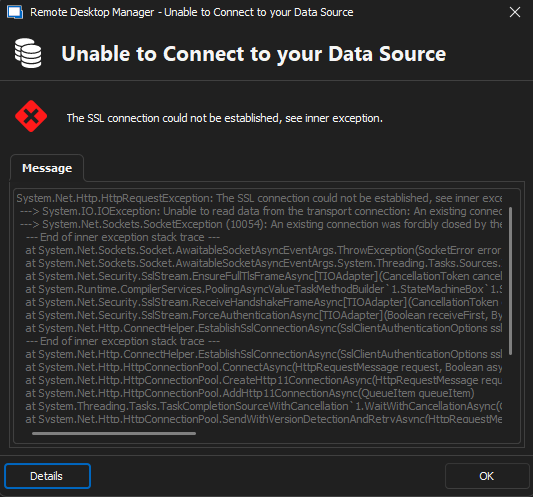
on versions 2024.1.15 and 2024.1.19 when trying to connect to devolutions hub personal data source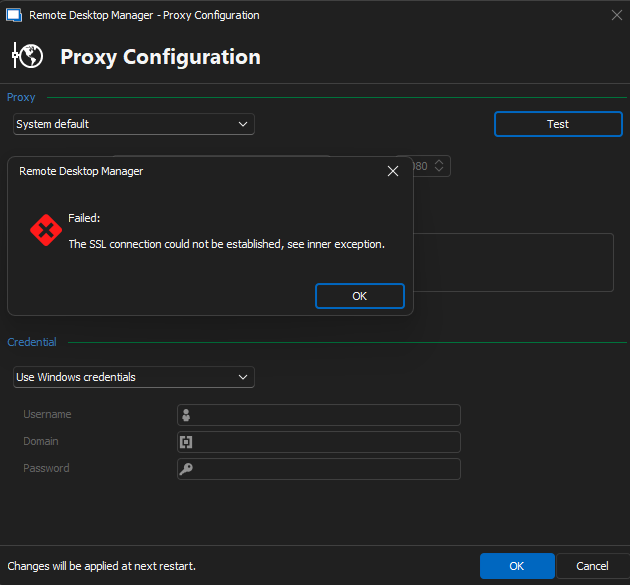
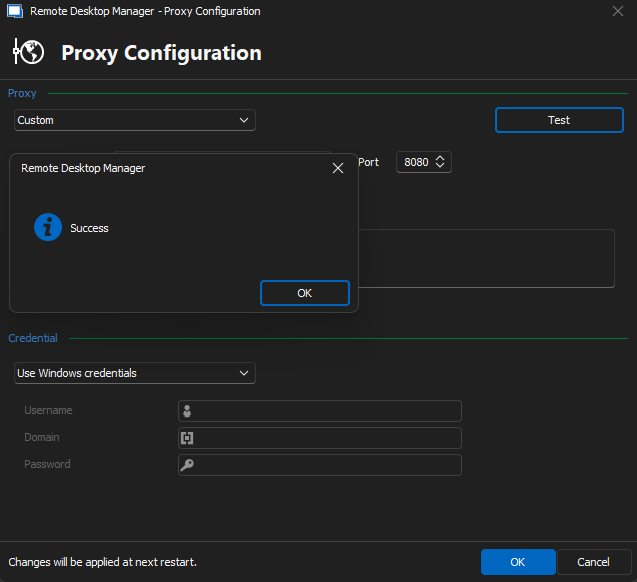
The odd thing is the custom proxy settings were pulled from the system default config.
I could happily accept using custom settings and ignoring system default if it stayed on custom settings, but it doesn't.
4d40f8c0-717d-472f-99ed-60d631811b31.png
f099282d-e01a-40fe-bab8-ccb621d737dd.png
dcdddc5b-55c6-4427-9e2e-7797d88ff83d.png
Hello,
Sorry for the late reply.
Do you have the entire error message details under Help -> Application Logs? Could you paste us the entire call stack of the error message here please.
Best regards,
Jeff Dagenais
Doesn't show in the application logs, but simple enough to reproduce.
As there isn't any more visibility than this I have to assume that RDM is ignoring my proxy settings and trying to get out direct, which is blocked. if I knew which URL is targeted when this exception happens I could grab proxy and firewall logs to correlate and confirm.
System.Net.Http.HttpRequestException: The SSL connection could not be established, see inner exception.
---> System.IO.IOException: Unable to read data from the transport connection: An existing connection was forcibly closed by the remote host..
---> System.Net.Sockets.SocketException (10054): An existing connection was forcibly closed by the remote host.
--- End of inner exception stack trace ---
at System.Net.Sockets.Socket.AwaitableSocketAsyncEventArgs.ThrowException(SocketError error, CancellationToken cancellationToken)
at System.Net.Sockets.Socket.AwaitableSocketAsyncEventArgs.System.Threading.Tasks.Sources.IValueTaskSource<System.Int32>.GetResult(Int16 token)
at System.Net.Security.SslStream.EnsureFullTlsFrameAsync[TIOAdapter](CancellationToken cancellationToken, Int32 estimatedSize)
at System.Runtime.CompilerServices.PoolingAsyncValueTaskMethodBuilder`1.StateMachineBox`1.System.Threading.Tasks.Sources.IValueTaskSource<TResult>.GetResult(Int16 token)
at System.Net.Security.SslStream.ReceiveHandshakeFrameAsync[TIOAdapter](CancellationToken cancellationToken)
at System.Net.Security.SslStream.ForceAuthenticationAsync[TIOAdapter](Boolean receiveFirst, Byte[] reAuthenticationData, CancellationToken cancellationToken)
at System.Net.Http.ConnectHelper.EstablishSslConnectionAsync(SslClientAuthenticationOptions sslOptions, HttpRequestMessage request, Boolean async, Stream stream, CancellationToken cancellationToken)
--- End of inner exception stack trace ---
at System.Net.Http.ConnectHelper.EstablishSslConnectionAsync(SslClientAuthenticationOptions sslOptions, HttpRequestMessage request, Boolean async, Stream stream, CancellationToken cancellationToken)
at System.Net.Http.HttpConnectionPool.ConnectAsync(HttpRequestMessage request, Boolean async, CancellationToken cancellationToken)
at System.Net.Http.HttpConnectionPool.CreateHttp11ConnectionAsync(HttpRequestMessage request, Boolean async, CancellationToken cancellationToken)
at System.Net.Http.HttpConnectionPool.AddHttp11ConnectionAsync(QueueItem queueItem)
at System.Threading.Tasks.TaskCompletionSourceWithCancellation`1.WaitWithCancellationAsync(CancellationToken cancellationToken)
at System.Net.Http.HttpConnectionPool.SendWithVersionDetectionAndRetryAsync(HttpRequestMessage request, Boolean async, Boolean doRequestAuth, CancellationToken cancellationToken)
at System.Net.Http.RedirectHandler.SendAsync(HttpRequestMessage request, Boolean async, CancellationToken cancellationToken)
at System.Net.Http.HttpClient.<SendAsync>g__Core|83_0(HttpRequestMessage request, HttpCompletionOption completionOption, CancellationTokenSource cts, Boolean disposeCts, CancellationTokenSource pendingRequestsCts, CancellationToken originalCancellationToken)
at Devolutions.Hub.Clients.HubClient.GetServerConfigurationAsync(CancellationToken cancellationToken)
at Devolutions.Hub.Clients.HubClient.<GetServerConfiguration>b__428_0()
at Devolutions.Hub.Clients.HubClient.GetServerConfiguration()
at Devolutions.RemoteDesktopManager.Business.DataSources.HubConnectionDataSource.Login()
My assumption was correct. Remote Desktop Manager is trying to connect to hub.devolutions.com directly through the firewall rather than use either the default proxy settings on the system or the custom proxy settings I have defined.
Hello thomasfeely,
Thank you for this feedback.
An internal ticket has been opened to investigate this issue.
I will post here when I will have news on this case.
In the meantime, the workaround will be to continue to use 2024.1.15.0.
This version can be downloaded here:
https://devolutions.net/remote-desktop-manager/home/previousversions/
Best regards,
Patrick Ouimet
I'm currently working around this by logging into devolutions hub personal and using an export as a local data source so I can stay on the latest code.
Happy to grab any logs or info if you'd like me to test. Great that you're looking into this.
Hello,
I'm reaching out to inform you that we have deployed a potential fix for the issue you've been experiencing.
Could you please download the latest version of RDM (2024.1.21) at your earliest convenience? After updating, we would greatly appreciate it if you could verify whether the issue has been resolved on your end.
Thank you for your continued support and cooperation. Please do not hesitate to contact us for any further assistance or information.
Best regards,