User-specific pin/favorite of folders
0 vote

Hi there,
we are using RDM clients (mostly Windows) with shared Devolutions server as Data source.
All of our entries are sorted into folders.
Is there any way to pin (keep on top) specific folders, so that we don't have to scroll through Navigation bar or search to use them? I know there is an option to Favorite some entries, but we need to Favorite entire folder of entries. If we do that, in Favorites bar we see only the folder itself, not all the entries it contains. And applying Favorite on all the entries and sorting them to new Favorite folders is too much work.
Or is there any other way to mark/favorite/pin specific folders, so they are quickly available?
This setting has to be user-specific or local, every user wants to choose different folders.
Thanks!
All Comments (7)
Hello Martin,
Thank you for reaching out to us regarding this,
The only other option I see would be to use the Sort Priority but this affects everyone using the data source and cannot be modified using Use Specific Settings.
I will discuss this with our development team.
Best regards,
Samuel Dery
Hello,
I have added your request to your todo but I'm not even sure how we could implement this.
Regards
David Hervieux
Hi,
thanks for your response!
I am definitely no expert or programmer, but I see two possible solutions:
Modify Favorite feature in a way that making a folder Favorite applies also to its contents (Favorite feature is already User-specific, afaik, so no problem there)
Implement a new simple feature, something like "Pin", which basically keeps pinned folders (or entries) on top of the Navigation list. This would also need to be User-specific.
Just adding my 2 cents there...
Thank you.
I knew it was a good idea to ask you for some ideas. I think that easiest implementation we could do is:
- Add an option to prioritize favorites in the sort. This means that when you add a entry to your favorites, it will jump up in the list.
What do you think?
Regards
David Hervieux
If these favorited folders would also show its child entries, that would solve our problem.
Because currently, if we favorite some folder, it shows only the folder itself:
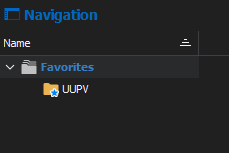
We need to see also its content, as we now do in Main Vault view:
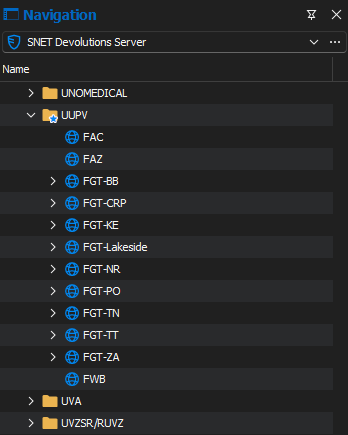
If you can implement a change that would make favorited items show at the beginning of the Main Vault view and also show it's child entries (so that we don't have to switch from Vault view to Favorites view), that would be even better!
Thank you very much.