Bug with newest RDM Manager - no Powershell Script with RDP possible
Bug with newest RDM Manager - no Powershell Script with RDP possible

2024.1.12.0
In this version i can't open RDP session with get LAPS credentials over powershell Script.
See following error:
grafik.png
All Comments (15)
Hello,
Are you running RDM as an administrator? Because the PowerShell window displays that it is running as an administrator. If you run RDM in a different user context, then the execution policy is also different than what you get in PowerShell.
Can you run the Get-ExecutionPolicy cmdlet from the embedded PowerShell window in RDM using the PowerShell (RDM CmdLet) from the Tools menu? What results do you get?
Best regards,
Érica Poirier
eaf9b060-93a5-4591-bb5c-32cea1afbabc.png
No, its not the reason with admin / user context.
Its not working! Big Bug and big problem!
Do you not try such things? Its always terrible to make an update....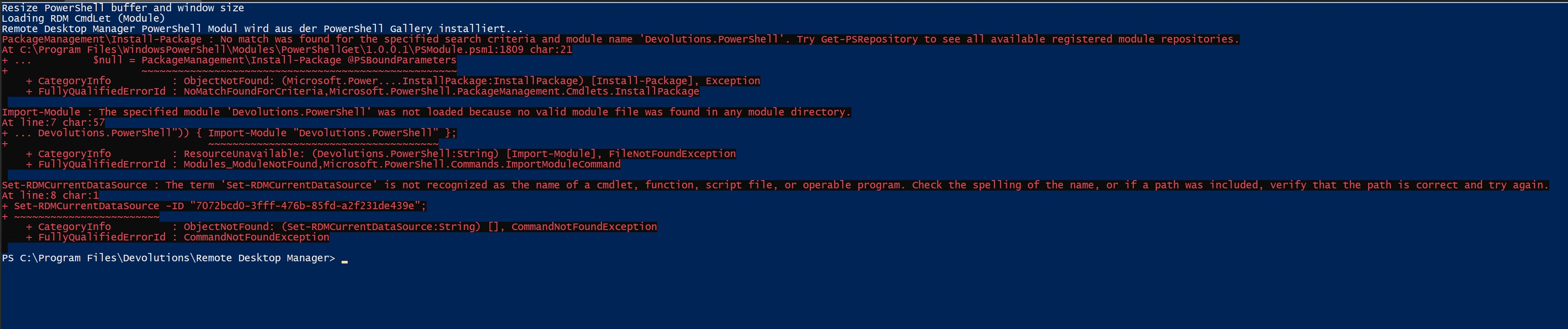
grafik.png
Hello,
Thank you for your feedback.
Could you please update to the latest RDM version 2024.1.18? Multiple fixes have been implemented as well as the missing REF folder.
Let us know if that helps.
Best regards,
Érica Poirier
This version is installed. And its not working...
Now i installed 2024.1.19 - same problem!
Hello,
Thank you for your feedback.
What PowerShell version are you using from RDM?
Please update the default value to PowerShell 7 in File - Settings - Types - Sessions - PowerShell.
Let us know if that helps.
Best regards,
Érica Poirier
5e7ca3e8-4a26-425e-83ee-0dd374aab218.png
Hi,
i changed it but no different behaviour.
Hi,
I'd like to add some additional steps to what my colleague previously mentioned regarding the issues you're experiencing with executing PS scripts.
Our PowerShell module is installed through PowerShellGallery, which is should be available as a default repository.
If you don't need our PS module to execute your script and don't want to deal with PowerShellGallery, you could simply remove our module dependency in your PS session. In the Advanced section of your PS script, make sure 'Load RDM CmdLet' is unchecked.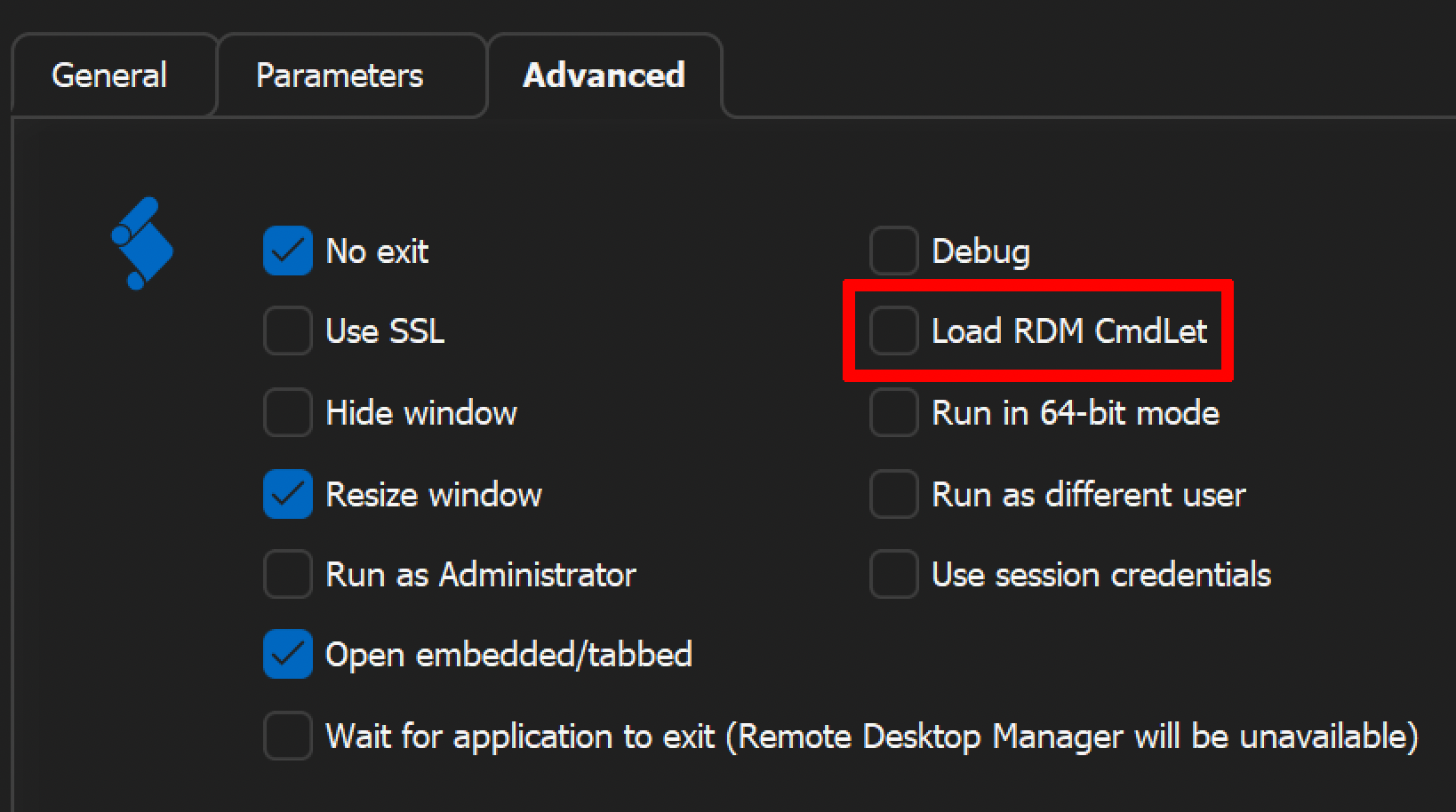
If you do need our module, the first step would be to execute Get-PSRepository in PowerShell to make sure PowerShellGallery is listed and operational.
Please let us know if you encounter any issues following these steps or if there's anything more we can do to assist.
Jonathan Lafontaine
c124c2fc-1e5c-429e-bd7b-d664c8d66591.png
Hi,
i don't know if i need your module.
But actually i can't use my LAPS script with powershell to get the LAPS password for admin account.
I configured a powershell script customized in RDM to start the query. Its not configured how in your screenshot, my Credential script is called "user-defined".
I can't set something like in your screenshot.
I don't know what you did in new version - but my query don't work...
Oh, I mixed up your script your script execution and the error message you've shown after debugging with my colleague.
Looks like the error message regarding our PS module appeared when you tried to execute Get-ExecutionPolicy after clicking the PowerShell (RDM CmdLet) in the toolbar. We can ignore this error for now.
So back to your first issue, you script is unable to run due to a system restriction. RDM switched to net8 for the 2024 release and uses the PowerShell 7.4.1 engine version to execute scripts. From what I understand, PowerShell 5.1 and 7 don't share execution policy.
Do you have pwsh.exe installed?
Jonathan Lafontaine
I've done some testing.
If you add this line at the beginning of the custom credential script, that should change the execution policy for PS7.
Set-ExecutionPolicy RemoteSigned -Scope CurrentUser
After the script has executed once, you can remove it.
That should allow you to invoke psm1 script from your custom credential entry.
Let us know if that helps.
Best regards,
Jonathan Lafontaine
Hi Jonathan,
i have installed Powershell 7 now and tried again. Again not working.
Than i tried to edit my script, but i can't . It is a .RDM script and i can't see it. How i can edit this?
I created another script and run there the execution command. After that i can execute something in Powershell Comandlet in RDM directly. And now my RDM LAPS Script works again.
But i don't know how i must use this on my other servers:
- Must i install Powershell 7 on local system?
- Must i ran the Set-ExecutionPolicy Command one time?
- Do you must change something?
Thanks
Hi,
Glad you could make is work.
Yes, the command is only needed once to change ExecutionPolicy from its default, more restrictive value.
If your data source is shared between your servers the easiest way could be to have a custom script that you can run once on each server.
Otherwise, installing PS7 and manually running the command is also valid.
That being said we will evaluate options to ease the transition from PS5.1 to 7.
Best regards,
Jonathan Lafontaine
Hi Jonathan,
i need to install the powershell module 7, but i thought the module is only implemented in the RDM Manager, so there no need to install on local system?
No possibility to change that way?
Hi,
Our module used to be shipped along side RDM but that greatly limited the module release cycle.
Since then, we moved the module to PSGallery and switch to PS7 to solve cross platform compatibility issues.
The upside to this is you can now use the module standalone on Windows, Mac and Linux.
RDM will install the module if it not present or use the version available on your system.
I hope that answers your question.
Let me know if that helps.
Best regards,
Jonathan Lafontaine