2FA on multiple clients

Good morning,
I have been using the Free version of RDM for some time now (updated to version 2024.1.14.0 64-bit).
As a database, I use Devolution Hub Personal.
Of course, for security reasons, I have enabled TOTP via Google Authenticator, which works without any problems. The only "difficulty" lies in accessing the same database from different systems.
If I have configured TOTP on one system, is it possible to use the same Secret Key on other systems or will each of these have to have a different authentication instance?
I ask this because I usually use three different Windows systems to access the same Data Source and it would be extremely convenient to be able to have a single MDA instance of Google Authenticator, rather than having to create three.
Could copying the RemoteDesktopManager.cfg file (which I haven't tested yet) allow me to obtain the desired result?
In the meantime, I thank you for your support and send you my best regards.
Roberto
All Comments (3)
Hello,
Thank you for contacting Devolutions Support.
I see, to clarify have you configured the 2FA on the Application? If so, I believe that would work yes.
That being said, since you're using Hub Personal perhaps simply adding the 2FA to your Devolutions Account and changing the "Settings" on the Portal for the Force Prompt for credentials may work: https://portal.devolutions.com/hub-personal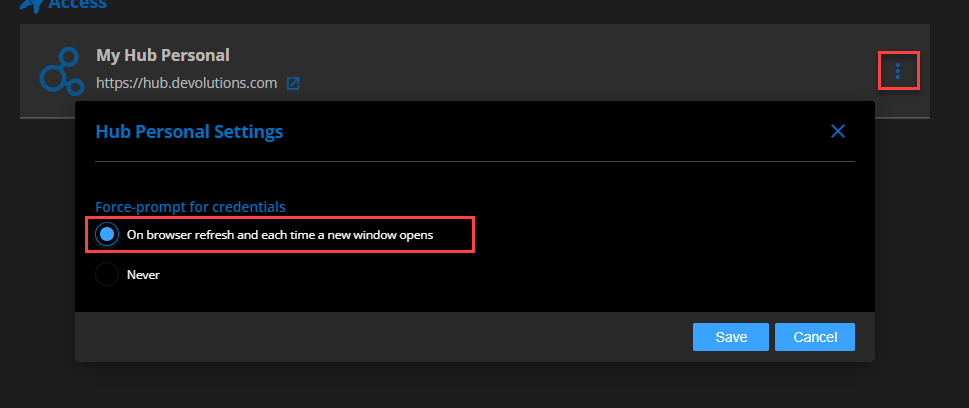
Let me know,
Best regards,
Samuel Dery
685efcd5-44b1-4ebe-8e5c-f9873ff1af73.png
Good morning and thanks for the feedback.
Basically, if I understand correctly.
- TOTP at the Desktop application level is managed via the application itself. Copying the "RemoteDesktopManager.cfg" file should cause the devices to which the file is copied to inherit the TOTP configuration (thereby requiring only one instance).
- If the Web platform is used, with the indicated settings, the request for the second would be forced
authentication factor upon the occurrence of each event (Browser Refresh or opening of a new window). In any case, this setting would not impact the Desktop application (unless the username and password request window is presented, in which case the TOTP request procedure would be triggered).
I hope I understood the mechanism correctly.
Thanks again
Hi Roberto,
It is possible to use the same TOTP entry from multiple devices as its based on a secret key. For security reasons it is not possible to display the key once configuration is completed.
Google Authenticator supports synchronizing the entries to a Google account, this could be a convenient way to share them between devices. Devolutions Workspace also supports backing up authenticator entries to Hub. Alternatively, when configuring the TOTP keep a copy of the QR code or the secret key until you have it configured on all your devices. Just make sure to delete the copy once you're done.
Sébastien Duquette