Send keys to remote session fails for enter key

When you set the following keys:
'HKLM:\SOFTWARE\Microsoft\Windows NT\CurrentVersion\Winlogon' LegalNoticeCaption "Some Text"
'HKLM:\SOFTWARE\Microsoft\Windows NT\CurrentVersion\Winlogon' LegalNoticeText "Some Text"
You get a prompt when you RDP to a windows server with an OK button.
When you tell mRemoteNG to send keystrokes to the remote session, you will be able to press either enter key to allow you to proceed past the legal notice banner.
Not with RDM.
Even with the option to send keystrokes to the remote session, it will not respond with either enter key. You MUST use the mouse to press the OK button.
All Comments (21)
Hello
Can you clarify what feature you're using in RDM to try and accept the prompt automatically? Is it "Events > After Open > After Open - Macro"? Or another mechanism to send the input?
Please let me know if something isn't clear
Thanks and kind regards,
Richard Markievicz
Nothing automatic here.
What I am saying is pressing either Enter key does nothing.
I have to use the mouse to ack the OK button.
Hello again
Ok, thanks for clarifying that. Can you tell me what you mean by "the option to send keystrokes to the remote session"? In both RemoteNG and RDM: are you talking about a specific session option, menu item, something else? Maybe a screenshot would help.
Please, let me know if something isn't clear
Thanks and kind regards,
Richard Markievicz
When you set those 2 registry keys, you get this screen BEFORE you can get to the desktop.
mRemoteNG allows pressing ENTER key (either one) and that WILL press the OK button.
RDM does not work. Pressing ENTER key does not work.
I do have this set and it makes zero difference.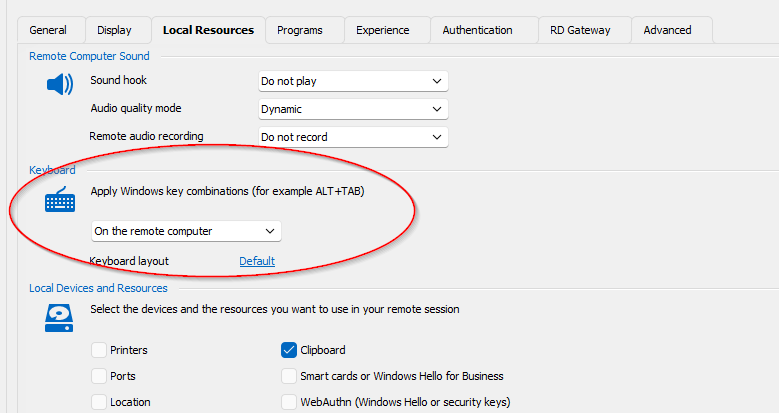
7f51c6bf-8e44-40c7-9c75-05e4298f0392.png
Hello
Thanks for clarifying. I do reproduce the problem, but it seems to be focus related rather than related to the actual key dispatch.
On my side, once I get the legal prompt, pressing any other key (for example "Tab") or clicking inside the session once allows the enter key to work. Can you confirm if you ge the same result?
It is strange because if I connect to an already signed in session, the "Enter" key works immediately inside the session without having to press another key or manually assign focus. I'm looking into that, in the meantime it would help if you can confirm you get the same result as me.
Thanks and kind regards,
Richard Markievicz
Pressing tab and then enter works.
Keep in mind mRemoteNG somehow does not require a focus shift. It already has that once the banner is raised.
Hello again
First, I asked the support team to edit a couple of your previous posts with screenshots with redacted information. My feeling was the information was redacted in a way that might be reversible, so without wanting to risk it I asked them to remove the screenshots. This is just for your information so you don't perceive an issue with the forum; I was able to view the screenshots and understand the questions.
On to your issue: the Microsoft RDP ActiveX control provides a setting "GrabFocusOnConnect" and if I enable that setting, things work as expected. It's not a setting that's currently exposed in RDM and in fact it's explicitly disabled, as I understand things it caused issues for users with focus stealing.
It might be that the resolution is to make this configurable in RDM, as perhaps the focus stealing problem applied to different workflows than your own. It might also be possible to fix this on our side: RDM's multi-document interface does assign focus to the RDP control at the proper time, although it's obviously not perfect and you found an edge case. Perhaps we need to look at assigning the focus at a different time. I suspect that what happens is, if the focus is not assigned at the right point in the connection sequence, the ActiveX control is focused but the "OK" button inside the session is not.
Right now the workaround is as above - press TAB, an arrow key or click your mouse to put focus on the "OK" button before hitting "Enter". Moving forward I'm opening a bug ticket for this internally, but one of my colleagues with a better understanding of RDM internals will have to look at it. Once there is some news on that we'll update this forum post.
Thank you for your patience, and please don't hesitate to post back if something isn't clear or you have further questions
Kind regards,
Richard Markievicz
Hello
I'm tracking another issue that might have the same cause as this one. Can you tell me what version of RDM you are using? Did you notice that this issue is a regression (i.e. it used to work as expected, but stopped working after updating to e.g. 2024.1.x)?
Please, let me know if something isn't clear
Kind regards,
Richard Markievicz
2024.1 was first release I ever tried where I tested that part.
Tab > Enter key does work. mRemoteNG the tab is not needed.
Hello
Tab > Enter key does work. mRemoteNG the tab is not needed.
Sure, I understand. We're looking into this and will come back to this post once there's some more information.
Thanks for your patience
Kind regards,
Richard Markievicz
I have seen and installed 2 new versions since I created this thread. When can we expect RDM to act like mRemoteNG?
I am on 2024.1.21.0 64-bit now.
Hello
I've checked the ticket and a fix for this is merged and looks like it will be in the next release (2024.1.23) That should be in a short timeframe but I don't know the release date yet.
Thanks for your patience
Kind regards,
Richard Markievicz
Bummer, just tried the latest release (2024.1.23.0 64-bit) and still have to press tab before enter.
Still no on 2024.1.24.0 64-bit
Hello
Please can you check in Options > Types > Sessions > RDP (Remote Desktop) > Advanced for the setting "Grab focus on connect" (this is new).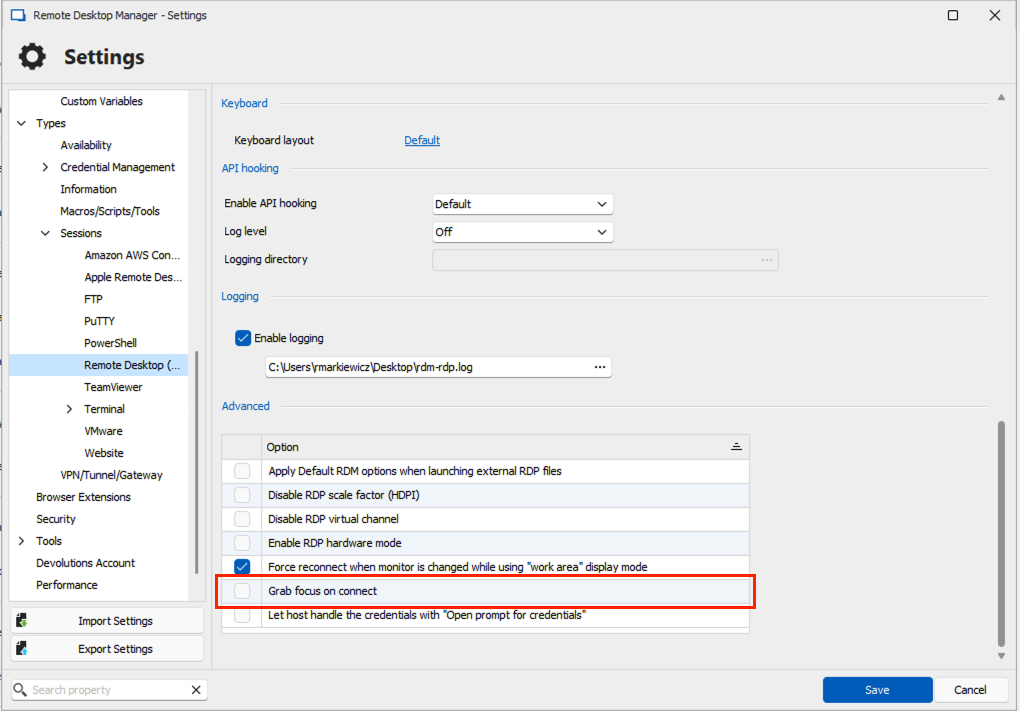
Please try to enable that and let us know if you still experience issues, or if you have other questions or comments.
Kind regards,
Richard Markievicz
Screenshot 2024-04-12 at 12.39.16.png
Works wonderfully.
Thanks for the efforts.
Perhaps make it a default?
Hello
No, it's not the right place: check in the application options (File > Settings); then "Types > Sessions > RDP (Remote Desktop) > Advanced".
Please let us know if you still have questions or comments.
Kind regards,
Richard Markievicz
Works wonderfully.
Thanks for the efforts.
Perhaps make it a default?
Great news! I'm glad that works.
We're hesitant to make this the default; I believe at one time it probably was but there is some commentary internally that it can cause issues with focus stealing.
This is a very old change (in the order of years) so it's not clear if that's still an issue at the present time.
Since you'll be using this feature, I'd encourage you to give feedback if you find it continues to work well or you notice ancillary problems.
Thanks and best regards,
Richard Markievicz
Roger that.
Thanks for the time and effort.