.net 8 requirement

Hello,
Is there a plan to build the .net 8 requirement into the RDM installer and not force a separate install? .net 8 is very difficult to install via Intune due to no .msi installer being available and none of our users have admin rights on their baseline laptops to install it themselves. As of right now we are pretty much stuck on the last 2023 release for RDM and subsequently DVLS as well.
All Comments (18)
Hi,
We are working on getting the .NET 8 prerequisite to install via the .msi/.exe.
FYI, in case this can help, the RDM Chocolatey package will install the proper .NET 8 runtime as a prerequisite (since version 2024.1.17).
Best regards,
Stéfane Lavergne
Unfortunately we don't run chocolaty so that doesn't help us at the moment. Can I be notified when you have the installer packaged together?
Thanks,
Yes, we will notify you.
Best regards,
Stéfane Lavergne
Hi,
If I'm not mistaken, all should be resolved with v2024.1.20 released earlier this week.
Best regards,
Stéfane Lavergne
Hello
I'm afraid there is a little confusion here, your original OP is not resolved with the last release. We did make some bug fixes to the installer that prevent it from interactively prompting to install the .NET runtime (which was a blocker for MDM deployments like InTune), but we don't yet bundle the runtime with our installer.
We're still looking into the best path forward here, and once we have some information we'll update this post.
That being said, potentially there is a workaround for you. The .NET 8 runtime installer is distributed as an .exe bootstrapper because it actually runs multiple MSIs. I can see that the bootstrapper is built using WiX and while Microsoft don't offer a way to crack the .exe open by itself, you can install the WiX Toolset and do it manually using the CLI tool dark.exe.
e.g. dark.exe /x dotnet-runtime-package windowsdesktop-runtime-8.0.3-win-x64.exe
In that example, I ask dark.exe to unpack to the 8.0.3 Windows Desktop Runtime to a directory called "dotnet-runtime-package". The result is a folder containing the 4 MSIs contained within: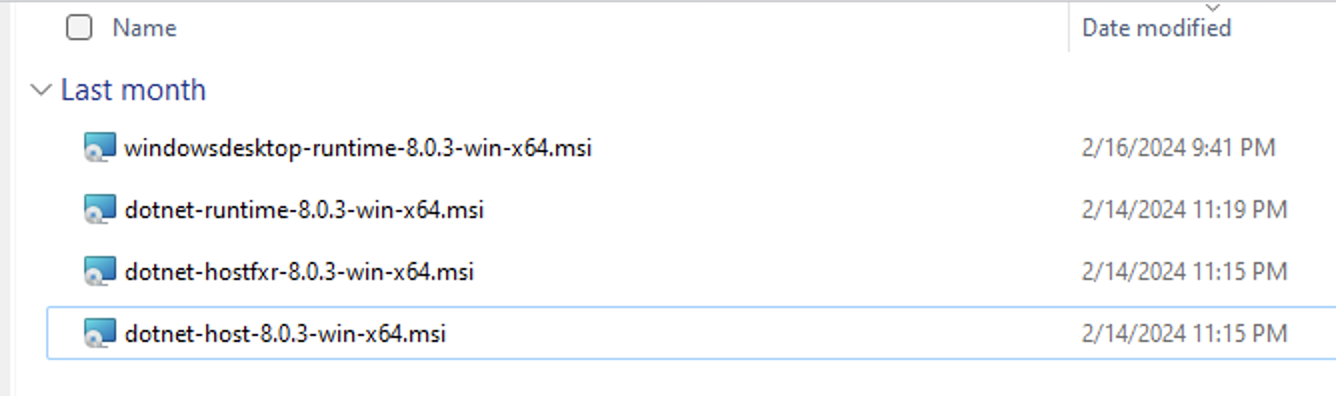
Individually installing those 4 MSIs is equivalent to running the .exe bootstrapped and results in a functional .NET 8 runtime environment, and that should be achievable by InTune.
As I said, I'm only suggesting this as a workaround in the interim. Please let me know if you have some questions or anything isn't clear.
Thanks and kind regards,
Richard Markievicz
Screenshot 2024-03-29 at 12.38.45.png
Richard,
Thank you for the heads up. We will wait until there is a solution directly in the RDM installer it's self. Please keep us posted.
Thanks,
Jeff
Hello,
We also have the same problem, do you know when they will solve it?
Greetings
Hello,
We also have the same problem, do you know when they will solve it?
Greetings
Hello
We have a ticket open for this internally. I should be able to post some news next week.
Thank you for your patience
Kind regards,
Richard Markievicz
Hello
I wanted to update you that we've been working on this and, all being well with QA, there should be some changes in an upcoming release.
We do not package the .NET runtime inside the installer, but we are giving the installer the capability to download and install it as a prerequisite if needed. We're being quite cautious here to try and avoid transient issues that can occur (like, the download URL is not accessible or the user is on a very slow uplink).
Here is how it will work:
- The feature is currently opt-in. You'll need to modify your `msiexec` command appropriately (appending the parameter INSTALL_DOTNET_RUNTIME="1")
- The installer must be run with Admin privileges, although that doesn't seem to be an issue for InTune or other MDMs (that's more of a concern for interactive installations)
- We'll check for any compatible version of the .NET 8 Windows Desktop Runtime, and if already installed; there's nothing more to do
- If a compatible runtime is not found, we'll first try to get the download link for the latest version from Microsoft. In case of failure, we'll fallback to a statically configured version (currently 8.0.4).
- The runtime installer is downloaded to a temporary location from Microsoft's CDN
- The runtime installer is executed
As above, we're being cautious here, so a failure to install the runtime will not cause the RDM installation to fail. The whole process also has a time limit of around 3 minutes to prevent hanging the install for too long in case of a slow network link or etc.
I'll update this thread once those changes are rolled out, but in the meantime your feedback is welcome. Please also don't hesitate with other questions or comments.
Kind regards,
Richard Markievicz
Hello again
Just to update you all that this capability should be available since 2024.1.25. Please let me know if you have any questions or feedback.
Thanks and kind regards,
Richard Markievicz
hi!
I tried editing our config like so:
But when uninstalling RDM and re-installing using this published app .NET was not installed on the client.
Any hint where to look for (logs?) why this did not work?
KR
G.
e7880d9f-95ad-4c5e-af09-e09127623831.png
Hello
Without the new argument, is your command-line arguments normally empty? I had thought it would be needed to specify at least /qn (or similar) to make the install run without UI (although I doin't know Intune very well so I might be wrong).
A log file will be written to the temp directory; in the case of InTune that will be in the context of the SYSTEM user which is normally C:\Windows\Temp. The file is named like Devolutions.Updater.RuntimeInstaller.{timestamp}.log. Please check for that log file and you can send it to me by PM or to service@devolutions.net (mentioning this forum thread).
Please let me know if something isn't clear or you have further questions
Kind regards,
Richard Markievicz
hi Richard,
I just tested with a fresh Cloud PC and everything works as expected - the log shows that the setup was downloaded and installed;
I will investigate what went wrong with the colleagues setup routine - for now it looks like everything is setup correctly and works as expected.
Just for clarification: the command-line was empty before because we don't push RDM to the clients but let the colleagues download it using company portal.
KR
G.
Hello again
Thanks for the follow up; if you find something not working as expected please locate the runtime installer log file and send it to me! Your feedback is greatly appreciated.
Thanks and kind regards,
Richard Markievicz
Sorry for the delay, but I was finally able to test this.
Via company portal I was able to upgrade successfully to 2024.1.25.0 and .net 8.0.4 did install with it.
I used the switches /quiet INSTALL_DOTNET_RUNTIME="1"
I guess we will have to have users manually update via company portal as we don't have access to command line switches when using ManageEngine Patch Manager Plus (how we normally patch/upgrade RDM). This is ok as we now have a path forward. Thanks!
Hello
Thanks for the feedback. I'm glad it works for you and that you have a path to move forwards with this. Ultimately I think we might make this the default behaviour, not requiring a command line opt-in. For now I wanted to solicit some feedback as I wanted to be extremely cautious with the first iteration (especially with silent or unattended installs, anything that hangs up the installer can cause a lot of problems).
Please, do let me know if you have any questions or further comments.
Kind regards,
Richard Markievicz
Richard,
I just wanted to stop back and thank you for getting this resolved for us. We have now upgraded all of our users and there was not one complaint or issue in doing so via Intune.
Thanks!
Richard,
I just wanted to stop back and thank you for getting this resolved for us. We have now upgraded all of our users and there was not one complaint or issue in doing so via Intune.
Thanks!
Great news! Thank you for the positive feedback.
Kind regards,
Richard Markievicz