Remote CUPs browser through jump server

I have connect to my google cloud Linux server through SSH.
Then I have to use that session as a jump session to another server in another network and only these two servers can communicate.
On my local PC I would like to open a browser that is a remote connection to the CUPs management console on end 2nd server through the jump server.
this is all done through linux ssh sessions. no RDP.
All Comments (26)
Hello Patrick,
Thank you for reaching out to us regarding this,
Would an SSH Tunnel be what you're looking for? We have the following knowledge base article regarding this:
https://docs.devolutions.net/kb/remote-desktop-manager/how-to-articles/setup-ssh-tunnel/#create-an-ssh-tunnel
The screenshots are from an older version of RDM but the process is the same,
Let me know,
Best regards,
Samuel Dery
I was trying that one out but maybe I am setting up something wrong or missing a step somewhere.
- its not RDP so the example there isnt 100% what i need.
- CUPs runs on port 631 on the remote server.
- how do it get it to transition into a browser?
Hello Patrick,
Thank you for your reply,
Can you provide me with some additional details on your configuration? If my understanding is correct from your current workstation, you are connecting to another Host using SSH Shell and from this host you are looking to connect to your CUPs management console?
Or is this connection to your management console made from a Website type entry on your current workstation?
Perhaps you would be interested in a remote session so that you can show me what you're looking to do? If so, I would need to open a case regarding this, would the email used for your account be the correct one?
Let me know,
Best regards,
Samuel Dery
Hello Patrick,
Thank you for your reply,
Can you provide me with some additional details on your configuration? If my understanding is correct from your current workstation, you are connecting to another Host using SSH Shell and from this host you are looking to connect to your CUPs management console?
Or is this connection to your management console made from a Website type entry on your current workstation?
Perhaps you would be interested in a remote session so that you can show me what you're looking to do? If so, I would need to open a case regarding this, would the email used for your account be the correct one?
Let me know,
Best regards,
Sorry, missed this one.
Currently I have an SSH connection created to connect to a Linux server in another network(Primary). This SSH connection has an SSH Gateway setup to tunnel through our own Linux server(Jump).
I am looking to launch the browser CUPs printer management interface console on the 'Primary' server.
If I was in the local network of the Primary server and launching from the Primary server it would be http://localhost:631.
If I was in the local network of the Primary server but on a different PC it would be http://primaryserverhostnameorIP:631.
But since I am not in that network, i am in my network I want to launch here in RDM on my local PC in my local network from the Primary server through the Tunnel server.
I hope that clears it up.
Hello Patrick,
Thank you for your reply,
No problem, I see, perhaps you could provide me with some additional details on how you're currently achieving this outside RDM?
I'm also wondering if perhaps a Jump Host would be more suitable in this case? We have the following knowledge base article regarding this:
https://docs.devolutions.net/rdm/overview/the-devolutions-platform/rdm-jump/#configure-a-jump-host
Let me know,
Best regards,
Samuel Dery
No problem, I see, perhaps you could provide me with some additional details on how you're currently achieving this outside RDM?
I can not achieve this at all. Users within that network can in the browser. But I am not in the local network so I can not.
Which is why I am trying to solve this.
your link is instructions on how to use remote desktop manager as a jump host.
There is no RDM involved in my scenario. It is all Linux SSH shell connections.
My PC > RDM > ssh gateway to local Linux server > ssh to remote Linux server. At this point i want to launch http://localhost:631 or http://remoteLinuxServerHostname/IP:631 (on the remote Linux server) and view it in a browser on my PC.
Hello Patrick,
Thank you for your reply,
I see, I'd like to have a remote session with you regarding this so that we can discuss this problem,
I would need to open a case for this, would the email used for your account be the correct one to use?
Let me know,
Best regards,
Samuel Dery
OK, I think I found a roundabout way. simplified it I guess.
I kept my ssh shell session as is.
My PC > RDM > ssh gateway to local Linux server > ssh to remote Linux server
This allows me to run Linux session and do what is needed.
I now created an ssh tunnel session
My PC > RDM > ssh gateway to local Linux server > ssh to remote Linux server
This has additional tunneling setup for port 631: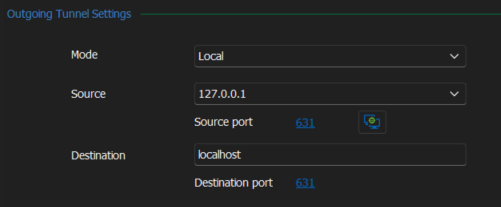
When I connect to this, it opens a tunnel session: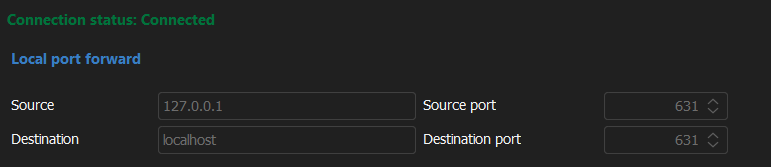
Then I can just open my own Chrome browser to http://127.0.0.1:631/ and I see the CUPs admin console on remote server successfully
---------------------------------------------------------
I was also able to take it another route:
I kept my ssh shell session as is.
My PC > RDM > ssh gateway to local Linux server > ssh to remote Linux server
This allows me to run Linux session and do what is needed.
I now created a website session:
has the CUPs URL setup:
Then in left "VPN/Tunnel/Gateway settings I setup an ssh tunnel same as above the the gateway of local server
My PC > RDM > ssh gateway to local Linux server > ssh to remote Linux server > CUPs
-----------------------------------------------------------
Now in both cases I have to open the tunnel separate from my original ssh shell session. Because in both cases once the tunnel is established i can not get to linux. I have to open them as 2 sessions, one for linux and one for tunnelling. Not terrible but would be nice to be able to get linux shell even when tunnelling.
Also you can only setup 1 tunnel per session. In a competitor software in a connection they can setup multiple port tunnels but all within the same connection session:
Do you have this ability that I am not seeing somewhere?
677ccec5-1f64-457d-a35b-e00c50a1cd20.png
fa1a93da-84a7-4df6-bbd7-18d61e0feaa9.png
921fc4e3-9e1e-4b36-8d32-e2057b223149.png
9ec45d32-6d83-4162-91cb-31bd15d9d5c8.png
also on a side note. I think i found a bug.
on my original ssh shell session I had originally add the "VPN/Tunnel/Gateway" settings on the left, which did work. That's how I discovered that when it connected the tunnel I could only have the tunnel, not the shell. So I thought I would set it to prompt for tunnel. So if I wanted tunnel I would say yes and when I wanted shell I would say no. Saying no still connected the tunnel, still couldnt get shell.
Even disabling the tunnel it still connected to tunnel and didnt give me shell. I even enabled it again, removed all the configured settings and save, then went back in and turned off tunnel and saved. still opened tunnel and no shell.
Had to delete and recreate to get shell back.
Hello Patrick,
I see, I'm glad to hear you've been able to resolve your issue!
Regarding your question, you can create multiple SSH Tunnel in your data source and switch the one currently assigned in the session Properties, but I can see how that may be useful to have them all already assigned in the session properties itself. I would recommend you create a feature request for this:
https://forum.devolutions.net/forums/17/remote-desktop-manager--feature-request
For your new problem, could you confirm which version of RDM you are currently using?
Let me know,
Best regards,
Samuel Dery
For your new problem, could you confirm which version of RDM you are currently using?
2024.1.28.0 64-bit
Hello Patrick,
Thank you for your reply,
I see, could you provide me with some screenshots of the configuration? This will allow me to attempt to reproduce the behavior.
Let me know,
Best regards,
Samuel Dery
I assume you are referring to screenshots for:
also on a side note. I think i found a bug.
on my original ssh shell session I had originally add the "VPN/Tunnel/Gateway" settings on the left, which did work. That's how I discovered that when it connected the tunnel I could only have the tunnel, not the shell.
current working setup: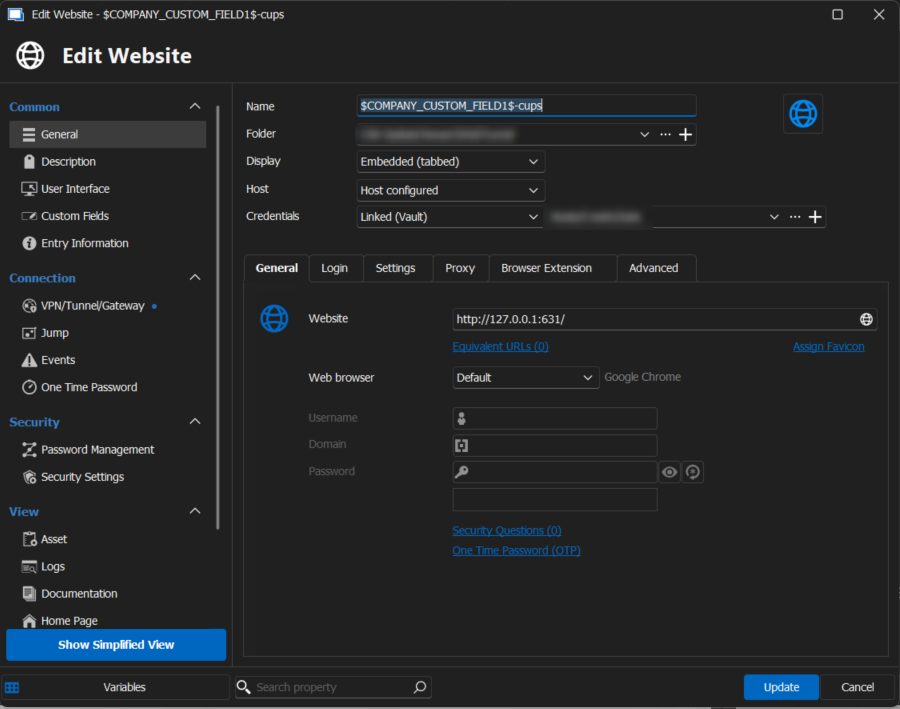
Tunnel setup: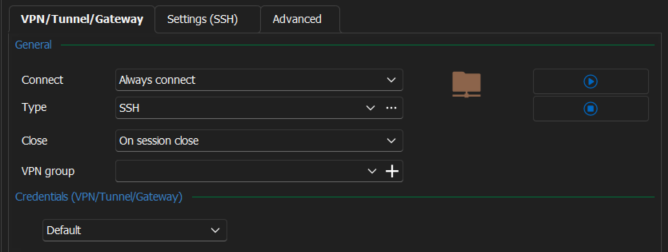
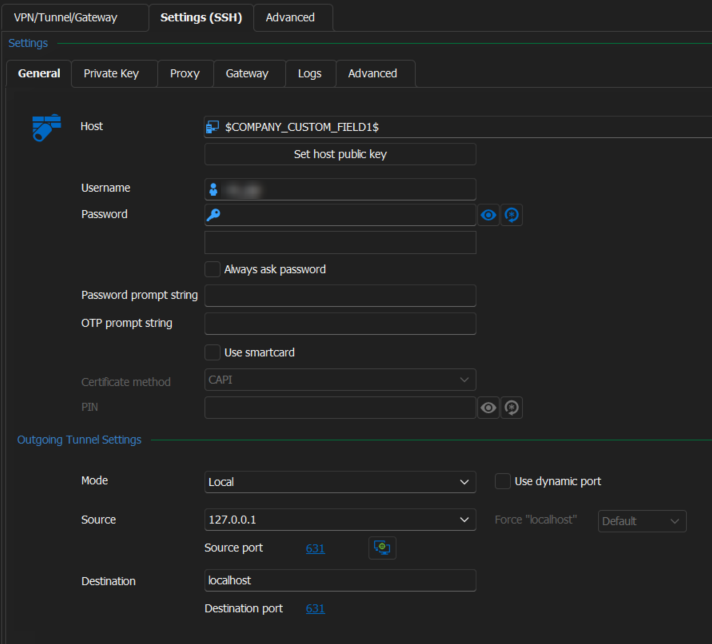
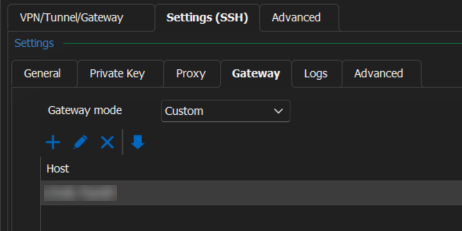
this just opens the tunnel session screen that is just basically a connection log. and it opens the website.
this is my current setup using web connection session. I did the same setup for ssh tunnel session setup.
in both setups, the tunnel session screen and website open. but in neither case is there also a shell open to same server. So I can either open an ssh tunnel session to browser or i can open an ssh connection to shell. even though both are the same remote server and both are passing through the same gateway local server.
so thats issue 1. more of an annoyance that i need 2 sessions and 2 setups to go to the same server based on whether I want shell or web.
the bigger issue, the bug that I think it is.
So I thought I would set it to prompt for tunnel. So if I wanted tunnel I would say yes and when I wanted shell I would say no. Saying no still connected the tunnel, still couldnt get shell.
Even disabling the tunnel it still connected to tunnel and didnt give me shell. I even enabled it again, removed all the configured settings and save, then went back in and turned off tunnel and saved. still opened tunnel and no shell.
Had to delete and recreate to get shell back.
I set it to prompt to gateway: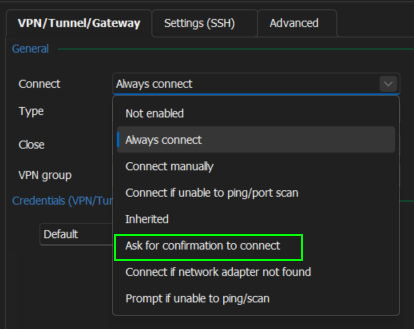
thinking that when I connected, it would ask, which it did based on the setting. Thinking that if I said yes, it would connect the session and launch the browser. which it did.
but i thought that if I said no, it would got he regular route and get me to shell instead. but it didnt, it still connected to tunnel session.
So i disabled (not enabled) and it still connected to tunnel session.
I enabled and went into testing(ssh) tab and cleared everything out and then set back to "not enabled". tested connection and it still opened the tunnel session.
0bfee996-5e68-47c8-a16c-3844914eb2cc.png
1c2ed683-1a2a-41d2-b1a7-1fb37397fa83.png
d4e19919-de65-49e3-959d-1958ec6df710.png
598d738c-76fd-4208-8d1e-b8f04933ef93.png
66c1cd41-afb3-4747-8659-7e3ebfe6a9ec.png
Hello Patrick,
Thank you for your reply,
Could you provide me with a recording of the behavior?
I will send you a link via private message so that you can send us the recording securely,
Best regards,
Samuel Dery
what all does the recording capture? and sort of logging?
server info, user/password/key?
files?
Also how to do recording?
Hello Patrick,
Thank you for your reply,
It would be a simple screen recording of the issue so that we can attempt to reproduce the behavior you're encountering,
Internally, we use Snagit but you're free to use any software of your choosing for the recording,
Best regards,
Samuel Dery
sorry this took so long, been a busy few weeks.
recording uploaded: Forum-41454-remote-cups-browser-through-jump-server.mp4
any update on the outcome of the video recording? was it useful?
Hello Patrick,
Thank you for your reply,
My apologies for this delay, It seems I do not have the recording, do you by any chance still have it available? If so would it be possible for you to reupload it to the same link I initially provided?
Let me know,
Best regards,
Samuel Dery
Looking through this conversation i posted I shared it via your file share:
recording uploaded: Forum-41454-remote-cups-browser-through-jump-server.mp4
Based on your DM:
Please use the secure link below to send us the requested file(s);
Please name your file as follows so it can be easily identified:
Forum-41454
But I just uploaded it again: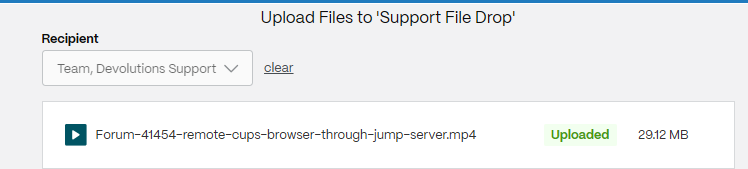
fb6a1b9c-f26e-4861-80fa-a8234126bc13.png
Hello Patrick,
Thank you for your reply,
Unfortunately, I no longer have the recording available on my machine, and it can no longer be downloaded from the shared file due to how long it has been; I'm assuming you no longer have it on your end either?
Let me know,
Best regards,
Samuel Dery
I just re-uploaded to the file share yesterday
Hello Patrick,
Thank you for your reply,
Perfect, I can confirm we've received it, I will have a look at the recording and keep you updated with any news I have,
Best regards,
Samuel Dery
Hello Patrick,
Thank you for your patience,
Do you have something configured under the "Jump" section of your entry "Properties"?
I'm also wondering if you are still on 2024.1.31.0 or if you have updated since then.
Let me know,
Best regards,
Samuel Dery
I update every version, every week as they are released.
I have updated to 2024.2.19.0 64-bit yesterday from 2024.2.18.0
And yes the issue still persists (as of .18. I have not tried .19 yet but its not mentioned int he release notes)
Jump section is not configured: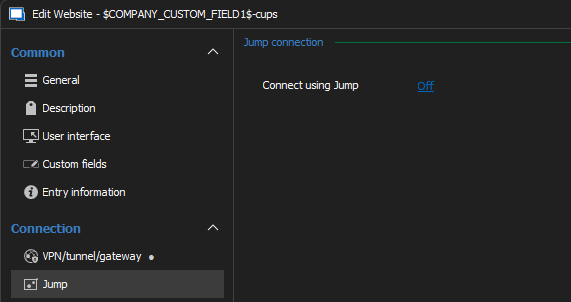
I hop through gateway instead: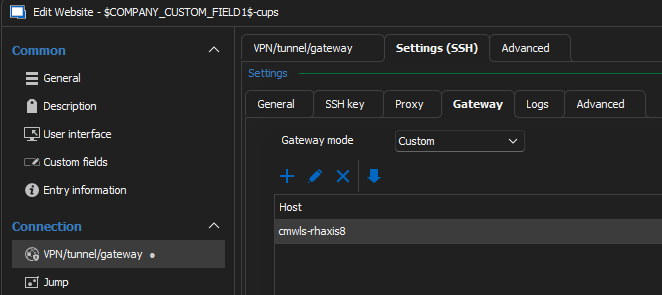
9ee7467d-624d-4914-8f7d-cf1bc971859f.png
a04206ba-701b-4bb1-82b3-1ebcf9188c86.png