SQL Server Data Source Version Control

Hello,
I am wondering something about DB schema and RDM app version control on a SQL Server data source... I understand if we allow a newer RDM version to connect then they may be prompted to update the database. However what happens if we allow (via the versioning settings) an older RDM version to connect (such as an older minor version - for example v2023.2 when "current" is v2023.3)? Would they be prompted to downgrade the DB, or would they be able to connect with reduced functionality, or...? And.. if it is allowed (for older clients to connect without DB modification)... how flexible is this - how far back does it go?
Also how do we verify the DB schema level - in Data Source details I see it says v1.91 - but looking at this chart I don't see a 1.91 or "191" - just a "910" (would that be 1.91? meaning the number shown on the chart just refers to the decimal portion of what data source details shows?)
Any info is appreciated, thank you!
David Willis
All Comments (3)
I am wondering something about DB schema and RDM app version control on a SQL Server data source... I understand if we allow a newer RDM version to connect then they may be prompted to update the database. However what happens if we allow (via the versioning settings) an older RDM version to connect (such as an older minor version - for example v2023.2 when "current" is v2023.3)?
Like with any great question, the answer is: it depends. (see below)
Would they be prompted to downgrade the DB, or would they be able to connect with reduced functionality, or...?
No, once the DB schema has been upgraded by a newer version an older version won't be able to downgrade the schema. Nothing is impossible but it would be very difficult for a version released last year to revert changes made by a version made last week.
And.. if it is allowed (for older clients to connect without DB modification)... how flexible is this - how far back does it go?
Again it depends. For every major upgrade 2023.2 => 2023.3 => 2024.1 we try to make them backwards compatible, where the only difference would be the availability of the new features/functionality and in most part, we succeed. Where it gets difficult is when we need to convert the internal structure of data. Two such "recent" changes were the user vault migration (2021.1) & the introduction of the system vault (2023.1). In this case using an older version has repercussions. For example, the user vault would have been empty in the old version since it was migrated to the new unknown format by the new version.
Also how do we verify the DB schema level - in Data Source details I see it says v1.91 - but looking at this chart I don't see a 1.91 or "191" - just a "910" (would that be 1.91? meaning the number shown on the chart just refers to the decimal portion of what data source details shows?)
I will change the UI as it's no intuitive. v1.911 => 911 or v1.910 => 910, you simply ignore "v1.". Not sure why we have it displayed like this but it is odd. My guess is at first it was only for us, but now that we publish the version numbers this format doesn't make sense anymore.
Best regards,
Stéfane Lavergne
Hi Stefane,
Thanks so much for your quick and detailed reply. That all makes sense - like you mentioned, I could see where it would indeed be difficult, if not impossible for an older version to undo DB schema changes made by a newer version (especially without data loss). So, my takeaway from your response seems to be that the exact behavior will depend on the version, but in general the user with the older version could expect to connect and have access to the features that their current app version supports, however in some cases it is possible there could be change or loss in functionality for them (in scenarios as you mentioned where a feature is changed by the upgrade such that the old version of the app would not understand the new/current data structure). Is that accurate?
Also I was originally thinking that "y" was a "minor build number" in the version system xxxx.y but in fact that would be a different major build (per your response, also per this thread I found on RDM versioning), so with that in mind we would probably only allow the most recent previous major build (e.g. v2023.2 if current is 2023.3, but no older). Hopefully this would, in most cases, mean that the user on the older version wouldn't run into issues (but, of course, as noted above - it is possible they could in some scenarios - in which case they just need to upgrade =) ). But it is good to know that there is no risk of the user on the older version somehow causing problems for those on the newer/current version.
Best regards
David Willis
Thanks so much for your quick and detailed reply. That all makes sense - like you mentioned, I could see where it would indeed be difficult, if not impossible for an older version to undo DB schema changes made by a newer version (especially without data loss). So, my takeaway from your response seems to be that the exact behavior will depend on the version, but in general the user with the older version could expect to connect and have access to the features that their current app version supports, however in some cases it is possible there could be change or loss in functionality for them (in scenarios as you mentioned where a feature is changed by the upgrade such that the old version of the app would not understand the new/current data structure). Is that accurate?
Correct, like I've said, we try but can't guarantee backwards compatibility between "releases".
We define major releases as major.minor (2023.3 or 2024.1 for example). These are the releases (3 times a year) where new features get introduced which includes any database schema/data upgrades. On the actual release day the version might be something like 2024.1.12 but due to bugs and such in the following weeks we will release a few "minor" builds (2024.1.13, .14, .15...) fixing issues as we stabilize the app in the real world. None of those "minor" releases (major.minor.build) will have additional database upgrade steps required.
Note, when you upgrade the database schema, you will get a prompt asking if you want version management to be configured. If you chose "automatic" the min/max will be set to major.minor/major.minor.9999, this is the range for which we guarantee compatibility.
Also I was originally thinking that "y" was a "minor build number" in the version system xxxx.y but in fact that would be a different major build (per your response, also per this thread I found on RDM versioning), so with that in mind we would probably only allow the most recent previous major build (e.g. v2023.2 if current is 2023.3, but no older). Hopefully this would, in most cases, mean that the user on the older version wouldn't run into issues (but, of course, as noted above - it is possible they could in some scenarios - in which case they just need to upgrade =) ). But it is good to know that there is no risk of the user on the older version somehow causing problems for those on the newer/current version.
Yes, you can set the min version, one release below the actual running version and for the most part all should be good.
Note, in the latest release we also introduced "Recommended version", this is the version that would be download and install for any user trying to connect using a version outside the min/max range currently set.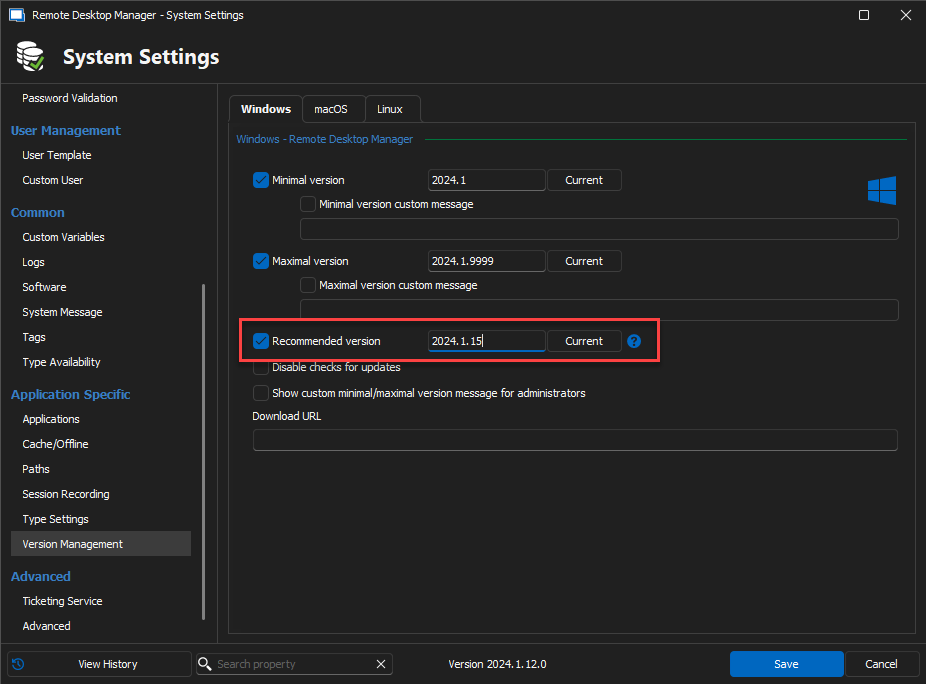
Stéfane Lavergne
f4f005b0-f392-40fb-800c-48ca299beb8b.png