RDM v2024.1.12.0 64-bit + MS SQL Listener with 4 IP's, only one active. Connection timeout when trying to access DB
RDM v2024.1.12.0 64-bit + MS SQL Listener with 4 IP's, only one active. Connection timeout when trying to access DB

We have upgraded from v2023.3.36.0 to v2024.1.12.0 using inTune (so this forced us to publish .NET 8 also in our Company Portal).
After software upgrade, users coming from different locations (network, VPN, W365, etc.) do have connection timeouts.
We believe this is due to .NET 4.7 being upgraded to .NET 8, as, with previous version we didn't had problems.
RDM connects through a SQL listener that has 4 IP's. 3 of them are OFF and only one is ON.
A workaround was to modify the DB connection and replace the listener FQDN with the working IP, but we need a fully working solution as the listener may switch to different IP's.
Does anyone else had the same problem?
All Comments (9)
Very interesting, we have a few other clients stating connection issues. I think you might have discovered the root cause.
Could this be the solution? https://learn.microsoft.com/en-us/troubleshoot/sql/database-engine/availability-groups/listener-connection-times-out
To configure your RDM with the parameter:
- File > Data Sources
- Edit
- Advanced (tab)
- More Settings (button)
- If you don't see
MultiSubnetFailoverin the list- Within the Setting Name column (double-click) on any value and replace it the value
MultiSubnetFailover
- Within the Setting Name column (double-click) on any value and replace it the value
- Now set the Value
true - Save
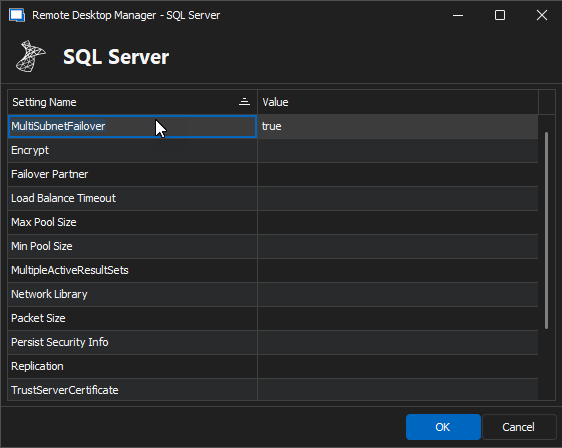
Does this resolve the issue for you?
Best regards,
Stéfane Lavergne
c181ff92-5a3c-4cd5-97ac-a70aafd68a64.png
Dear Stephane,
Thanks for your prompt reply. I have a problem, that is this setting is not appearing in the connection setup (see attached screenshot).
Also I saw that this issue is related to old versions of .NET Framework.
"This parameter is supported in newer versions of the SQLClient driver that is included with the .NET Framework 4 and with later versions of the .NET Framework, and is back ported to the .NET Framework 3.5."
As stated in the title, we're using the latest RDM version (2024.1.12.0) and .NET Framework 8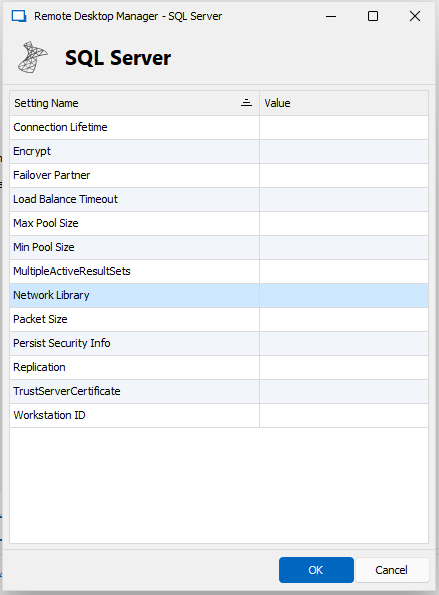
We also are testing connections to AzureSQL servers, but these ones are working fine.
Our SQL servers are not Windows 2012. They are Windows Server 2016 SP3.
NOTE:
Sorry, I think I misunderstood you. I have proceeded to modify one of the entries with the one you suggested.
Capture.png
Dear Stephane,
I have proceeded as you suggested and, at first time, software seemed to freeze. I opted to right click in the taskbar icon and select "Exit". After a while I received the exit confirmation window, replied "yes" and restarted again.
It lasted a bit (not much at all) and RDM seemed to be working.
Now my SQL server connection settings is like this: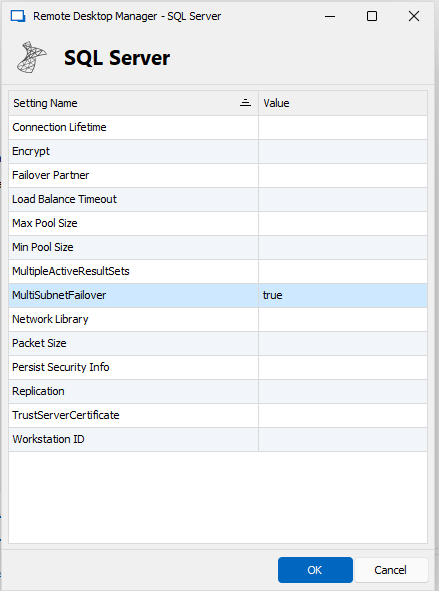
Will have a look during this week to see if this is working.
Thanks for your help!
Capture.png
Hi,
Good news, please keep us updated.
Like I've said, we haven't reproduced the issue internally but many clients have. So I'm going at this somewhat blind and I'm still trying to understand what is going on with .Net 8.
I'm hoping this setting will either solve the issue or at least shed some light so that we can find the real solution.
Best regards,
Stéfane Lavergne
Hi Stephane,
I can confirm that, after applying the configuration setting, RDM is working without problems.
We let 2 days of testing on several machines and they're working.
Thanks for your assistance!
Wow great news. Thank you for the update.
I will add MultiSubnetFailover to list in the "more settings" form. Easier than having to double click on a different setting and changing the name.
Best regards,
Stéfane Lavergne
Hello Stephane,
As we are updating our software as it is published in your site, our InTune service has upgraded RDM to latest version: 2024.1.17.0 and some users have found that, even though the "MultiSubnetFailover" setting is appearing, they are not able to modify its value, neither able to modify ANY value.
Double clicking on the setting has no effect.
Could you check and see if this can be set as modifiable as some users do have the timeout but are not able to apply the setting?
Thanks for your prompt support.
Hi,
What is going on. I can't modify it either, something must have changed.
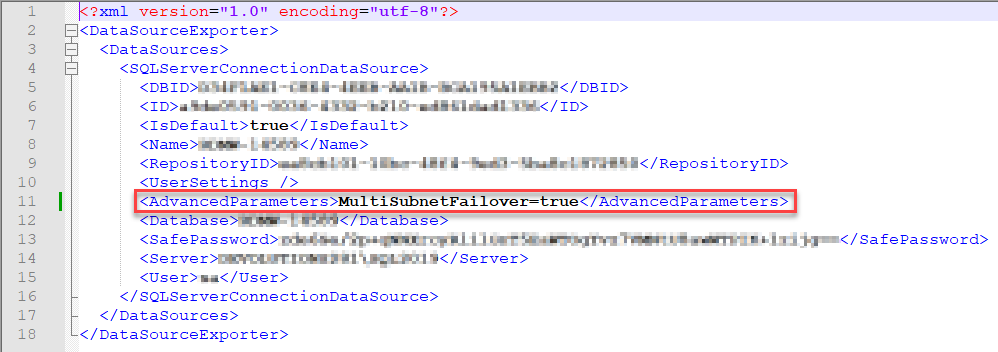
The only workaround you have for the time being is export/edit/import:
- Export the data source using the Export button (see image below)
- Save it to disk
- Open with NotePad.exe (or any text editor)
- Add the following to the file (see image below)
<AdvancedParameters>MultiSubnetFailover=true</AdvancedParameters>
- Save
- Import
- You will have to data sources (the old and the new), test the new DS if it works delete the old DS
I'm investigating the issue and should have a fix in the next version.
Sorry for the inconvenience.
Best regards,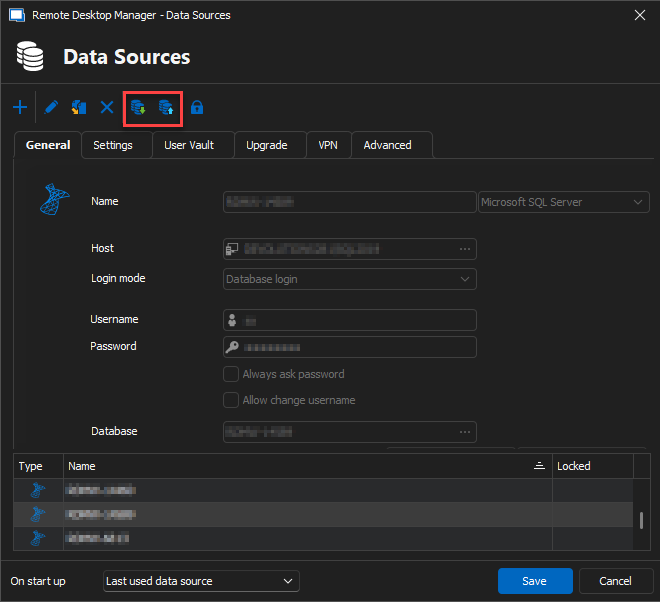
Stéfane Lavergne
c6d5cb1f-cb74-4d8b-af81-1cf0ebe3c2cc.png
a07f4487-5137-46e5-a996-8bb92dead278.png
Hi,
Found it, it's a regression that was introduced with .17 that has already been fixed internally.
Sorry for the inconvenience
Best regards,
Stéfane Lavergne