no longer closing OpenVPN on - On session Close

Hello, I'm experiencing an issue after the last update.
When I log in with VPN and a group is set to "Close" under VPN option "On session Close,"
it no longer closes OpenVPN properly. This functionality worked flawlessly until the last update.
I can see that OpenVPN is being closed, but there's still an active VPN connection running,
labeled something with "daemon" in the job list. Since this daemon isn't being closed by RDM,
it causes errors when I try to connect to another VPN where it needs to open and use VPN.
This have been tested on more then on pc
All Comments (18)
Hello,
Could you please confirm these two things:
- Are you using "OpenVPN" or "OpenVPN Connect". We support both addons, but they act quite differently.
- What is the version of your vpn client?
Regards
Jonathan Del Signore
Hey, I'm using OpenVPN 2.6.9.
After the error occurred, I updated to the latest version, which is now 2.6.9, as I thought maybe the issue lay within OpenVPN. However, it seems like RDM can no longer fully close the active session.
Thank you, we'll open a ticket to investigate and let you know as soon as we have an update.
Regards
Jonathan Del Signore
Thanks Jonathan,
The problem lies in the fact that it no longer kills the process "openvpn.exe" as it used to do upon close.
My fix for now to solve this has been to run this small *.bat script. before i open a new server
@echo off
taskkill /f /im openvpn.exe
We have updated the RDM to version 2024.1.17 and have the same problem. The OpenVPN is opened once and then we have to end the openvpn.exe task manually. The automatic termination via the RDM no longer works. Could you include this as a fix for the upcoming update @Jonathan Del Signore?
Hello,
I'll start looking into this today, so I'll notify you of any progress early next week at the latest.
Regards
Jonathan Del Signore
Small update,
It looks like RDM doesn't have the right to close the OpenVPN process anymore. I've been able to reproduce this issue on my end, but haven't quite figured out the reason yet. We haven't changed anything specifically related to OpenVPN between 2023.3 and 2024.1, so it might be caused by our switch to .Net 8.
While we keep looking into this, if you have the possibility to start RDM as an admin, it should close the process properly.
Regards
Jonathan Del Signore
Yes, you are right. I can confirm that it works if I run RDM as an administrator.
I can also confirm that it works, when runs as admin
Thank you for you input. We have a fix coming in version 2024.1.20.0 that will resolve this issue.
Regards
Jonathan Del Signore
Thank you, for the help :)
Thank you. We will be looking forward to the next update. :)
Hi. I installed the new version 2024.1.20 a few minutes ago. But the "bug" with OpenVPN and Sophos VPN is more worse than before. When I start a VPN from RDM I get the message "Error: Unknown option or missing param: --command. Enter 'openvpn-gui --help' for more information." two times. The VPN client is starting without any action at the message windows correctly. But a click at the close button in the RDM for the VPN session shows the same error message two times again and nothing more happends. The VPN client is still running and connected but in RDM it is shown as closed. In attachments you can find a screenshot from the german message. 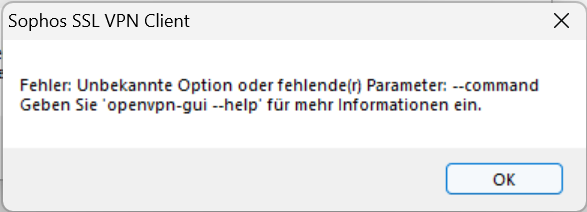
2024-03-26_18h45_39.png
Hi Maurice,
Could you please confirm the version of your OpenVPN GUI ? As far as we could tell, the "--command" parameter has been available for a few years, so you might be using an outdated version.
Regards
Jonathan Del Signore
Hi Jonathan,
I have Sophos SSL VPN Client 2.1 installed. The openvpn.exe in bin folder is version 2.3.8.0. The oldest version of openvpn I could find was 2.4.6 and it is released in april 2018. So, you are right, the openvpn version of Sophos SSL VPN Client should be a few days older.
I will try with a newer OpenVPN client in the next days...
Same problem here. After the update with .NET 8 we encounterd the same problem with the Sophos SSL VPN client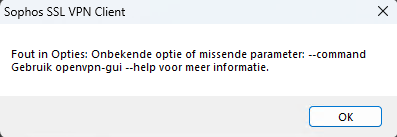
The Sophos SSL VPN client is version 2.1 and also the last version
It's also unable to closing the SSL VPN service. Even when I run RDM as Administrator.
3c45a389-c5dd-4593-83ee-4582487b3323.png
I investigated a few hours in using the latest OpenVPN client (2.6.10) instead of Sophos SSL VPN client (2.3.8). But many Sophos VPN configurations are not running in the OpenVPN client. They all stuck at step "MANAGEMENT: CMD 'hold release'". This also same with RDM 2024.1.19 und 2024.1.20. In RDM 2024.1.19 with Sophos SSL VPN client these configurations working fine. A significant difference between OpenVPN client and Sophos client is that OpenVPN is x64 and Sophos is just x86. It is not possible to install OpenVPN x86 on 64-bit Windows.
Jonathan, is it possible to make the RDM working well with Sophos SSL VPN client again? :)
2024-03-27_14h56_22.png
Hello,
We've reverted the changes made to OpenVPN in order for Sophos to work again. This will be effective from version 2024.1.22.0.
One thing to note though : RDM will need to run as administrator, otherwise the VPN won't be able to be fully closed.
Regards
Jonathan Del Signore