Power on Hyper-V guest for users without full admin rights on host
Power on Hyper-V guest for users without full admin rights on host

Hi, I have a use case that I cannot seem to find a way of implementing. Our need is to allow users of RDM to power up a virtual machine if they shutdown it down. We have migrated away from VMware as our Hypervisor and now run Windows Server 2022 and Hyper-V in our infrastructure (We're a Microsoft partner). The users will only have administrative access on the guest and none on the host server. As we run a least privilege approach we don't want to give the users any more rights that is absolutely necessary, to this end I was hoping to provide just the ability to execute the Start icon for a guest as is shown on the Hyper-V Dashboard. I cannot find a way to achieve this so I thought we may be able to create an entry for each server to execute a simple PowerShell command like Start-VM using a behind the scenes service account and allowing only execute permissions on the entry. I failed at making this work too, so I started to look into adding the user into the Hyper-V Administrators group on the host and see if I can give them the Hyper-V Dashboard view, this fails too as shown below from the profiler. It seems you need more rights than just Hyper-V Administrators, I wasn't convinced this was the right approach anyway as they will have access to more rights than powering on a guest.
Main thread (UI)
----------------------------------------
Silent: System.UnauthorizedAccessException: Access is denied.
at System.Runtime.InteropServices.Marshal.ThrowExceptionForHRInternal(Int32 errorCode, IntPtr errorInfo)
at System.Management.ManagementScope.InitializeGuts(Object o)
at System.Management.ManagementScope.Initialize()
at Devolutions.RemoteManagement.Execution.WmiExecutionContext.Connect()
at Devolutions.RemoteManagement.Execution.ExecutionContextFactory.ConnectToHyperVWithVersionCheck(WmiExecutionContext context)
at Devolutions.RemoteManagement.Execution.ExecutionContextFactory.GetOrCreateExecutionContext[T](Object key, Func`1 createFunc, Action`1 overrideConnectFunc)
Silent: System.UnauthorizedAccessException: Access is denied.
at System.Runtime.InteropServices.Marshal.ThrowExceptionForHRInternal(Int32 errorCode, IntPtr errorInfo)
at System.Management.ManagementScope.InitializeGuts(Object o)
at System.Management.ManagementScope.Initialize()
at Devolutions.RemoteManagement.Execution.WmiExecutionContext.Connect()
at Devolutions.RemoteManagement.Execution.ExecutionContextFactory.ConnectToHyperVWithVersionCheck(WmiExecutionContext context)
at Devolutions.RemoteManagement.Execution.ExecutionContextFactory.GetOrCreateExecutionContext[T](Object key, Func`1 createFunc, Action`1 overrideConnectFunc)
at Devolutions.RemoteManagement.Execution.ExecutionContextFactory.CreateWmiHyperVExecutionContext(ConnectionContext context, RemoteManagementHyperVVersion hyperVVersion)
at Devolutions.RemoteManagement.Commands.HyperVGetTargetComputersCommand.Execute(ConnectionContext context, HyperVGetTargetComputersParameters parameters)
at Devolutions.RemoteDesktopManager.Business.RemoteCommandDispatcher.ExecuteCommand[T,U](String commandName, ConnectionContext context, U parameters, Boolean addEntryToProfiler)
at Devolutions.RemoteDesktopManager.Frames.Embedded.FreEmbeddedHyperVVirtualMachines.<RefreshHyperVVirtualMachines>b__91_0()
I give up and I'm sure there will be a simple and elegant way to achieve this but it evades me. Can anyone help point me in the right direction or have any suggestions on how to achieve our needs? Thank you in advance.
All Comments (2)
Hello,
I guess that you are using a Hyper-V Dashboard session type.
In the properties of this session, under Management Tools -> Tools, could you try to select Use session credentials instead of Use default credentials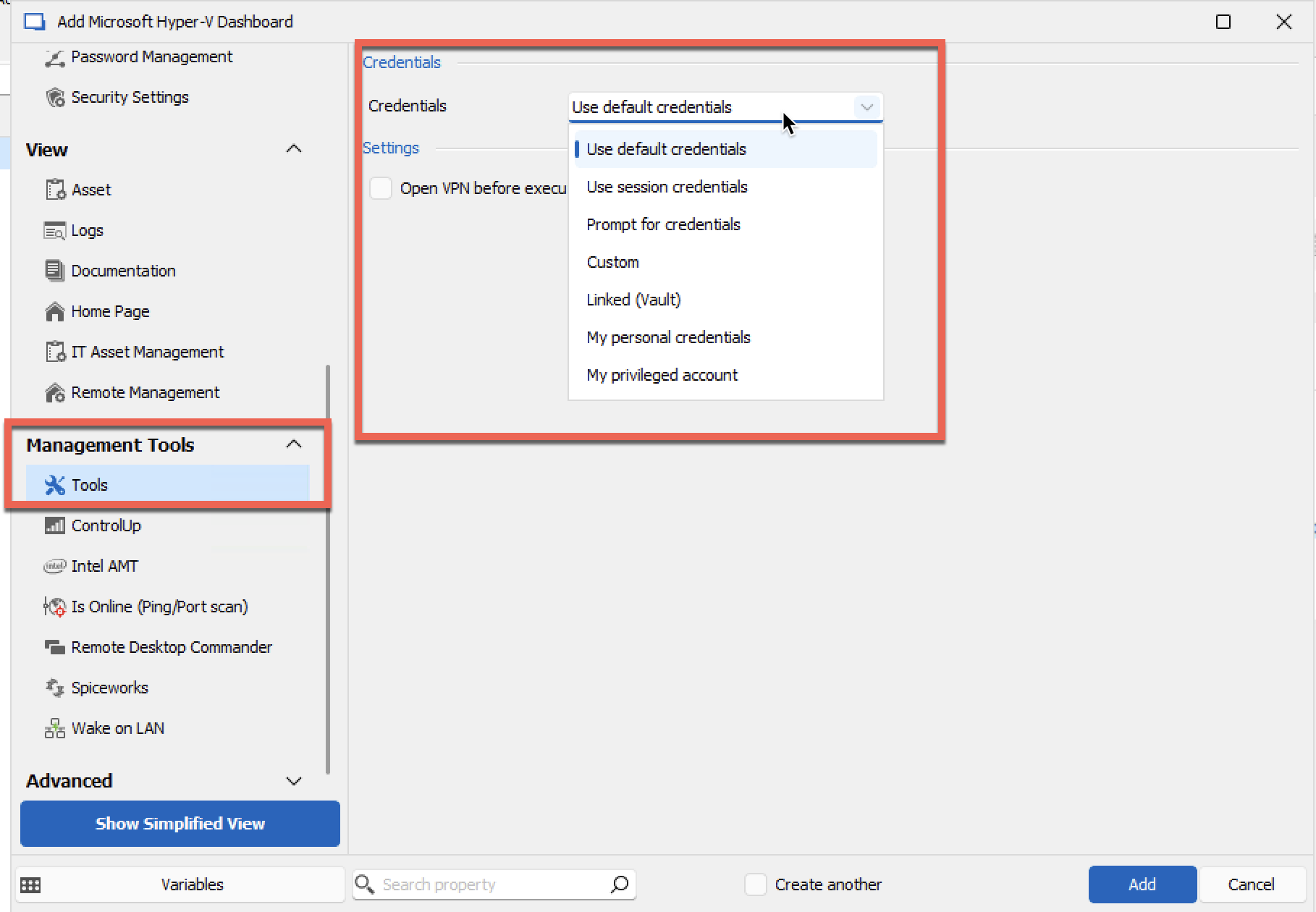
Let us know if that help.
Best regards,
Jeff Dagenais
99654058-f2d9-4153-ac0d-fad5babf68ff.png
I guess that you are using a Hyper-V Dashboard session type.
In the properties of this session, under Management Tools -> Tools, could you try to select Use session credentials instead of Use default credentials
Thank you for your response. Yes we're using the Hyper-V session type and we have the same issue when using your suggested config on session credentials. I don't think this is an issue with RDM and believe it's more with Windows Server/Hyper-V permissions. I've started to look again at writing a PowerShell script that will take arguments for the host, guest name and credentials to start a VM using a combination of Invoke-Command with a script block for Start-VM. Fingers crossed I can get this working, if I do I'll report back on how we achieved it.