2024 version problems, I wouldn't upgrade yet..

I have now two tickets open and I think this release is not ready yet. 1) ssh sessions lose focus when embedded, need to be undocked 2) copy usermame/password doesn't work.
Additionally I can't even downgrade es export to .rdm format from Personal Hub isn't working (RDM just freezes) and you can't downgrade with this Data Source Type. Just a warning for others..
All Comments (13)
Ok, an update re downgrade:
- Get 2023 version from here (binary) https://devolutions.net/remote-desktop-manager/home/previousversions/ and extract
- File – Export – Export vault (.rdm) in 2024 version and WAIT.. and wait some more (at least 5 mins), RDM will freeze, no progress bar :(
- Copy over ..\AppData\Local\Devolutions\RemoteDesktopManager\RemoteDesktopManager.bak into extacted directory and rename to .cfg
- Start RemoteDesktopManager.exe from extracted directory
- select local data source and import .rdm
you should be fine for now, only layout is missing, not sure how to bring this over.
..and all sessions lose their clinked credentials with a local datasource (the crdentials are still there). What a mess..
Hello,
For the export, did you make sure to check the "include credentials" box when exporting? If you don't check it, RDM will wipe the stored credentials within the exported entries, which includes the configuration for linked credentials.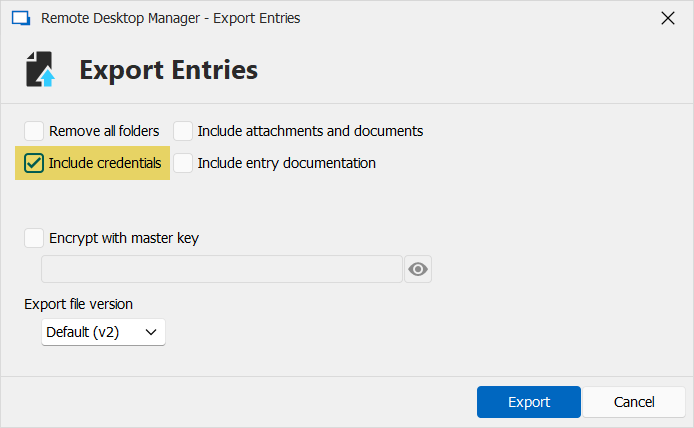
For your two other issues (exporting within Hub personal being slow, and SSH entries losing focus), we will check with our QA team to see if they can reproduce these issues.
Regards,
Hubert Mireault
c39dcdf3-4d9d-473c-bfd2-36ad9ac5eefe.png
no sorry, I didn't, my fault. It was early morning of a full day without my favourite tool ;/
right now I use the 2023.29 in read only mode in the hope that these bugs are quickly squashed.
Hello,
for the focus issue with SSH, does it happen at the start of your session or while working in it?
Also, did you change anything in the properties of the session? This could help pinpoint the issue.
Best regards,
Antoine Mauger
starts as soon as you press the first key inside the session. strangely, space works. see the video I uploaded to support (can't share here as it is not blurred). doesn't happen, when session is detached. happened immediately after the update, no changes.
ok, the copy username/password/otp issue is fixed in 2024.14. But.. additionally to the focus issue, now logging into SSH with an ssh key isn't working anymore..
@everyone,
Regarding the SSH issue, you can follow the development here https://forum.devolutions.net/topics/41369/ssh-sessions-no-longer-use-ssh-key
Best regards,
Jeff Dagenais
Hello perler,
can you please send us your .cfg file by following the steps of this KB: https://docs.devolutions.net/kb/remote-desktop-manager/how-to-articles/send-sanitized-configuration-file/
Best Regards,
Antoine Mauger
Hello perler,
do you have the option 'Use embedded Microsoft Edge for overview panel' disabled in File > Settings > Advanced? If so, enable it and tell us if the focus issue with SSH still happen.
Best Regards,
Antoine Mauger
Screenshot 2024-03-28 at 9.18.08 AM.png
sorry, problem is long fixed. thanks!
Hello,
glad to hear! If there's anything else, don't hesitate to communicate with us again.
Best Regards,
Antoine Mauger
Hello,
In case anyone else stumbles upon the focus issue with terminal sessions, we've made a fix which will be included in version 2024.1.24.0.
Regards
Jonathan Del Signore