Does 2024.1 on Win ARM64 REALLY want an x64 version of dotnet?
Does 2024.1 on Win ARM64 REALLY want an x64 version of dotnet?

Auto update on Win11 ARM (Parallels VM) is requesting x64 version of dotnet 8. See image.
rdmArm64Windows.png
All Comments (10)
Hello
Thanks for the issue report, that definitely doesn't seem right. I'm trying on my side, but how are you getting this message? Do you run the portable RDM, or running the .exe or .msi installer?
Thanks and kind regards,
Richard Markievicz
After a failed automatic update, here's what I see:.gif)
2024-03-05_11-53-16 (1).gif
Hello,
I think it's the default installer from Windows when it detect a missing .NET installation.
Regards
David Hervieux
Hello
I do reproduce the issue on my side. Windows is launching the app as an x64 process, which is causing this faulty check to kick in. We have to take an extra step to tell Windows to run the app as ARM (Windows by default runs 3rd party applications as x64 for backward compatibility reasons) but something seems to have changed on that side.
I'm looking into it. Thanks for your patience!
Kind regards,
Richard Markievicz
Hello again
I've done some investigation here. The short answer is this: there's some changes to the publishing for 2024.1 (which now, clearly, runs on dotnet 8) which has broken things for Windows on ARM. We did have at least one ticket go through QA on that platform, so I'm not sure how this was missed but it's possible their test environment was faulty. I do apologize for the inconvenience.
Right now I don't have a quick fix, so I'm afraid I can only offer two workarounds:
- Rollback to the 2023.3.x version for now
- Install the x64 dotnet 8 runtime and run RDM under x64 emulation
The second option (running under emulation) might not be too bad, but it really depends on your workload and features you are using. I'd suggest trying it first.
To give the longer answer: under .NET Framework, the build produced an MSIL executable that could run natively (just-in-time compiled) for x64 or ARM. Under dotnet core, the MSIL executable is actually a library (RemoteDesktopManager.dll) and a small, native launcher (RemoteDesktopManager.exe) is generated simply to execute that library. This launcher is (currently) an x64 native image, so naturally it can't run natively on an ARM system: hence the error message - it's running emulated and therefore looks for the x64 runtime.
I had thought we can workaround this by simply bypassing the launcher (`dotnet path\to\RemoteDesktopManager.dll`) which does work - but crashes on startup (both on ARM and x64) with an error I don't understand. My colleague who I think might have some knowledge of that issue is on vacation currently. It's possible I might have a better workaround after speaking with them, however.
I'm liaising with the RDM team to understand what we can do to fix properly this in the near term. I'm also going to check in with the QA team, because I think this should've been caught earlier - we don't have many users on ARM, but we did validate at least one bug on that platform for this release, so I wonder if there is a problem with the QA environment for ARM.
I do apologize for the inconvenience and thank you for your patience. Please don't hesitate with further questions or comments.
Kind regards,
Richard Markievicz
Thanks for the detailed information. Nice of MSFT to change it on you, eh?
There's no urgency in running 2024.1 in my VM; it's the backup for the macOS version I use. Usually, when there's an update for one, I update the other (esp. as there's a warning in the dashboard about Hub not being on a matching version).
I'll fall back to a previous version.
There's no rush but if you can remember, please update this post when you think it's been resolved.
Hello again
We've done some more detailed investigation of the problem; I've actually come up with a workaround which I won't propose because it's quite ugly. However if you or another user finds themselves blocked on this, I'd be able to share some details.
Otherwise - proper multi-architecture distribution was planned for 2024.2 (which is a way off). We're discussing bringing that up to 2024.1, or implementing an interim fix in the meantime. It's just a case of planning and shuffling priorities around right now.
I'm opening a ticket and attaching it to this post, so we'll be sure to circle back here once there is some news.
Thanks again for your patience
Kind regards,
Richard Markievicz
Hi Alex
This should be fixed in the latest (2024.1.17) release; please let know if you still experience a problem after updating.
Thanks and kind regards,
Richard Markievicz
Wow! That was fast. Thanks.
All good here...though you may wish to let Win Arm64 users know they will need to install dotnet 8. As you can see in the recording here, RDM (or maybe it's Windows) knows the system doesn't have dotnet 8 installed, installs it and all is well. But this happens _after_ RDM upgrade. One kinda doesn't expect it after-the-fact. Still, it's not an issue.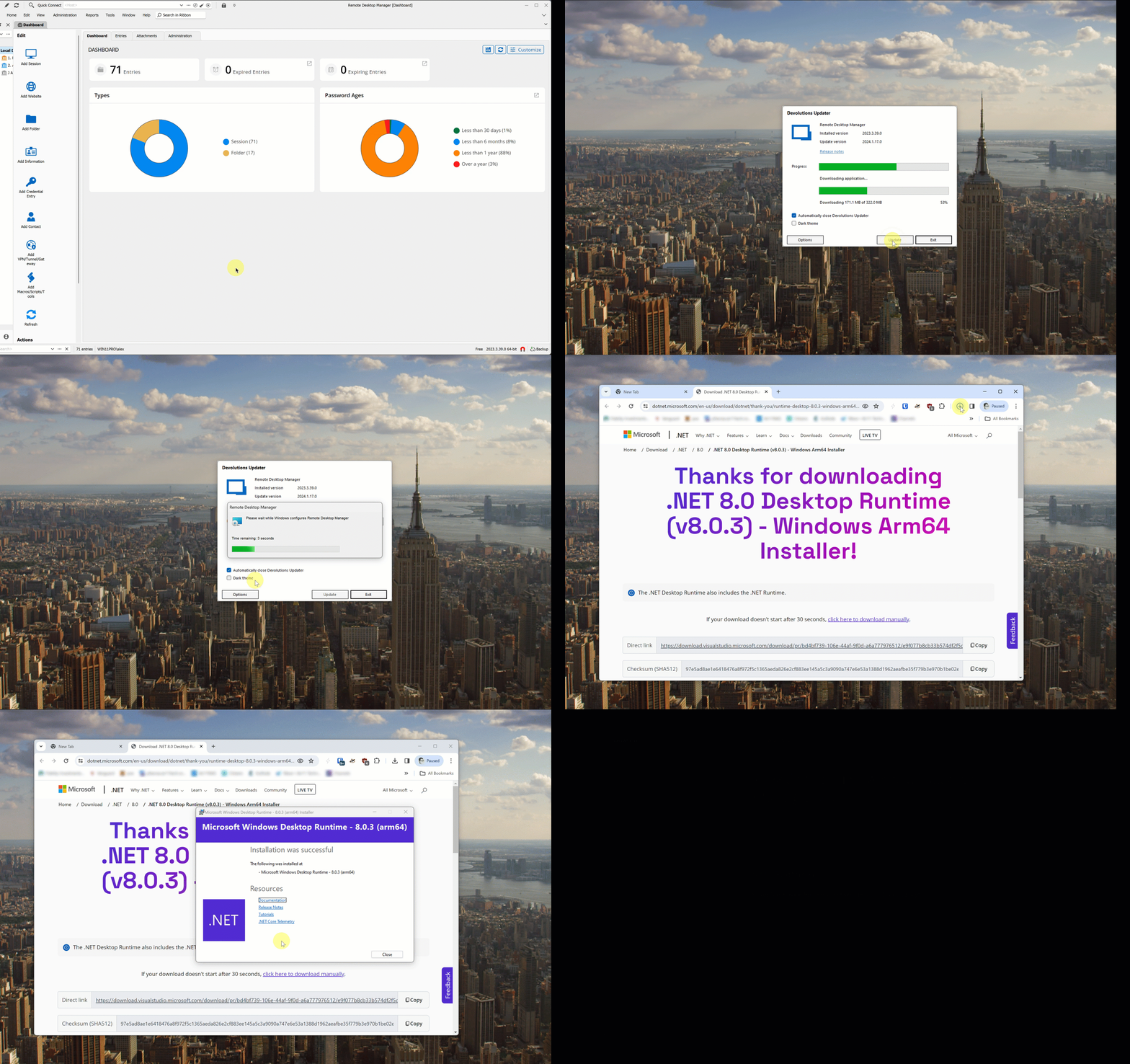
arm64-a.gif
Hello
Yes, this is an annoyance. I'm not sure there's much that we can do to address this in the current iteration, but we might be able to make improvements here for 2024.2 if it brings proper multi architecture support.
I would like it if either this was handled directly in the installer itself, or the native launcher (the actual RemoteDesktopManager.exe) detected the missing runtime, prompted for installation, then relaunched itself seamlessly.
Anyway, thank you for your feedback; this should be improved incrementally. If you find other issues or have questions about ARM64 support we really welcome that.
Thanks and kind regards,
Richard Markievicz