Apply display settings on RDP connections opened from .RDP files?
Apply display settings on RDP connections opened from .RDP files?

Hi all,
In RDM, you can configure templates for RDP sessions. Any new RDP entry you create in RDM will be able to use the template and this saves you time from having to configure specific settings over and over again. The problem is that this only works for entries that you create in RDM. I'm trying to figure out how to apply this template to .RDP files that I open with RDM.
We use the Bastion native connect method to connect to our Azure VMs with our AAD credentials. For those unfamiliar, Bastion native connect is an AZ CLI extension and you basically run some command in Powershell. In the background, AZ CLI will download a temporary .rdp file under %temp% and then open it up with MSTSC to connect. I've figured out a way to use a script to intercept this .rdp file and modify a few settings inside the .rdp file, then open it up with RDM instead of MSTSC. It works great, the only problem is that it doesn't apply the RDP-specific display settings such as smart-sizing, because this is obviously unique to RDM and can't be added to the .rdp file itself.
My question is, for any .rdp file that we open with RDM, is there a way to force RDM specific settings onto it? I don't want to always have to save a RDP entry into RDM. Sometimes, opening a .rdp file with RDM is just a temporary session.
--------------------------------------------------------------------------------------------------------------------
I'm always using the latest beta RDM x64 version.
Local data source.
All Comments (11)
Hi chaoscreator
There might be a way to achieve what you're asking (I'll have to let a member of the support or RDM Windows team give you an answer), but I'm wondering if this is an x-y problem.
Is there a reason you don't use the native Azure Bastion integration built in to RDM? You can create an Azure Bastion VPN type, then configure it as the VPN on an RDP entry which gives you the full breadth of options available (and saves you from manually using `az` to grab the .rdp file for a host).
Let me know if something isn't clear or you have any questions
Kind regards,
Richard Markievicz
Didn't know about that, I'll try it out.
--------------------------------------------------------------------------------------------------------------------
I'm always using the latest beta RDM x64 version.
Local data source.
Hello again
If you're mainly working with temporary connections that you don't want to create an entry for, then it might not be a final solution. But please take a look at that and let us know how you get on; it's possible your requirements are already met (or could easily be met) by RDM.
Thanks and kind regards,
Richard Markievicz
I followed the guide here:
https://docs.devolutions.net/kb/remote-desktop-manager/how-to-articles/configure-azure-bastion-entry/
I'm getting this error:
I'm not sure what that means. I think it's saying it can't find the Bastion resource. I've let it prompt me for auth and I'm definitely auth to my Azure tenant properly. Also tried to use AZ CLI and Powershell login as prompt options. For the host, I'm not sure what to put there. In your guide, the example is "Devolutions-202309011056-vnet-bastion", but I don't know how this was derived.
The other issue is that my Bastion is located under the Connectivity subscription, while my VMs are located in another subscription. Not sure if RDM will support using Bastion from a different sub and then connect to the VM that belongs to another sub. And what about situations where you have the same VM name found in different subs? How does it know which one to connect? Normally, you'd specify the resource ID of the resource.
Also, while I do want to get the Bastion setup working, I still think it's worthwhile for your team to look at my original issue. There may be situations where I just download a .rdp file and it doesn't have to do with Azure or Bastion at all. I may just want to open the .rdp file with RDM and have some of my default RDM settings applied automatically, without having to save the RDP entry.
--------------------------------------------------------------------------------------------------------------------
I'm always using the latest beta RDM x64 version.
Local data source.
376b6e7a-503a-4ecc-b4a0-9e53305ab0be.png
Hello again
For the first point, yes it seems like we're getting a 404 error trying to call a resource on the Bastion. How is your Bastion VPN entry defined? Specifically the "Host" field. I see that the docs say this should contain "{Existing Virtual Network}-bastion" which doesn't make much sense to me. To be clear: the Bastion "Host" should be the Bastion instance name.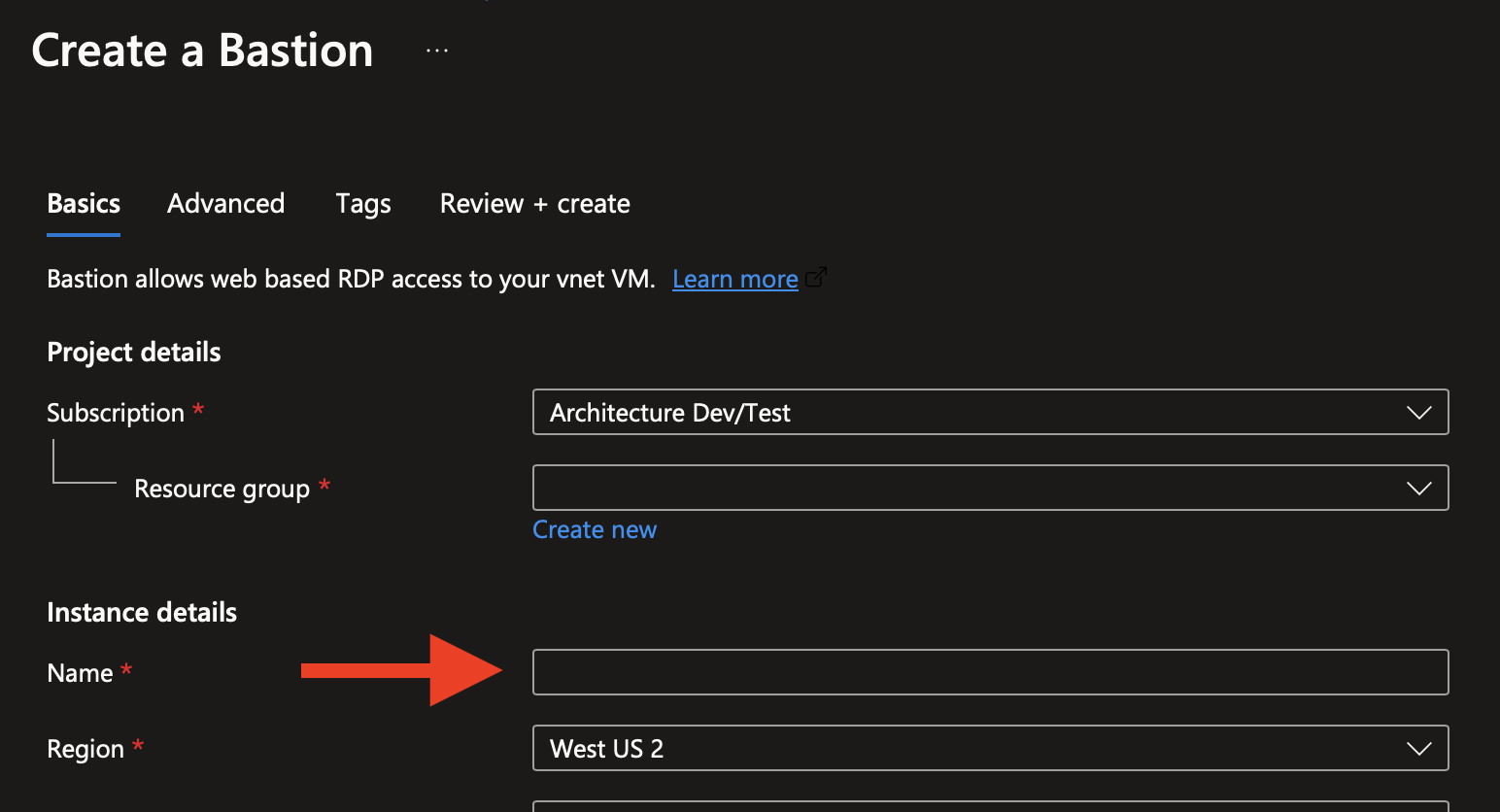
If you check that and it's still not right, I'd really appreciate if you can send me the output from the Help > Profiler window (in the "Debug Only" tab with a debug level set to 1) while trying the connection.
For the second point, the docs call out a simple scenario but what you want to achieve is definitely supported. In the "VPN" tab of a Folder or RDP connection - assuming you've a Bastion VPN configured - you can override one or both of the subscription ID or resource group. These values can be set as "Custom" or "Inherited" (this should allow you to define folders for subscriptions and resource groups as appropriate, and then let those values inherit down to the RDP connections inside).
Please let me know if something isn't clear or you have further questions. We introduced the Bastion native support around a year ago, and while it seems to be working quite well for most users we're still refining things. Feedback is very welcome.
Thanks and kind regards,
Richard Markievicz
Screenshot 2024-03-04 at 22.48.45.png
I got it working. But I don't like this solution.
The issue is basically what I had mentioned already. If your VM is in subscription A and your bastion resource is in subscription B, then RDM will by default use the subscription of the bastion resource to find your VM.
The fix is to set the subscription and resource group for the VM, as per below: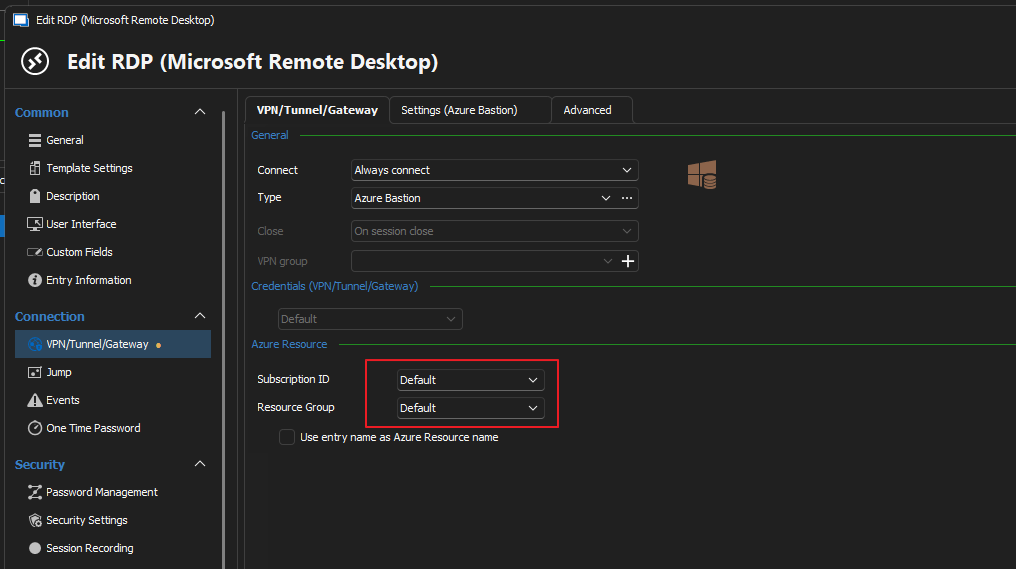
However, this is a pretty terrible solution and here's why:
Whenever I want to connect to an Azure VM using Quick Connect in RDM, I normally just set it to use a specific RDP template, like this: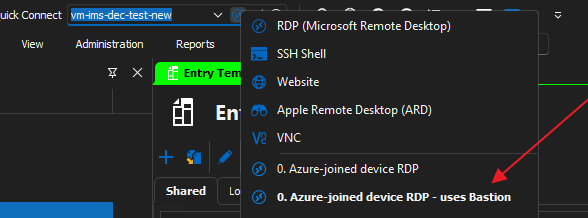
The benefit of this is that you don't have to create RDP entries just to apply RDM specific settings. You can just connect to VMs on the fly and they'll apply the existing RDP template that you've already configured and that's great.
Now here's the problem. Let's say I have VMs in subscriptions A, B, C, D and my bastion resource is in subscription Z. When I connect to these VMs in the different subscriptions, I will be using the same RDP template for all of them. I can't be expected to make changes to the RDP template (i.e update the subscription and the resource group) for each VM that I'm trying to connect, every single time. That's very inefficient. This solution is only good for SAVED entries, where it's fine to hardcode the settings just once. But if you're trying to do this on the fly, it won't work well.
What should really happen is that you take the resource ID of the VM (which contains the subscription and the resource group) and you paste it into the Quick Connect field. RDM should then take that and extract the subscription ID and resource group, then automatically populate these values in the background.
Anyway, ignore Bastion and Azure for now. The root issue is still there. If I connect to an on-prem VM on the fly, by clicking on the .rdp file to open with RDM, then I'd expect RDM to apply my pre-configured RDP template to this RDP connection. I don't always need or want to save entries into RDM, especially if I only need to temporarily jump on the VM once or twice in a year.
--------------------------------------------------------------------------------------------------------------------
I'm always using the latest beta RDM x64 version.
Local data source.
16ed0540-6b84-46a3-9b3e-5ddc4ac84736.png
5696d5ab-4480-4ba6-a7f3-87eabd7b831f.png
Hello again
That would be an interesting feature (quick connect to an Azure resource ID) and I'll think about that in the future.
But I understand the problem for your workflow is more of a generic one. I've brought this directly to the attention of the RDM Windows team, they are creating a feature request ticket and will circle back to this thread to either ask for or provide more information. To set expectations, they'll probably be at least a week or two before this gets looked at because I know the team is currently occupied getting the 2024.1 release out the door.
Thanks for your patience, and please don't hesitate to post back with further questions or comments
Kind regards,
Richard Markievicz
Hi, how is the progress on this?
--------------------------------------------------------------------------------------------------------------------
I'm always using the latest beta RDM x64 version.
Local data source.
Hello
I see the ticket is still in the backlog. I will ask the developer assigned for an update.
Thanks for your patience,
Richard Markievicz
Hello again
I'm afraid the ticket is still in backlog; there are a number of higher-priority tickets assigned currently. We'll update this post once there is some traction here; but in the meantime if other users are interested in this feature I'd encourage them to chime in on this thread. Unfortunately the priority that this has internally will reflect the level of demand.
In the meantime, if you have further questions or comments please don't hesitate to post back
Thanks and kind regards,
Richard Markievicz
Hello,
We have the Apply default RDM options when launching external RDP files option available. You can find it in Files - Settings - Entry types - Sessions - Remote Desktop (RDP). It is localed in the Advanced section.
With this enabled, it should launch external RDP files with the default settings.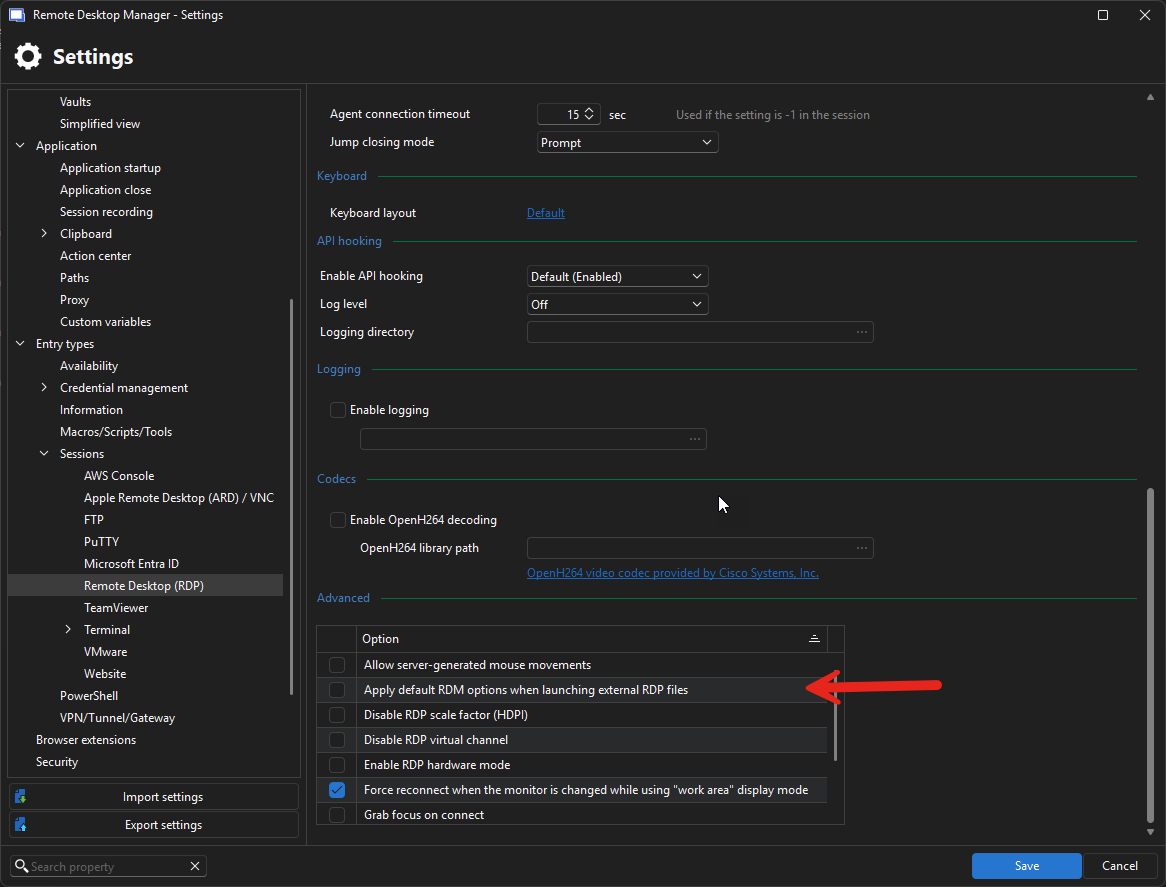
Regards,
Jafran Majeau
8e73d4c8-6a9d-4faa-a270-2ec17652f328.png