Disallow access to clipboard history
0 vote

An option to disable the access for RDM to clipboard history.
If you copy username, then password. Both gets saved in the password history in Windows i cleartext.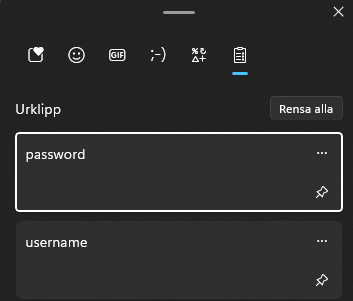
Skärmbild 2024-02-29 072041.png
All Comments (3)
Hello,
You can use the clipboard diagnostics feature to put certain processes on the blocklist: https://docs.devolutions.net/kb/remote-desktop-manager/troubleshooting-articles/clipboard-diagnostic/
Please note that this only affects the "copy" buttons in RDM, if you manually copy text in RDM elsewhere, we can't change the behavior of the Windows Clipboard History.
Regards,
Hubert Mireault
Hello,
You can use the clipboard diagnostics feature to put certain processes on the blocklist: https://docs.devolutions.net/kb/remote-desktop-manager/troubleshooting-articles/clipboard-diagnostic/
Please note that this only affects the "copy" buttons in RDM, if you manually copy text in RDM elsewhere, we can't change the behavior of the Windows Clipboard History.
Regards,
Yes, but we would like to disable this for all users in our organization. The block would be client-specific right?
Also im not sure if there is a process that is blockable for the clipboard history? If you have anything regarding that please share :)
Hi jakobbrandt,
When RDM is configured Clipboard copy method = Paste once (secure) (this is not the default) RDM will send formats telling other apps that the data is sensitive and should be kept "secret". This is meant to protect your clipboard data from tools like Windows Clipboard History, asking them to not include the value as part of its history, for example.
Note: Not all third party clipboard history tools or any other application will adhere to this convention. Clipboard Diagnostic window can help you identify those apps.
You would need to configure this setting and any other setting you would like to distribute to your organization then generate a custom installer and distribute it within your organization. 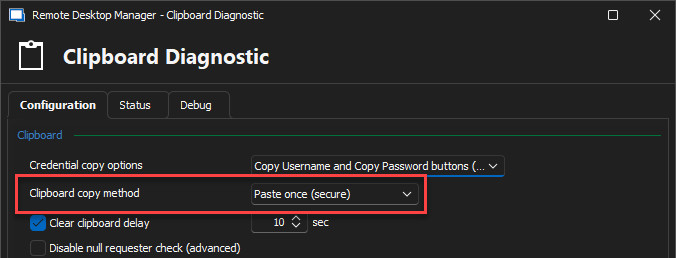
Stéfane Lavergne
83836bcd-c13e-4179-83d8-2e11b51ef992.png