Hoist
0 vote

It would be helpful in the Vault / Default Data Source Navigation Tree to use the hoist function.
Example:
- Open multiple ssh sessions
- Left click on the opened sessions
- Right click on one of the selected sessions
- On the context menu, click on Execute Macro/Script in Terminal
- Command - enter the command and execute
Challenges with the current process
- I organize my ssh session in folders and I have hundreds of ssh sessions. If I open 10 ssh sessions the folders can be further down the scroll which take more effort to locate the opened sessions so I can select them.
- If I goto the Opened sessions section I can easily see all of the opened sessions however if I right click on the sessions the context menu does not appear so I am unable to execute scripts.
Recommendation
- In the Vault / Default Data Source Navigation Tree allow the ability to use the hoist feature. So I right click on an opened ssh session, in the context menu you would see hoist you would see options such as hoist opened sessions. By hoisting opened sessions it would only show the opened ssh sessions which would then allow the ability to ctrl a to select all then I could right click and select Execute Macro/Script in Terminal. This process would shorten the time to perform tasks on selected sessions.
If you need more details on hoisting here is the application I use and copied the idea from --- https://kinook.com/UltraRecall/Manual/index.htm?hoisting.htm
Thank you for the consideration.
All Comments (2)
Hello,
Thank you for the suggestion. We will consider adding this in a future update.
In the mean time, maybe you could use the "Tab groups" pane to achieve what you need: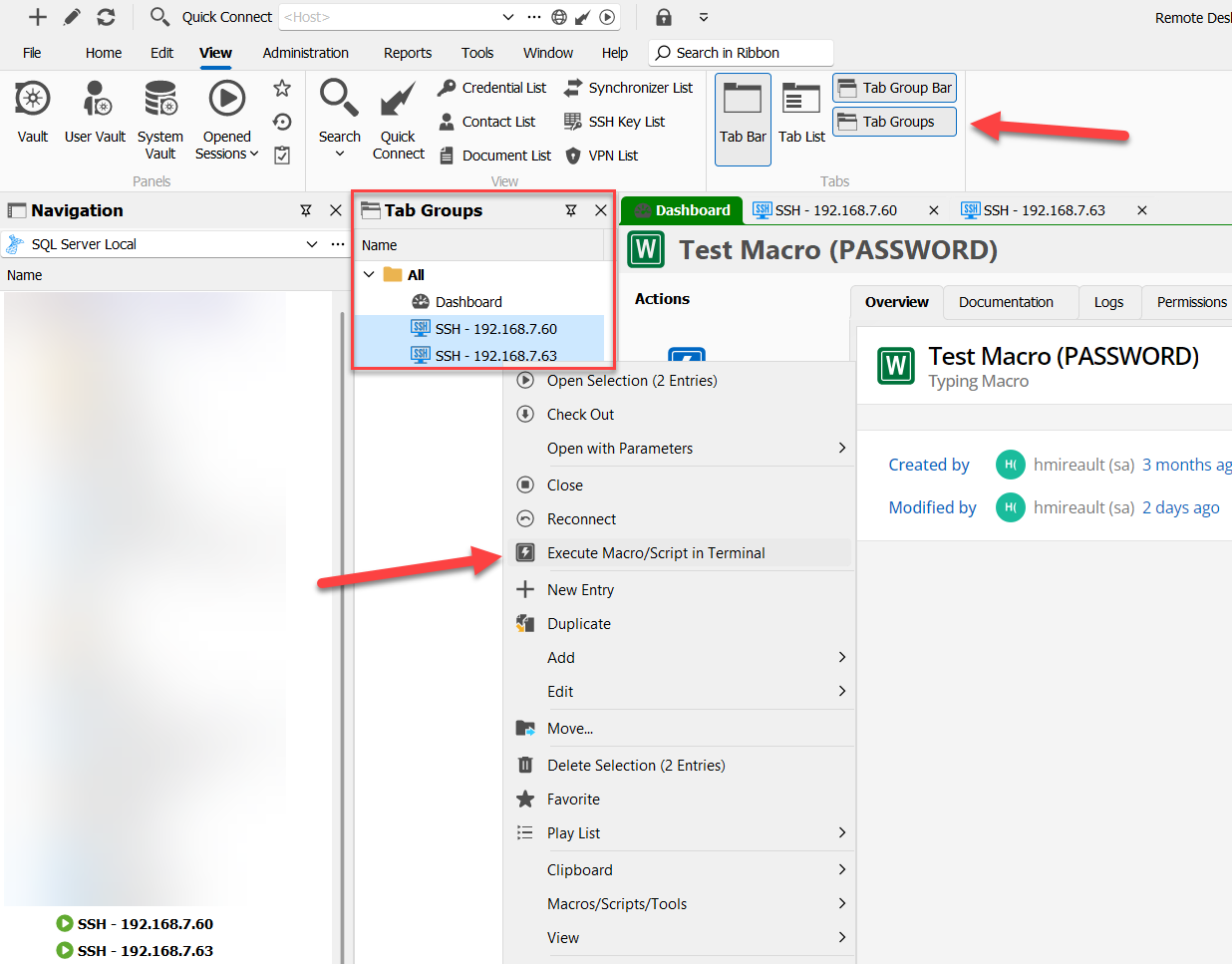
This tab lists all opened entries, and the context menu is similar to the one in the navigation pane. It's not as convenient as you describe though: for example you can't Ctrl-A but you can Shift-click to make the selection easily, and for some reason the macros aren't listed in the Macros/Scripts/Tools tab (we will take a look at this as it looks like a bug). This could provide you a workaround for the moment.
Regards,
Hubert Mireault
c5958700-5fc2-4ca2-94f6-0e9505be0138.png
Thank you, I am using a Smart Folder for now.