Any way to capture RDP Disconnects to allow for reconnects when service is retored?
Any way to capture RDP Disconnects to allow for reconnects when service is retored?

Hi,
I have a VPN connection active on my laptop that lets me connect to all the servers at work. Overnight, the VPN disconnects because I'm not using it. If I was still remoted into any sessions, I end up getting disconnected and receive a whole bunch of errors like this when I log on in the morning: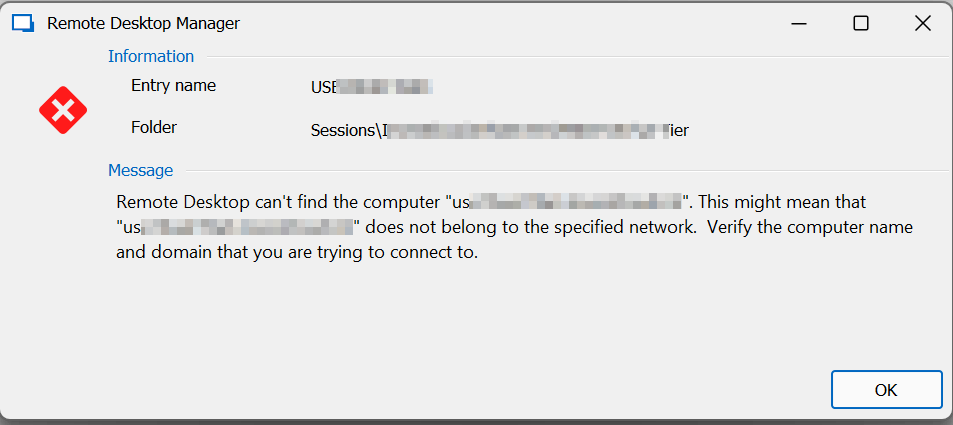
Before I can use RDM, I have to click OK to all the errors, reconnect my VPN, and then reconnect to all the servers I was on.
Is there any way for RDM to handle these errors by maybe showing me a list that says "You were disconnected from these servers" and then having a list? It could then ask if I want to reconnect or not. That would allow me to reconnect my VPN and then click Yes and have all my sessions open back up.
1) This would help me remember what I was working on and get back on the machines
2) This would help reduce orphaned, disconnected sessions on servers when I got cut off while active and want to go back on to log off properly.
Not sure how it would work exacly, but it's an annoyance I have every morning.
Thanks.
82c132fe-96d8-44d1-943c-44aec7a30bc6.png
All Comments (3)
Hello,
Thank you for contacting us regarding this,
I see, regarding the error message, I'm wondering if enabling the option "Disable RDP Embedded error message" might help, you can find it under "File" -> "Options" -> "Types" -> "Sessions" -> "Remote Desktop (RDP)"
That being said, for your second issue, I suspect the "Keep tab page opened on disconnect" may be of interest you can find this in the entry "Properties" under the "User Interface" section or you can change this globally under "File" -> "Options" -> "Types".
Let me know if this helps,
Best regards,
Samuel Dery
Looks like if I enable the second option, then I don't need to do the first option. This works great.
Thanks.
Hello,
Thank you for your reply,
Perfect, I'm glad to hear that this works for you!
Let me know if you have further questions regarding this,
Best regards,
Samuel Dery