Questions regarding credentials input

Hi there,
I have 3 questions. Regarding this option in the screenshot below:
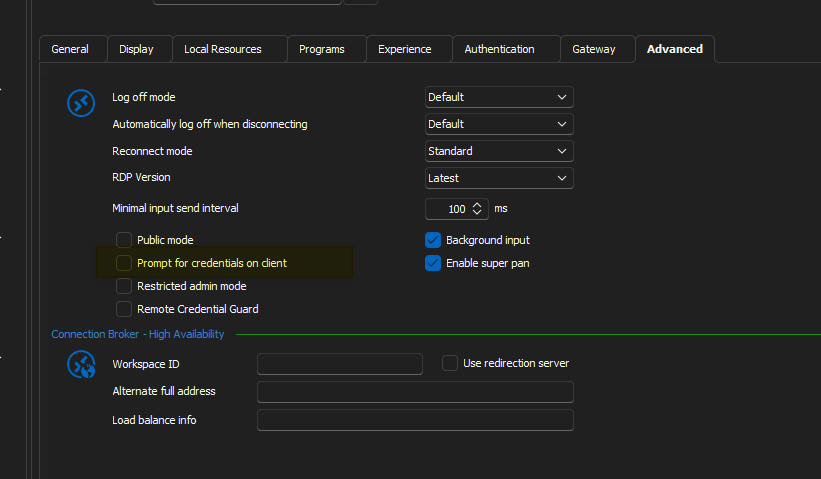
What does it do exactly? I've tried looking it up in the documentations, but I found nothing.
2nd question, what are the possible options for dealing with this - "The Server’s Authentication Policy Doesn’t Allow Connection with Saved Credentials"? You can find more about this from this link here, just search the exact sentence in my quote:
https://woshub.com/fix-saved-rdp-credentials-windows/
As this is server side policy and I don't have permissions to modify the registry or group policy or whatever, I need a solution that works from the client side. I know there are a few different ways of entering a credential. You can either connect to the VM and you enter the creds at the lockscreen. This is pretty common for entering Azure AD logins on the host. Alternatively, you can provide the credentials beforehand by using a linked vault or whatever. Problem is, none of the options I've tried works.
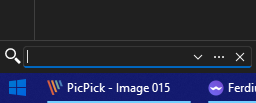
Lastly, how do you clear the search history? I'm referring to the search bar at the bottom left.
--------------------------------------------------------------------------------------------------------------------
I'm always using the latest beta RDM x64 version.
Local data source.
All Comments (8)
Hello,
Question #1 - Prompt for credentials on client
As per my knowledge, when you launch a RDP session, you will have the possibility to enter the credential when the connection is establish, prior to connect on the client. It will not be prompt prior to establish the connection, but when the connection is made. I am not 100% sure, but I will validate with my team and get back to you on this one.
Question #2 - The Server’s Authentication Policy Doesn’t Allow Connection with Saved Credentials
This means that your organisation has put in place a policy that doesn't allow you to save the credentials inside the session and launch it. It's usually for security reasons that organization enable this type of policy. However, there's maybe something that you can try via Remote Desktop Manager (RDM).
If you go in File -> Options -> Types -> Sessions -> Remote Desktop and select FreeRDP (Latest) for the RDP option, which is the first one in that window.
Question #3 - How do you clear the search history
I don't see an option to clear that filter. What are you trying to accomplish? Maybe you could provide us more details on that part please.
Best regards,
Jeff Dagenais
Hi,
For the "Always prompt for password upon connection" GPO, we have a workaround implemented in Remote Desktop Manager to make it work with both the RDP ActiveX (embedded) and mstsc.exe (external), so there should be no need to switch to FreeRDP. The check in the Microsoft client doesn't actually check if the password is saved, just that a password was set before the connection was started, so it just prevented any kind of credential injection, even if no local credman entry is used.
Let me know if you hit other issues with group policy settings affecting credential injection on the client. The embedded mode works better with strict CredSSP policies as it doesn't use a local credman entry for the credential injection. As for mstsc in external mode, a local credman entry is the only way to do it, unless we work on adding a custom out-of-process injection method using our API hooking. I've considered it, but haven't got to work on it yet.
Best regards,
Marc-André Moreau