Questions regarding credentials input

Hi there,
I have 3 questions. Regarding this option in the screenshot below: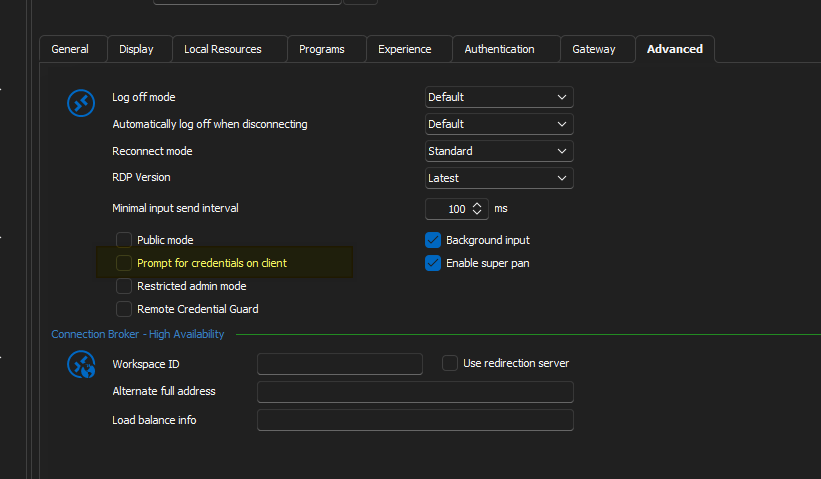
What does it do exactly? I've tried looking it up in the documentations, but I found nothing.
2nd question, what are the possible options for dealing with this - "The Server’s Authentication Policy Doesn’t Allow Connection with Saved Credentials"? You can find more about this from this link here, just search the exact sentence in my quote:
https://woshub.com/fix-saved-rdp-credentials-windows/
As this is server side policy and I don't have permissions to modify the registry or group policy or whatever, I need a solution that works from the client side. I know there are a few different ways of entering a credential. You can either connect to the VM and you enter the creds at the lockscreen. This is pretty common for entering Azure AD logins on the host. Alternatively, you can provide the credentials beforehand by using a linked vault or whatever. Problem is, none of the options I've tried works.
Lastly, how do you clear the search history? I'm referring to the search bar at the bottom left.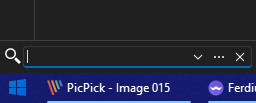
--------------------------------------------------------------------------------------------------------------------
I'm always using the latest beta RDM x64 version.
Local data source.
1c1d3c75-9dd1-4562-bf7d-65ebdbd13db1.png
963e9fe9-ace5-4f6f-a973-d7d48979cf69.png
All Comments (8)
Hello,
Question #1 - Prompt for credentials on client
As per my knowledge, when you launch a RDP session, you will have the possibility to enter the credential when the connection is establish, prior to connect on the client. It will not be prompt prior to establish the connection, but when the connection is made. I am not 100% sure, but I will validate with my team and get back to you on this one.
Question #2 - The Server’s Authentication Policy Doesn’t Allow Connection with Saved Credentials
This means that your organisation has put in place a policy that doesn't allow you to save the credentials inside the session and launch it. It's usually for security reasons that organization enable this type of policy. However, there's maybe something that you can try via Remote Desktop Manager (RDM).
If you go in File -> Options -> Types -> Sessions -> Remote Desktop and select FreeRDP (Latest) for the RDP option, which is the first one in that window.
Question #3 - How do you clear the search history
I don't see an option to clear that filter. What are you trying to accomplish? Maybe you could provide us more details on that part please.
Best regards,
Jeff Dagenais
Hi,
For the "Always prompt for password upon connection" GPO, we have a workaround implemented in Remote Desktop Manager to make it work with both the RDP ActiveX (embedded) and mstsc.exe (external), so there should be no need to switch to FreeRDP. The check in the Microsoft client doesn't actually check if the password is saved, just that a password was set before the connection was started, so it just prevented any kind of credential injection, even if no local credman entry is used.
Let me know if you hit other issues with group policy settings affecting credential injection on the client. The embedded mode works better with strict CredSSP policies as it doesn't use a local credman entry for the credential injection. As for mstsc in external mode, a local credman entry is the only way to do it, unless we work on adding a custom out-of-process injection method using our API hooking. I've considered it, but haven't got to work on it yet.
Best regards,
Marc-André Moreau
Hello,
Question #1 - Prompt for credentials on client
As per my knowledge, when you launch a RDP session, you will have the possibility to enter the credential when the connection is establish, prior to connect on the client. It will not be prompt prior to establish the connection, but when the connection is made. I am not 100% sure, but I will validate with my team and get back to you on this one.
Question #2 - The Server’s Authentication Policy Doesn’t Allow Connection with Saved Credentials
This means that your organisation has put in place a policy that doesn't allow you to save the credentials inside the session and launch it. It's usually for security reasons that organization enable this type of policy. However, there's maybe something that you can try via Remote Desktop Manager (RDM).
If you go in File -> Options -> Types -> Sessions -> Remote Desktop and select FreeRDP (Latest) for the RDP option, which is the first one in that window.
Question #3 - How do you clear the search history
I don't see an option to clear that filter. What are you trying to accomplish? Maybe you could provide us more details on that part please.
Best regards,
Thanks for your reply.
Question #1
I understand what you wrote, but I'm a bit confused as I'm not understanding the relevance of it. To me, "Prompt for credentials on client" would suggest that the prompt can either be on the client side or on the remote host. My understanding is that when the credential prompt is on the client side, it looks something like this: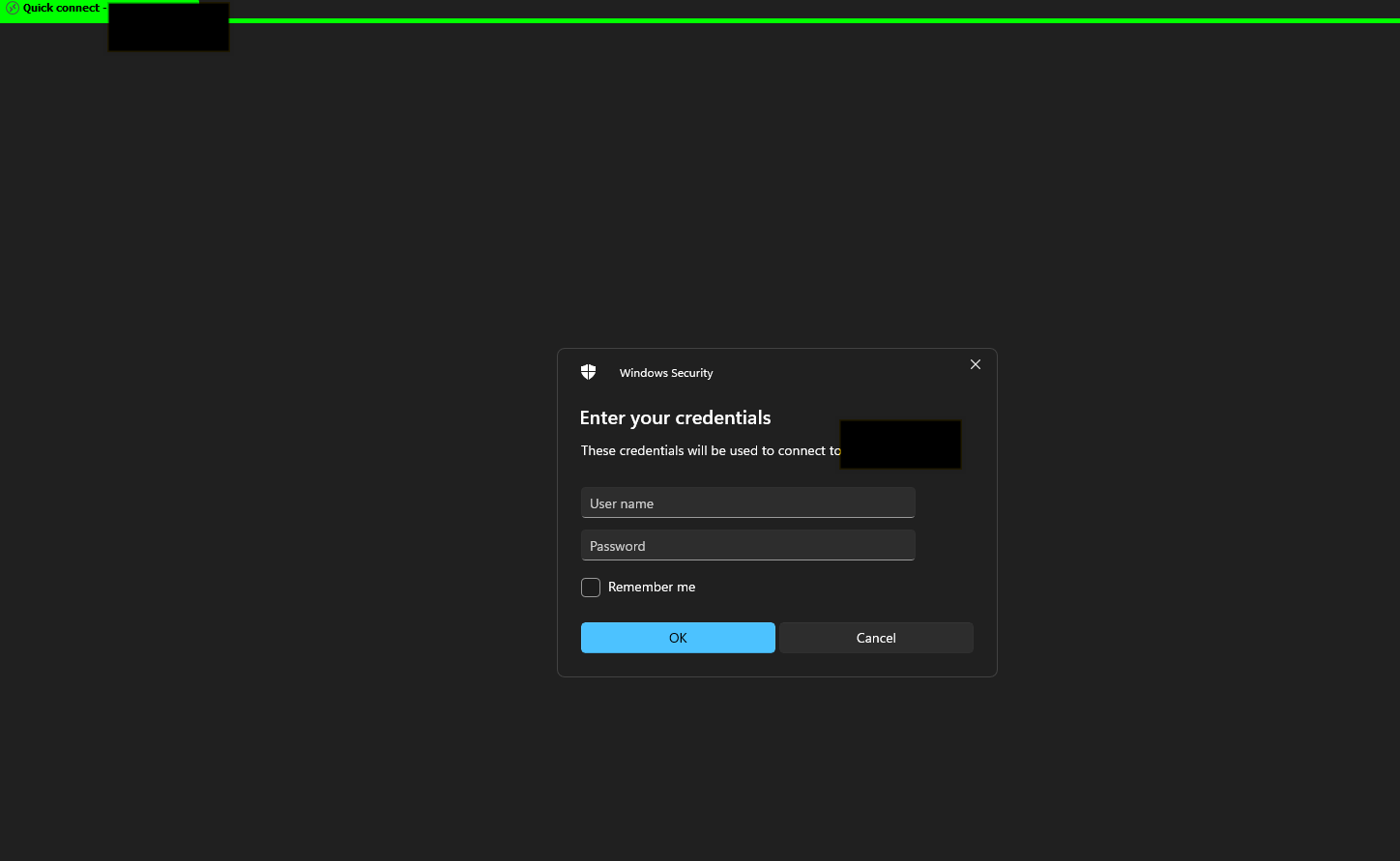
But when the prompt is on the remote host, it'll look like this (this is after you've connected to the VM and you get to enter the prompt at the lockscreen):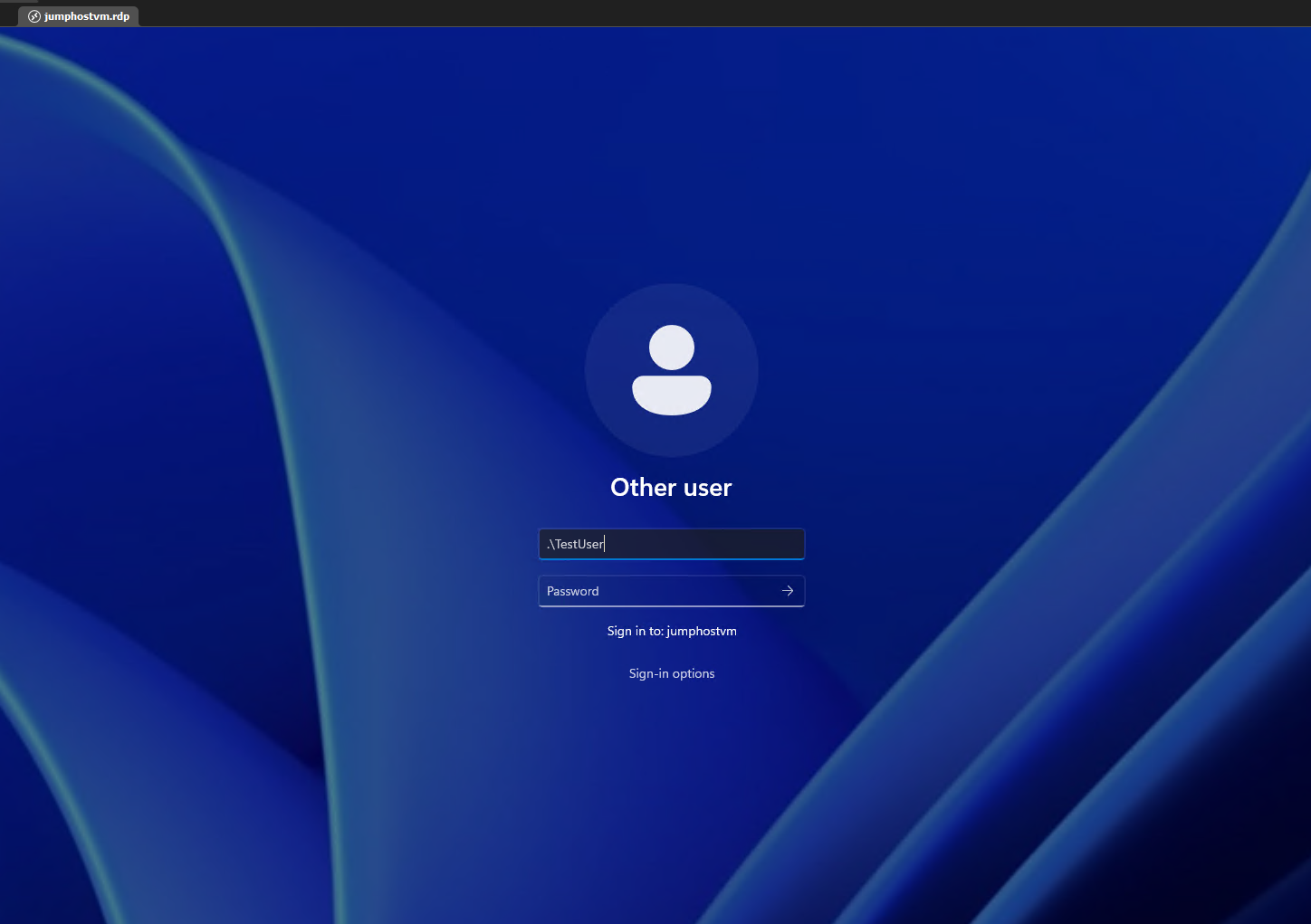
In both cases, my understanding is that connection to the remote host is made, which is why you're then prompted for credential entry. If the connection is not made, i.e you cannot telnet to remote_host_ip on 3389, then you wouldn't even get a credential prompt.
If the description "Prompt for credentials on client" has got nothing to do with what I wrote above, then could you please clarify what it means?
Question #2:
Yes, there is a configured policy that prevents you from using saved password during the RDP connection. However, since I'm using a Bitwarden credential entry that links directly to our company's Bitwarden account, I believe this method is secure enough that it should be allowed to pass the password during RDP connection. I'm trying to figure out if I can get this working in RDM and if yes, then it means our users will be able to have a better user experience. Anyone who isn't using RDM to connect to a VM with the use of Bitwarden credential entry, will have to manually type in the password (due to the policy).
Question #3:
I sometimes use RDM portable and while my flashdrive is Bitlocker protected, I still want to make sure that in case someone got hold of my flashdrive and somehow got access to the contents, they wouldn't be able to just open RDM and look at whatever is inside. I have a password configured on my RDM data source, but I also periodically clear any activity logs, etc. I'd also like to clear the search filter just to remove any traces. It also helps to provide this portable copy of RDM to another colleague, without them having to see all your previous searched histories.
I did manage to find a way to remove it, by deleting the .cfg and database file and then import them back in. But I wish there was an easier way to do this.
--------------------------------------------------------------------------------------------------------------------
I'm always using the latest beta RDM x64 version.
Local data source.
388081d0-afb2-45af-91e4-04ba7d730575.png
c354bf45-8d0b-4b3d-8ee1-7fd3bf632c91.png
Hi,
Question #1: What's "Prompt for credentials on client"
It is "prompt for credentials on client:i:1" in the .RDP file (external mode) and IMsRdpClientNonScriptable4::PromptForCredsOnClient in the RDP ActiveX (embedded mode). There's also a group policy setting. Unless you explicitly disable RDP NLA (not recommended) this setting won't do anything: it really means "prompt for credentials on client when it is possible to prompt it on the server, which only happens in the rare case of an RDP connection with RDP NLA disabled". We expose the same options provided by the Microsoft RDP client, and they don't always have good, meaningful names.
Question #2: Will RDM work with the "Always prompt for password upon connection" group policy enabled
Yes. We bypass the check the marks the injected password as being "saved" in the Microsoft RDP client, so as long as you launch the RDP connection from RDM, it will work. The server only forces the prompt on the client when it sees the flag set by the RDP client, so as long as the RDP client doesn't report the password as being saved, it works.
Question #3 is not related to RDP and probably would be better answered by a colleague, I jumped in on this thread because of the tricky RDP questions. I hope I have answered questions #1 and #2 to your satisfaction though.
Best regards,
Marc-André Moreau
Hello,
Question #3 - Clear search history
I had a chat with my team today and it seems that we have an option to accomplish what you would like to achieve.
If you go in File -> Options -> User Interface -> Filter, there's an option named Maximum item. Setting this option to 0 should do the trick in your scenario.
Best regards,
Jeff Dagenais
Hi,
Question #1: What's "Prompt for credentials on client"
It is "prompt for credentials on client:i:1" in the .RDP file (external mode) and IMsRdpClientNonScriptable4::PromptForCredsOnClient in the RDP ActiveX (embedded mode). There's also a group policy setting. Unless you explicitly disable RDP NLA (not recommended) this setting won't do anything: it really means "prompt for credentials on client when it is possible to prompt it on the server, which only happens in the rare case of an RDP connection with RDP NLA disabled". We expose the same options provided by the Microsoft RDP client, and they don't always have good, meaningful names.
Question #2: Will RDM work with the "Always prompt for password upon connection" group policy enabled
Yes. We bypass the check the marks the injected password as being "saved" in the Microsoft RDP client, so as long as you launch the RDP connection from RDM, it will work. The server only forces the prompt on the client when it sees the flag set by the RDP client, so as long as the RDP client doesn't report the password as being saved, it works.
Question #3 is not related to RDP and probably would be better answered by a colleague, I jumped in on this thread because of the tricky RDP questions. I hope I have answered questions #1 and #2 to your satisfaction though.
Best regards,
Regarding Question #1, I'm still a bit confused here. I've tried to disable NLA on both my client and the remote host and then tried to connect with mstsc.exe and played around with the setting prompt for credentials:i:1 and prompt for credentials:i:0 and it didn't make a difference. I don't notice any different at all. In terms of the effect, what is it supposed to look like? I keep thinking that toggling this on/off will be like what's shown in my screenshots in my previous post, but I don't see any change at all. I've also read the ADMX documentation you've provided and tried to look up for more information, but to no avail.
I did manage to find this and it seems to match what I was describing in my previous post, where the screenshots show the credential prompt on the client side and on the remote host side:
https://superuser.com/questions/712848/how-do-i-stop-remote-desktop-from-prompting-for-username-and-password-twice
However, I didn't have to adjust prompt for credentials:i:1/0 at all. Those screenshots were from a different configuration.
I've also found this:
https://www.donkz.nl/overview-rdp-file-settings/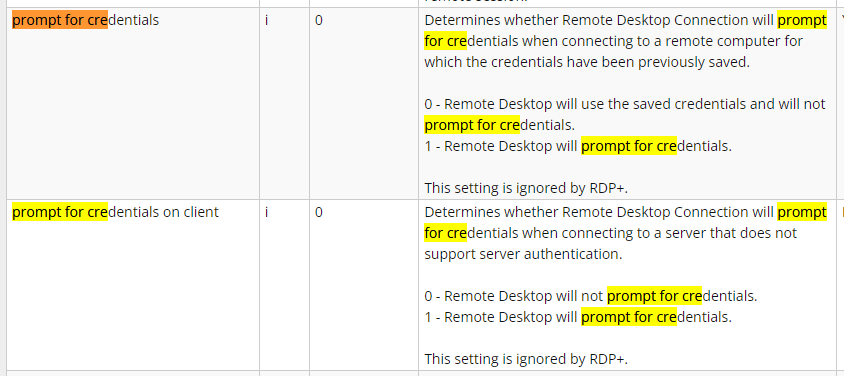
The explanation here seems to suggest it's related to saved credentials, which isn't the same thing as "prompt for credentials on client when it is possible to prompt it on the server". This is all rather confusing and inconsistent.
--------------------------------------------------------------------------------------------------------------------
I'm always using the latest beta RDM x64 version.
Local data source.
bdfbae66-2565-4512-a919-6f8073a8a724.png
Hi,
I agree it is all very confusing, and to be frank, we'd need to spend some more time investigating what the "prompt for credentials on client" option truly does in practice beyond the little amount of documentation available. It's possible that the modern RDP ActiveX and mstsc no longer do anything useful with that option, as it's very old, and relates to pre-NLA connection prompting behaviour from what I can tell.
We are just exposing the option from the Microsoft RDP client here, now is there a specific issue that involves RDM? We've removed RDP options we could confirm were truly ignored by the Microsoft RDP client in the past, but it's always tricky to be 100% sure it's no longer in use. We have a lot of customers and sometimes we only learn what the option truly did after we remove it and someone comes to complain it's gone and they needed it, which is why we tend to keep them longer.
As far as I can tell, you should be good to go for what you asked, the next step for you would be to try it out to confirm. If there's a specific issue, then we can look into what you were trying to achieve, and what options are available to make it work with RDM. I don't think you need to worry about the "prompt for credentials on client" option, the option that would have caused trouble is the "Always prompt for password upon connection" group policy, but as I have already explained it is bypassed through API hooking when using RDM.
Best regards,
Marc-André Moreau
Yes, my issue is resolved, I can connect to the server even though it blocks saved credentials, so thanks for that. I just wanted to fully understand the setting as it's implemented into RDM after all and want to understand its behaviour and its effect. To use any application fully, you need to play around with these settings and understand what they do, otherwise you're not really using the software with full proper knowledge.
Anyway, seeing as this is confusing for everyone and there's no consistent answer on this, I'm happy to park this for now.
I did notice that if I change the prompt for credentials setting in the .RDP file from 1 to 0 or vice versa, then open the .RDP file with RDM, then it does show a slightly different behaviour. RDM will show this connection popup with a username and password, but not the usual one that I'm normally used to. Then after that window disappears, you'll get ANOTHER prompt and this time it will be the normal prompt that I'm used to. So it's like a double prompt in a way, which matches with one of the links that I found and posted in a previous message.
--------------------------------------------------------------------------------------------------------------------
I'm always using the latest beta RDM x64 version.
Local data source.