Could clicking the 'X' on an RDP tab not just disconnect the session?
Could clicking the 'X' on an RDP tab not just disconnect the session?
0 vote

Hi,
Two requests here.
1) I always close down my RDP sessions by right-clicking the tab and choosing Logoff. If I just click the 'x', it immediately closes the tab, but leaves me with a disconnected session on the server.
Is there any way to change this behavior so that if I click the 'x' I could get a prompt asking of I want to Logoff or Disconnect or something like that? Even if this was an Option within Settings somewhere, it'd be a good way to help prevent disconnected sessions which leads to password lockouts and things over time.
2) Along the same lines, when I'm on an SSH connection, there is no Logoff option in the right-click menu. Could one be added and it could just type logout or exit into the prompt the same way the RDP one does a Start|Run and types logoff?
Thanks
All Comments (8)
Hello,
For your first point, there is an option to configure RDP to log off automatically when closing the tab. You can configure it in File > Options > Types > Remote Desktop (RDP), here: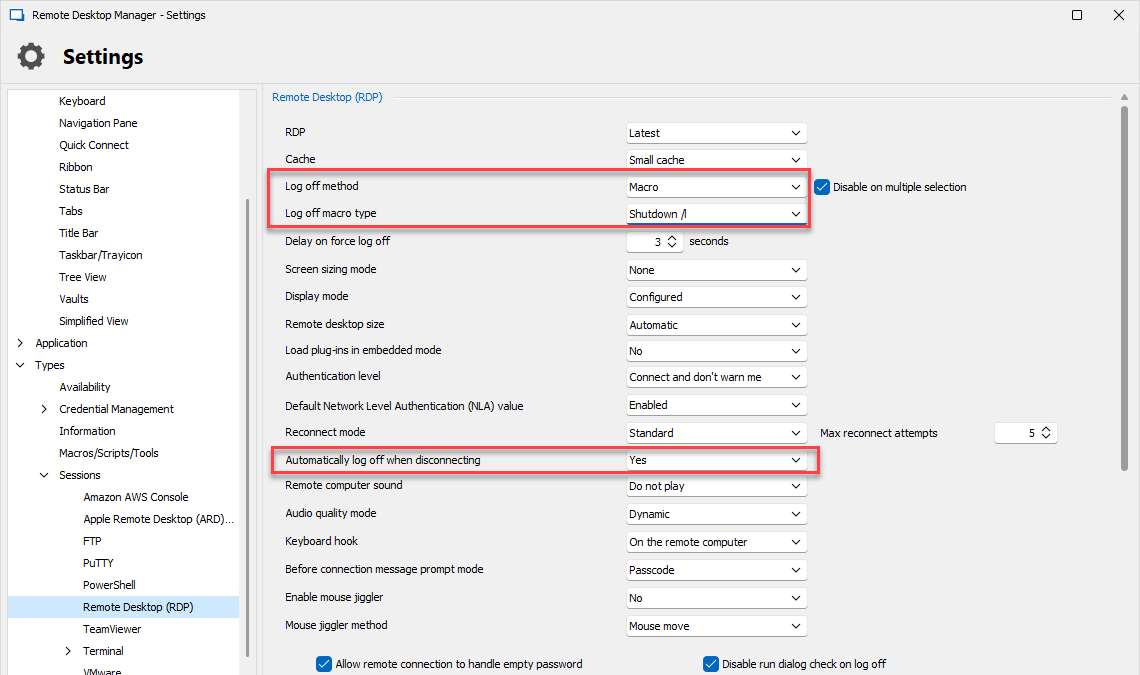
The option for it is "automatically log off when disconnecting". You should also probably configure the "log off method" and "log off macro type" (if your method is Macro), so it acts how you'd expect. Let us know if this works for you.
For SSH, there is currently a "before close" tab in the entry you can configure with commands to send before closing. Did you try putting an exit command there, or does it not work for your scenario?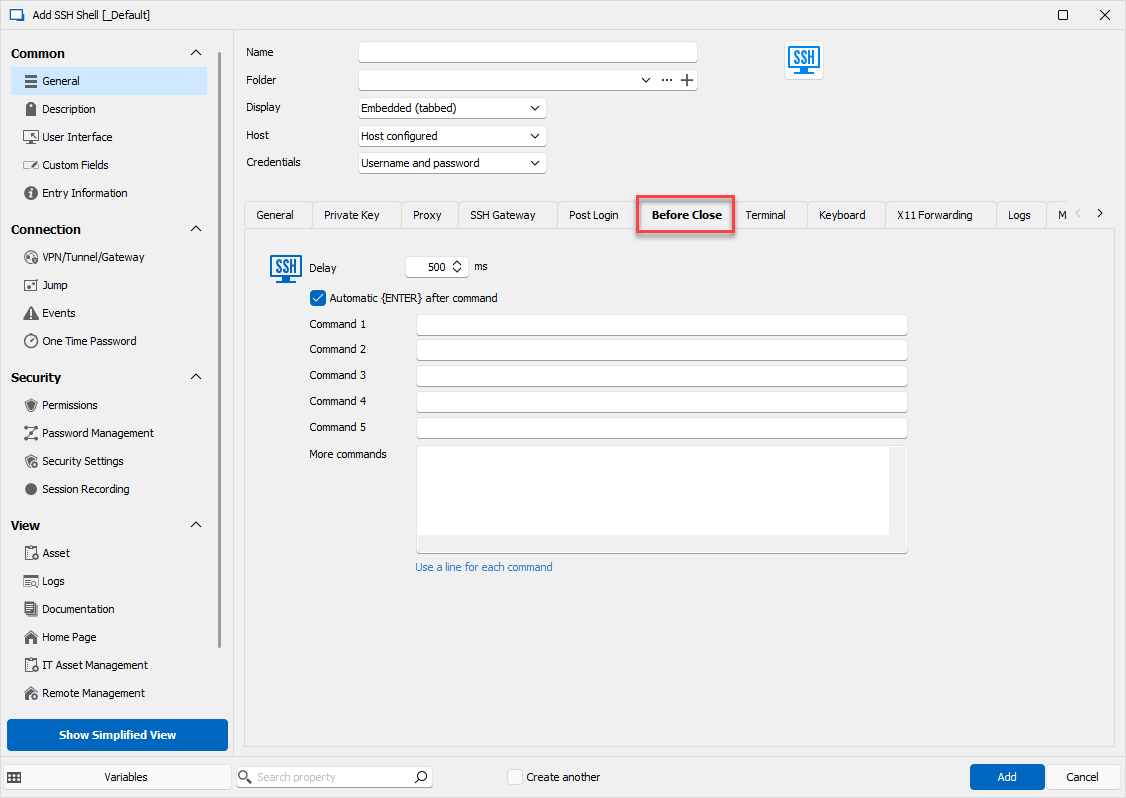
Regards,
Hubert Mireault
5b01b266-0492-44f3-aaf4-aaf9e5603035.png
5f40de1e-304e-43de-81df-474e26e17b06.png
Ha. That's the problem with having a million configurable options. NO way to know what's all there.
For the Logoff method, what do the different options do? I'm set to Automatic which seems like the Macro option since I can watch it do a Start|Run "logoff". I also see there's an Agent and an API item in there.
For the other options, I think that will work perfectly. I'll do some testing.
It might be nice to add a similar "Log off when disconnecting" option for SSH so it doesn't have to be set individually on every SSH Connection.
Thanks.
The "automatic" mode has RDM check whether the RDM Agent is available on the remote machine. If it is, it prioritizes sending the logoff through the RDM Agent, which is more reliable but requires having installed the RDM agent on the remote machine. If the RDM Agent isn't available, it falls back to the macro method which opens the run prompt and types the logoff command. This method may not work if the focus changes.
The "Remote desktop services API" method uses WMI to fetch the list of sessions on the remote machine, then tries to close the session that way. This method requires configuring WMI on the remote machine so that it accepts the commands.
So when it comes to which logoff method is best for RDP, it depends on your environment and what downsides you're willing to deal with, as there's unfortunately no perfect method that works for every server and configuration.
For configuring your SSH entries, you could consider using our Batch Edit feature to achieve this. If you select multiple SSH Shell entries > right click > edit > batch edit > edit entries (session type settings), and then edit only the Before Close tab, it should only change this part of all of the selection. If you weren't already using the Before Close tab, this should be a good way to achieve this. You could also create a template of type SSH Shell with the command already filled in the Before Close tab, so that whenever you create a new entry, you use this template and won't have to fill it manually.
I'll open an internal ticket to add a similar option for SSH, but for now I recommend using the workaround I've described.
Let me know if you have any other questions,
Hubert Mireault
So I just ran into something that might be considered a bug...
I've always had a problem using the right-click Logoff option if I have a Settings window open within Windows. Apps & Features, Windows Update, etc. For whatever reason, it will open the Run box BEHIND the Settings window. Then when RDM tries to type "logoff", it's typing it in the settings window instead which makes the machine not logoff.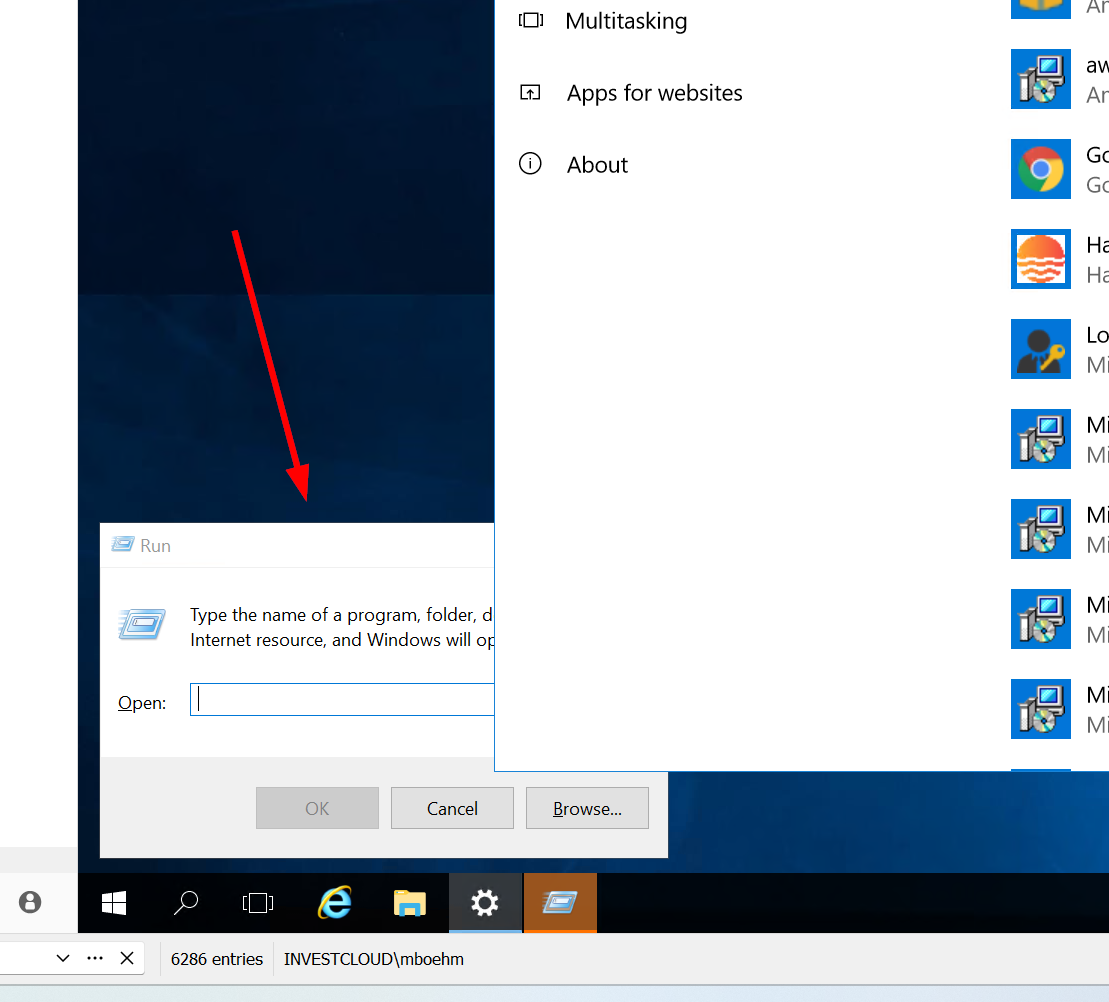
If I do the right-click Logoff option and this happens, it's no big deal. It just doesn't log off so I close the Settings window and try again. However, I just clicked the 'X' to close the tab, the settings window was open so the Run box came up behind, RDM couldn't type Logoff, but then after a few seconds, the RDM Tab close itself anyway. I was still logged on, because the command didn't run, but now I was disconnected. I had to re-RDP into the machine to logoff properly.
I'm guessing that if I click the X, and have it set to logoff, there's some sort of timer, after which it closes the tab if it's still open. If the Logoff never completed, this isn't a good thing to have happen. Since logging off will automatically close the tab when you get kicked off the machine, there shouldn't be any sort of timer that closes the tab.
Hopefully that all makes sense and maybe someone can look into it. If the Run box behind the Settings window thing can be fixed, then the timer thing wouldn't matter. But if it can't be, then the timer thing should be removed.
31273863-ffa3-43aa-ad38-eca2ff642511.png
Hello,
For the part where the "run" window appears behind the other window, I'm not sure there is much we can do, as RDM only executes keystrokes in the RDP window, and there's no way for us to confirm whether it successfully put it in the foreground or not. Even if we could know it wasn't successfully put in the foreground, I don't think there's a way for us to force it there. If this method isn't reliable in your situations, I would recommend checking out the other logoff methods.
For the logoff, as you mention, there is a timer and after it runs its course, it closes the tab whether the logoff was successful or not. I think it should be possible for us to add an option to make it so the logoff will only close the tab if the logoff succeeded (so, if it received a disconnection event by the RDP). The only thing is that this timer would still be taken into account if you're closing RDM, to make sure that RDM can successfully close even if the logoff actions from the RDPs cannot. Would this work for you?
Regards,
Hubert Mireault
I would definitely like individual tabs to NOT close because of a timer that runs after I click the X when I have the Close setting set to do a Logoff. I would always want the tab to go away on its own because I really did log off of a server. That would help me see if I had something open that I didn't save that might have prevented the Logoff from completing.
As for closing the program itself, I hadn't thought of that. If I have tabs open, and I have closing the tab set to do a Logoff, and I close the entire RDM program, will it treat that as closing each tab and send logoff commands to each tab that's open? If so, that's actually pretty cool. I always close each tab before closing the full program, but maybe I'll try that sometime.
As for the timer, maybe instead of waiting 5 seconds (or whatever it waits for) and then doing a close, it could wait 5 seconds, and then put up a prompt that said "Tab/Program is still open, should RDM close it anyway" or "Logoff appears to not have completed. Disconnect now?
I'm thinking like how when I shut down my laptop, if I have a program open that needs to be saved, so the shutdown doesn't fully complete, I get a list of programs that are still open, and then I get a button to Shut Down Anyway. Maybe something along those lines?
Thanks.
> As for closing the program itself, I hadn't thought of that. If I have tabs open, and I have closing the tab set to do a Logoff, and I close the entire RDM program, will it treat that as closing each tab and send logoff commands to each tab that's open? If so, that's actually pretty cool.
You're correct, when you tell RDM to close, it closes every tab individually, and this includes performing the logoff action if you're configured this way.
> As for the timer, maybe instead of waiting 5 seconds (or whatever it waits for) and then doing a close, it could wait 5 seconds, and then put up a prompt that said "Tab/Program is still open, should RDM close it anyway" or "Logoff appears to not have completed. Disconnect now?
If this behavior would work for you, then I think it would be possible to add with an option. I'll open an additional ticket for this and we will see what we can do.
Regards,
Hubert Mireault
If this behavior would work for you, then I think it would be possible to add with an option. I'll open an additional ticket for this and we will see what we can do.
I'm open to anything that doesn't automatically close the tab unless the logoff actually complete successfully.
Thanks.