Azure SQL connection port requirements

Hello Team,
I am using Azure SQL DB for our RDM source with login mode as AD Interactive (With MFA support).
The Azure DB can be connected using port 1433 via SQL management, which is allowed in the firewall.
When connecting via RDM it keeps failing and trying to connect with the list of ports 1433, 3856 or 2396 or other random port.
When all ports are allowed, the connection works fine.
Can you please advise why RDM requires additional random ports to connect to Azure SQL?
All Comments (3)
Here are a few resources from Microsoft on Azure SQL port usage
Start here:
https://learn.microsoft.com/en-us/azure/azure-sql/database/adonet-v12-develop-direct-route-ports?view=azuresql#outside-vs-inside
Other resources
https://learn.microsoft.com/en-us/azure/azure-sql/database/firewall-configure?view=azuresql#troubleshoot-the-database-firewall
https://learn.microsoft.com/en-us/azure/azure-sql/database/connectivity-architecture?view=azuresql
Stéfane Lavergne
Hi Stefane,
Thanks.
Its bit weird, as per MS documentation, the ports it should use are between 11000 to 11999. But for our connection, it uses ports like 3856 or 2396.
With the architecture documentation, I understood the role of proxy and changed the Azure DB network connection from default to proxy, which made the RDM connection use only port 1433 and fixed the issue. 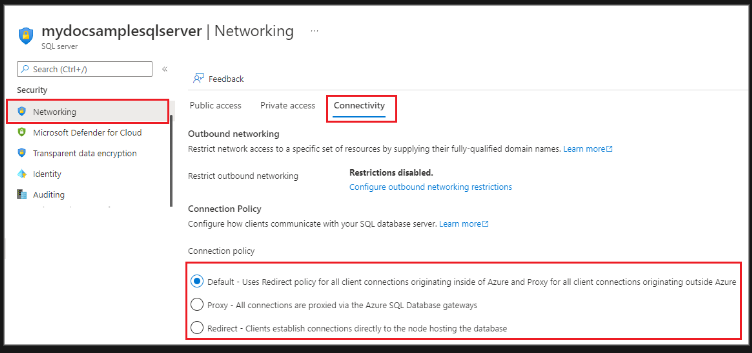
6397f155-c411-44c9-8f33-e93400ae0ff9.png
Wow, well done. I was kind of lost on how to help you. This is the first that I see with this type of issue. I'm glad you were able to resolve it and thank you for posting the solution. It will certainly help others in the future.
Best regards,
Stéfane Lavergne