AnyConnect Icon reset by itself

Hi Support,
I have identified a bug in the AnyConnect entry.
To replicate the issue:
- Create an AnyConnect entry.
- Change the default icon to another (e.g., default-orange) and click OK.
Initially, in the navigation, the icon changes to orange.
Upon revisiting the property later, it consistently reverts back to its default icon.
Could you please address and resolve this bug?
Thank you.
All Comments (12)
Hi Support,
I've conducted some tests, and it appears that this issue occurs with all entries under VPN/Tunnel/Gateway.
Hello,
Thank you for reaching out to us regarding this,
- Could you please specify the version of RDM you are currently using?
- What type of data source are you using?
With this information, we will be able to attempt to reproduce the behavior,
Let me know
Best regards,
Samuel Dery
Hi Samuel,
I'm using version 2023.3.34, and using local data source.
Thank you.
Hello,
Thank you for your reply,
Would it be possible for you to create a portable installation of the latest version of RDM and see if this issue still occurs? To do so, you will need to do the following:
1- Download the .zip file below:
https://remotedesktopmanager.com/home/thankyou/rdmbin
2- Create a new folder on your Desktop
3- Extract the content of the .zip file into the folder created at #2
4- Go to this folder once the .zip file has been extracted and run remotedesktopmanager.exe
5- Connect to your data source
Let me know,
Best regards,
Samuel Dery
Hi Samuel,
I have upgraded to the latest version, but the issue persists.
I have uploaded a small video link to demonstrate it to you.
https://jumpshare.com/s/1h2OKnYwuDB68Sj9GKpG
At 00:33, the icon changed back to default even though I had set it to blue.
Thank you.
Hello,
It appears that the video you provided has been removed. However, we remain very interested in viewing it. I will send you a private message shortly with a link where you can securely upload the video to us.
Best regards,
Carl Marien
Hi Carl,
This is the zipped video.
Thank you.
QdmkGEZVeF.zip
Hello,
Thank you for sending the video. We were able to reproduce the issue and have created a ticket for our developers. We will keep you informed about the progress of this case.
Best regards,
Carl Marien
Hi Carl,
Any update of this bug?
Thank you.
Hello,
I have requested an update from the developer and will keep you informed about their response.
Best regards,
Carl Marien
Hi Carl,
I've tried to upgrade RDM to version 2024.1.29, and when I changed the icon of AnyConnect and reopen it, the connection tab is blank, and when I click the "Update", there is an error message dialog (attached screenshot).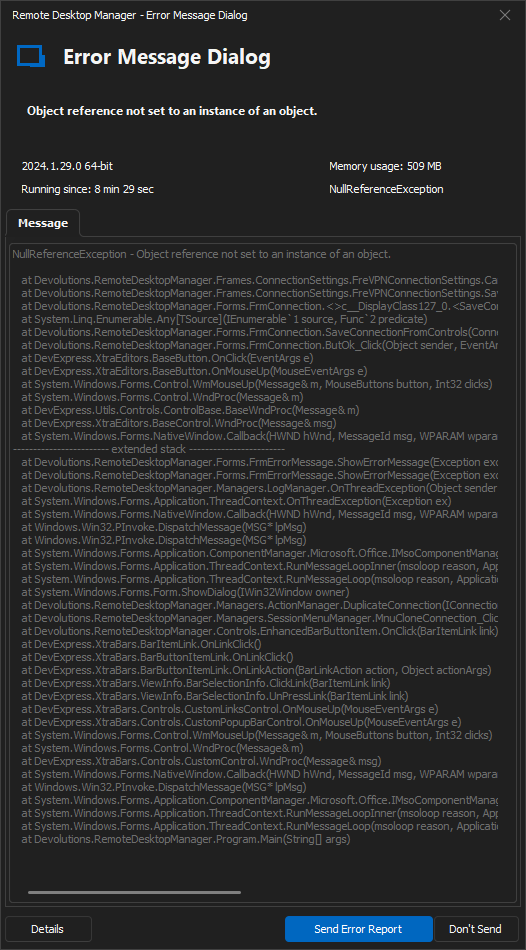
NullReferenceException - Object reference not set to an instance of an object.

   at Devolutions.RemoteDesktopManager.Frames.ConnectionSettings.FreVPNConnectionSettings.CanSaveConnectionFromControls()
   at Devolutions.RemoteDesktopManager.Frames.ConnectionSettings.FreVPNConnectionSettings.SaveConnectionFromControls(Connection connection, ConnectionType connectionType, String connectionSubType)
   at Devolutions.RemoteDesktopManager.Forms.FrmConnection.<>c__DisplayClass127_0.<SaveConnectionFromControls>b__0(FreBaseConnectionSettings frame)
   at System.Linq.Enumerable.Any[TSource](IEnumerable`1 source, Func`2 predicate)
   at Devolutions.RemoteDesktopManager.Forms.FrmConnection.SaveConnectionFromControls(Connection connection)
   at Devolutions.RemoteDesktopManager.Forms.FrmConnection.ButOk_Click(Object sender, EventArgs e)
   at DevExpress.XtraEditors.BaseButton.OnClick(EventArgs e)
   at DevExpress.XtraEditors.BaseButton.OnMouseUp(MouseEventArgs e)
   at System.Windows.Forms.Control.WmMouseUp(Message& m, MouseButtons button, Int32 clicks)
   at System.Windows.Forms.Control.WndProc(Message& m)
   at DevExpress.Utils.Controls.ControlBase.BaseWndProc(Message& m)
   at DevExpress.XtraEditors.BaseControl.WndProc(Message& msg)
   at System.Windows.Forms.NativeWindow.Callback(HWND hWnd, MessageId msg, WPARAM wparam, LPARAM lparam)
------------------------ extended stack ------------------------
   at Devolutions.RemoteDesktopManager.Forms.FrmErrorMessage.ShowErrorMessage(Exception exception, String message, String title)
   at Devolutions.RemoteDesktopManager.Forms.FrmErrorMessage.ShowErrorMessage(Exception exception, String title)
   at Devolutions.RemoteDesktopManager.Managers.LogManager.OnThreadException(Object sender, ThreadExceptionEventArgs t)
   at System.Windows.Forms.Application.ThreadContext.OnThreadException(Exception ex)
   at System.Windows.Forms.NativeWindow.Callback(HWND hWnd, MessageId msg, WPARAM wparam, LPARAM lparam)
   at Windows.Win32.PInvoke.DispatchMessage(MSG* lpMsg)
   at Windows.Win32.PInvoke.DispatchMessage(MSG* lpMsg)
   at System.Windows.Forms.Application.ComponentManager.Microsoft.Office.IMsoComponentManager.FPushMessageLoop(UIntPtr dwComponentID, msoloop uReason, Void* pvLoopData)
   at System.Windows.Forms.Application.ThreadContext.RunMessageLoopInner(msoloop reason, ApplicationContext context)
   at System.Windows.Forms.Application.ThreadContext.RunMessageLoop(msoloop reason, ApplicationContext context)
   at System.Windows.Forms.Form.ShowDialog(IWin32Window owner)
   at DevExpress.XtraEditors.XtraForm.ShowDialog(IWin32Window owner)
   at Devolutions.RemoteDesktopManager.Managers.ActionManager.EditConnection(IConnectionSource source)
   at Devolutions.RemoteDesktopManager.Managers.SessionMenuManager.MnuEditConnection_Click(Object sender, EventArgs e)
   at Devolutions.RemoteDesktopManager.Controls.EnhancedBarButtonItem.OnClick(BarItemLink link)
   at DevExpress.XtraBars.BarItemLink.OnLinkClick()
   at DevExpress.XtraBars.BarButtonItemLink.OnLinkClick()
   at DevExpress.XtraBars.BarButtonItemLink.OnLinkAction(BarLinkAction action, Object actionArgs)
   at DevExpress.XtraBars.ViewInfo.BarSelectionInfo.ClickLink(BarItemLink link)
   at DevExpress.XtraBars.ViewInfo.BarSelectionInfo.UnPressLink(BarItemLink link)
   at DevExpress.XtraBars.Controls.CustomLinksControl.OnMouseUp(MouseEventArgs e)
   at DevExpress.XtraBars.Controls.CustomPopupBarControl.OnMouseUp(MouseEventArgs e)
   at System.Windows.Forms.Control.WmMouseUp(Message& m, MouseButtons button, Int32 clicks)
   at System.Windows.Forms.Control.WndProc(Message& m)
   at DevExpress.XtraBars.Controls.CustomControl.WndProc(Message& msg)
   at System.Windows.Forms.NativeWindow.Callback(HWND hWnd, MessageId msg, WPARAM wparam, LPARAM lparam)
   at Windows.Win32.PInvoke.DispatchMessage(MSG* lpMsg)
   at System.Windows.Forms.Application.ComponentManager.Microsoft.Office.IMsoComponentManager.FPushMessageLoop(UIntPtr dwComponentID, msoloop uReason, Void* pvLoopData)
   at System.Windows.Forms.Application.ThreadContext.RunMessageLoopInner(msoloop reason, ApplicationContext context)
   at System.Windows.Forms.Application.ThreadContext.RunMessageLoop(msoloop reason, ApplicationContext context)
   at Devolutions.RemoteDesktopManager.Program.Main(String[] args)
I also attached the video demo.
Can you fix this?
Thank you.
vgf0DkR9D3.zip
kdX6HGP2iA.png
Hello,
I have provided the information to the developer. I will keep you informed about any advancements.
Best regards,
Carl Marien