Logoff toolbar command hits the wrong tab (and disappears)

Hi there,
I've noticed many times during last versions (can't say exactly starting from which) but there's a sort of bug regarding "logoff" button on the toolbar.
When I have more RDP sessions opened (so I have different tabs), I select/focus one of those, I hit "Logoff" and the command is launched in other tab/session (!!!!). Moreover, the button disappears from the toolbar so is not available anymore for the others.
Using "logoff" from tab context menu seems to work as expected instead.
Are you able to reproduce it? I don't know how to provide more details to track down the issue.
Thanks.
RDM 2023.3.37.0 64-bit (Windows)
All Comments (9)
Hello Nicola,
Thank you for reaching out to us regarding this,
Would it be possible for you to create a portable installation of the latest version of RDM and see if this issue still occurs? To do so, you will need to do the following:
1- Download the .zip file below:
https://remotedesktopmanager.com/home/thankyou/rdmbin
2- Create a new folder on your Desktop
3- Extract the content of the .zip file into the folder created at #2
4- Go to this folder once the .zip file has been extracted and run remotedesktopmanager.exe
5- Connect to your data source
Let me know,
Best regards,
Samuel Dery
I will try, but I want to add that the problem can be related to the entire toolbar command's focus to the wrong tab.
Yesterday I experienced the same issue with "reconnect" button. It was launched to the wrong tab and the command disappeared from that moment for other tabs.
Meanwhile, this is my first RDP session and logoff is missing from the toolbar: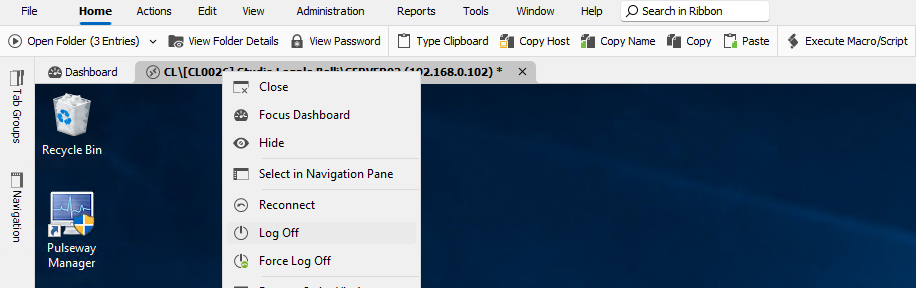
3e1eea57-3266-4a45-b880-47acb8865039.png
Spotted!
The toolbar depends on tree view selection (If I select a folder, logoff is not available)! Is it normal? Is there an option to make it tab focus related? I find it very uncomfortable.
Maybe this? 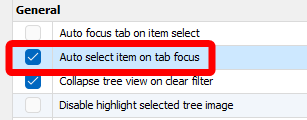
If yes, this will force the tree view to scroll every time a tab is selected (not always the best).
Thanks
dd17f6a8-9f87-4e15-b676-57c14c0d3b85.png
Hello Nicola,
Thank you for your reply,
I see, that is correct, from my understanding the Toolbar will display the options for the selected entry in the Navigation Pane.
Enabling both "Auto Focus tab on Item select" and "Auto Select Item on tab focus" may indeed help with this type of issue,
Let me know,
Best regards,
Samuel Dery
Thanks Samuel,
I would find more intuitive having toolbar related to focused tab instead of tree view selection. Tree view is more like a "selection way" but toolbar is an effective interaction point.
My two cents.
Regards.
Hello Nicola,
Thank you for your reply,
I've discussed this with our development team, and unfortunately, this would not be a simple change. That being said, we will keep this in mind as a possible improvement.
Let me know if you have further questions,
Best regards,
Samuel Dery
I can understand but thanks for considering this in the future.
Devolutions attention to users' requests is a great plus for his customers.
Cheers.
Hello Nicola,
Thank you for your reply,
I appreciate your understanding and feedback! Let me know if you have any further questions regarding this.
Best regards,
Samuel Dery