Invalid Mac after upgrade to 2023.3.39.0 64-bit

I upgraded three Windows machines to 2023.3.39.0 64-bit and they are all seeing these errors launching the program: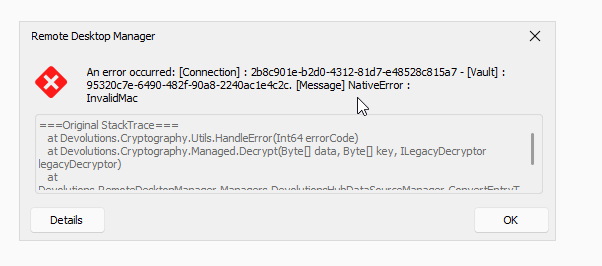
===Original StackTrace===
at Devolutions.Cryptography.Utils.HandleError(Int64 errorCode)
at Devolutions.Cryptography.Managed.Decrypt(Byte[] data, Byte[] key, ILegacyDecryptor legacyDecryptor)
at Devolutions.RemoteDesktopManager.Managers.DevolutionsHubDataSourceManager.ConvertEntryToCommonConnection(Guid dataSourceID, Guid repositoryID, Entry entry)
The popup occurs twice then allows me to proceed to the application normally and use it but is annoying. Anyone else have this?
9b28c222-8326-4dbc-8166-082fd74a879c.png
All Comments (2)
I found the issue. In the application log it noted two entries in my vault that it was "Unable to convert entry to connection" for. Those entries were "Authenticator App" and "Devolutions". Neither of those entries were in my application but they were visible in the vault online and showed 'corrupt' for whatever reason. I deleted them using the online vault and relaunched the application and now I do not have any errors. I don't know what the impact of removing those entries would be. I did not create them. I presumed they were generated as a result of my two factor auth but that seems to still be working okay.
I am fairly new to this product so likely something I am just not knowledgeable on yet.
FYI in case anyone else sees this and maybe for support as to whether or not I should have had this issue in the first place.
Hello, this is indeed a bug. We have created a ticket to address this issue. These entries serve as a backup for your entries in the Authenticator section of Workspace when the cloud backup option is enabled. Therefore, the only impact is that you will not have a backup for the time being. This issue will be fixed in the next release.
Best regards,
Dany Galarneau