Remote Desktop can't find the computer/Does not belong to the specified network.
Remote Desktop can't find the computer/Does not belong to the specified network.

Seems I have a similar issue to Remote Desktop can't find the compture (devolutions.net)
- I am trying to access my desktop computer remotely (i.e. outside the home network that that machine is on).
- I have verified the computer name is in fact correct, there's an open firewall rule for RDP, and RDP is enabled on that machine.
- I am able to connect to that same computer when WITHIN that local area network through RDM.
- I have setup a duplicate entry in RDM to the working local one, just changed the IP address to the public IP of the machine.
- I have enabled port forwarding on port 3389 in my router, and am forwarding to the correct computer name.
When I try to start the session, RDM clocks for maybe 2 seconds before presenting me with this error message: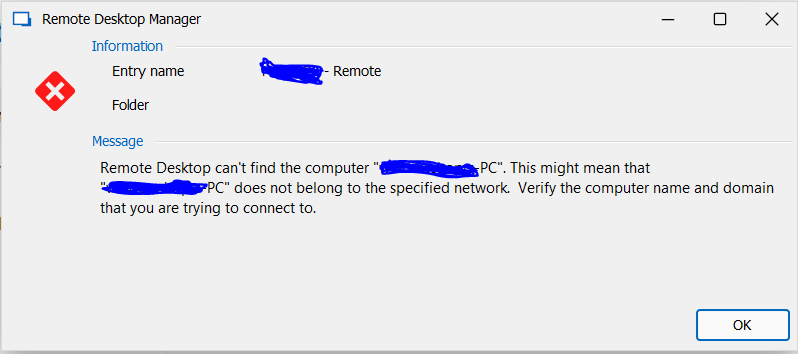
When I connect to that machine from WITHIN the LAN, it's literally the same computer name so "verify computer name" doesn't help much here. I have poked the correct hole in the firewall and setup port forwarding for port 3389 already, so what's the deal here? What could I be missing?
c94d7771-3e7c-45db-8d11-84359a7503f5.png
All Comments (2)
Forgive me, it seems as if I had the IP addresses in the wrong places. THIS is the correct placement of IP addresses when configuring a remote connection (maybe the Host/Domain definitions here are a bit ambiguous?):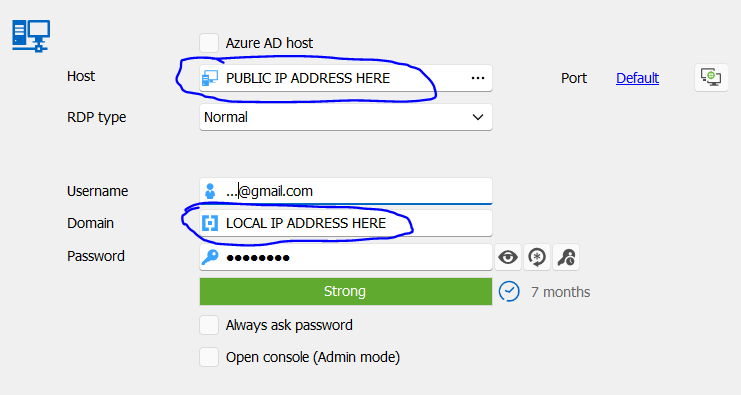
Thanks for letting me figure that one out here, hopefully it helps someone else.
d50d4de4-89ea-4267-bc51-b30e37edea24.png
Hello Mattmoneywilson,
Thank you for contacting us on that matter. I'm glad you were able to find the answer to your question!
Let us know if you have any further questions.
Best regards,
Maxim Robert