Log off all servers that i have opened (RDP)

Hi
Just started with Remote Desktop Manager - neet and a lot of possibilities
However, i am wondering one thing.
I f I open 10 RDP-session from different folders i the Vault and with different names. Is there a way where i can select "log off All" .
I can search for exampel "DC" and then mark listed - and choose logoff. i can even see the servers with connection being marked with bold fonts.
All Comments (1)
Hello,
You can go to the Opened sessions tab, select the sessions, or all of them, right-click and close the sessions: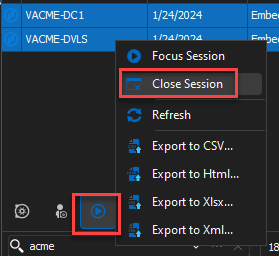
As for logging off the sessions, you can set the "Log off mode", under the advanced tab of the entries, to Automatic: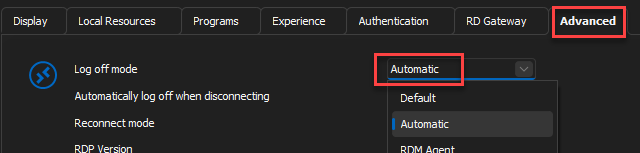
Best regards,
Richard Boisvert
dfd8c0b5-7a6f-4b37-bfcd-b9e5afd032cc.png
3d48d960-f553-4654-b7be-647b407db135.png