"Apply Windows key combinations" set to "Remote Computer" not working
"Apply Windows key combinations" set to "Remote Computer" not working

Maybe I'm missing something, but on the host I've set under "Local Resources" the option "Apply Windows key combinations" to "Remote Computer", but yet when I press ALT + ENTER, it switches windows on my local machine, not on the RDP connected machine.
All Comments (4)
Hello,
Thank you for reaching out to us regarding this,
I see, could you confirm which version of RDM you're currently using?
I'm also wondering if in the bottom right corner of your instance of RDM the "Grab the keyboard input" option is currently enabled?
Let me know,
Best regards,
Samuel Dery
Hello Samuel,
I'm currently running 2023.3.37.0
The option is enabled (if enabled means the icon is colored):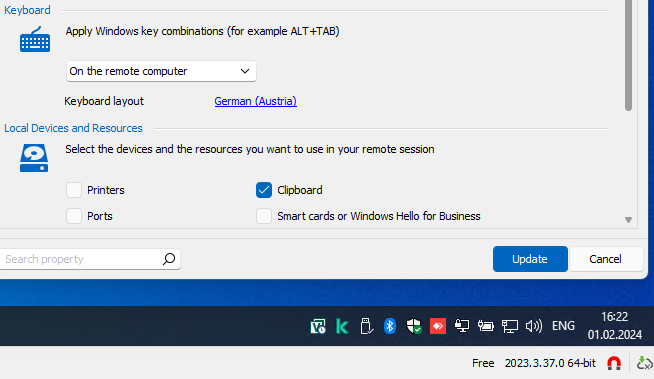
Further, as you can see, I have set my keyboard layout to German (Austria). On my local computer "English (United States) - QWERTZ" and "German (Austria) - QWERTZ" are enabled, but yet every time I start a session in RDM the keyboard layout is set to "English (United States) - QWERTY", which makes absolutely no sense, even more considering the remote computer is only installed with a German language. Only my local computer is installed with English (United States). Neither the settings in RDM are "respected", nor the keyboard layout at all.
Even weirder, both issues are not on every remote host. I have another Windows 10 host, where the keyboard is also English (US) - QWERTY, but the shortcuts like WIN + X do work, and on another host (Windows Server 2019), both - shortcuts and the correct keyboard layout - are working.
I've switched from rdman to RDM and although I like the more features and better UI, it's just frustrating so far.
Cheers.
d38427b6-27bd-4615-960b-492583acb9fb.png
Hello,
Thank you for your reply,
I see, from your description, it sounds like the issue may be related to the remote host itself, are there any obvious differences between the configuration of the one where it is working and the one where it is not?
Additionally, could you confirm that this is working as expected when attempting the connection outside RDM using MSTSC?
Let me know,
Best regards,
Samuel Dery
Hi devolutionsme
Further to what my colleague wrote above; it could be worth exporting a problematic and working entry to .rdm files (being sure to exclude credentials) and send them to us so we can cross-check the session configuration. You could send by a PM or to support@devolutions.net (mentioning this forum thread).
Please let me know if something isn't clear
Thanks and kind regards,
Richard Markievicz