Latest verision of RDM freezing when accessed over an RDP session
Latest verision of RDM freezing when accessed over an RDP session

To recreate:
OS: Windows 11
Launch RDM, use it.
Lock workstation, do something else
Return back, RDM is frozen.
Latest version used.
Uninstalled restarted, and reinstalled, worked for a short while, problem came back.
All Comments (21)

639464e0-fc64-4d33-947f-2769b4c69561.png
After killing the Not Responding app, this is still lingering will associated handles and cannot be killed >>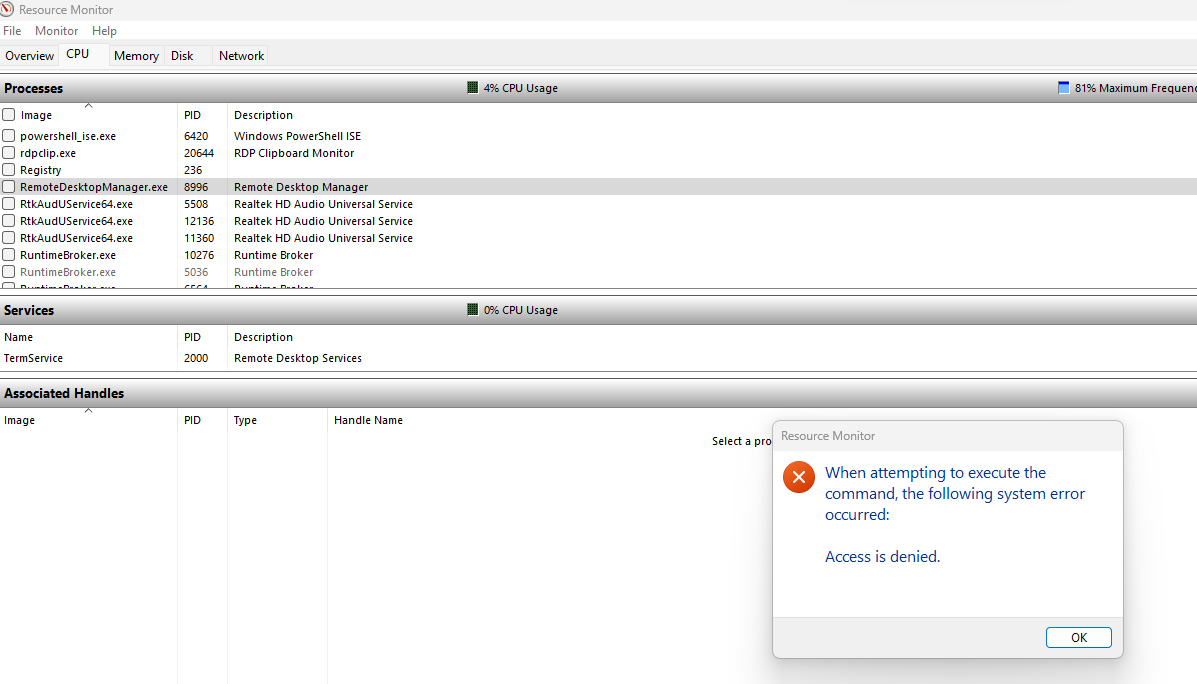
9e5d38d3-2f3c-4d71-97e1-dba560cc3870.png
Then when trying to launch it again, it terminates on launch, old zombie process still there >>
After a long time (10 mins) the Zombie dies by itself, RDM can be launched again and works.
cb97a5fa-7ab1-47dc-b466-e843b3399fef.png
@Devolutions Support I sent the logs earlier to you from RDM tool, it seems to be an intermittent issue happened over the last 3-5 days or so.
Since the above it has behaved ok, but it can and will happen again.
Hello,
Thank you for sending the logs. I will forward them to our developer immediately.
Meanwhile, could you please try creating a portable installation of RDM to see if the issue persists? Here are the steps to create a portable installation:
1. Download the .zip file from the following link: https://remotedesktopmanager.com/home/thankyou/rdmbin
2. Create a new folder on your Desktop.
3. Extract the contents of the .zip file into the new folder.
4. After extracting, navigate to this folder and run "remotedesktopmanager.exe."
5. Connect to your data source.
This test will help us determine if the issue is specific to your local installation of RDM.
Best regards,
Carl Marien
Hi Carl, thanks - it's been stable today - but as soon as it misbehaves I will test the above. It's been running fine since Sept 2023 on this PC so I guess it's something Windows Update related. We will see.
Hi @Carl,
I might have spoken too soon – I experienced another freeze yesterday. I followed the steps you provided with a few modifications:
- Extracted the zip download of the latest version to C:\RDM.
- Opted for "Hub Personal" to manage my RDM phonebook entries.
Regarding the freezing issue, it primarily occurs during open RDP sessions. The system becomes unresponsive, and after a prolonged period (often tens of minutes), it resumes normal operation.
Additionally, the freezing seems to happen, for instance, when closing an RDP session, which takes a considerable time before it finally shuts. Interestingly, if I close another RDP session tab immediately after the system starts responding, it freezes again.
I plan to check if this issue persists with the portable version from the zip file.
Also, I've captured a process dump of the frozen process from the locally installed MSI version. It's a 400MB file. If you have a preferred upload location, I'd be glad to share it with your team for further analysis.
Hi Devolutions Support, even the "portable" version has frozen.
This freezing issue is happening on my colleagues PCs as well.
I've taken a process dump, its a ~220MB file, would you like me to upload it somewhere?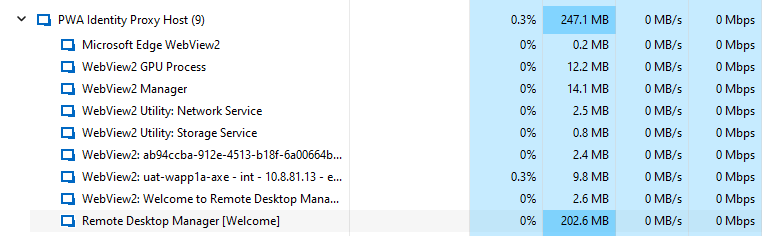
e3d19ebe-3208-48c3-826b-ab6cf3797ab9.png
It's frozen and I can't kill this zombie process off >>
There are no pending windows updates or anything else that could be causing this, as |I mentioned it's been working perfectly fine since last September on this new PC. I've been using the tool for years elsewhere and never had this issue. 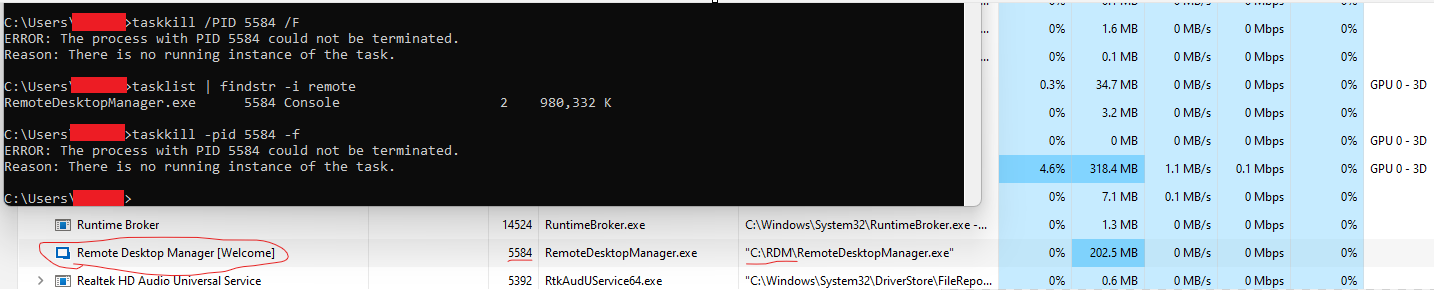
9d28aa40-b93a-4ee7-8789-2fa05bcd9cff.png
Hello,
Thank you for testing the portable version method. Since the issue persists, it appears that the problem is not related to your installation of RDM.
I have added to the ticket you created with us a link and a step-by-step guide on how to send us a dump file. This information will be crucial for further investigation.
Best regards,
Carl Marien
Hi Devolutions Support, have there been any fixes released for this? I have just seen version 2023.3.39.0 update available. I will try it now.
Hello,
Unfortunately, we are unable to recreate your issue on our end. However, it's worth noting that the upcoming release of RDM 2024 is set to transition to .NET 8. This update to .NET could potentially resolve your issue.
Best regards,
Carl Marien
Hi Team, thanks for looking into this, appreciated. The problem still happens and I need to alternate between the installed version of RDM and the portable version to get around this. When one freezes I end task it and start the other one. It's a very strange issues, was working flawlessly for years on Windows 10. This is the first time I've seen these freezing issues, albeit on Windows 11.
I am experiencing a similar issue with the latest RDM. I can login to multiple servers with RDP with no issue however when I try and log off, either from the OS or right click LogOff it logs me off but does not close the RDM window properly. That just goes black and then RDM is hung with no response until I either kill it through task manager or it crashes on its own eventually.
Windows 11 and have tried a complete uninstall / reinstall with no success.
I am experiencing a similar issue with the latest RDM. I can login to multiple servers with RDP with no issue however when I try and log off, either from the OS or right click LogOff it logs me off but does not close the RDM window properly. That just goes black and then RDM is hung with no response until I either kill it through task manager or it crashes on its own eventually.
Windows 11 and have tried a complete uninstall / reinstall with no success.
Confirmed, this is exactly what happens on my Windows 11 PC.
I have to kill it, switch to Portable Version, then when that freezes in the same way kill it, switch to installed version.
It is also less responsive when closing server windows etc.
In our case it's just RDP sessions to Windows servers we deal with.
It's a pain and a pity there is no fix for this as this has been a robust piece of software for many years, and a few months on Windows 11 prior to these recent issues from around Dec 2023.
Hello,
As mentioned in my previous message, it's possible that the next version of RDM, which integrates .NET 8, may resolve your issues. This upgrade is expected to be released next week.
Best regards,
Carl Marien
Hi Carl, great., looking forward to it. Thanks for the heads up. Can you please let us know here when it's released, ready to try?
Hello,
Thank you for your patience,
I wanted to inform you that RDM 2024.1.12.0 was released, you can download it from here: https://devolutions.net/remote-desktop-manager/home/thankyou/rdmsetup/
If you're using an Advanced data source such as SQL Server, it would also require a database upgrade, we have the following knowledge base article regarding this:
https://docs.devolutions.net/rdm/mac/installation/database-upgrade/
Let us know if the issue persists,
Best regards,
Samuel Dery
I've updated .net and to the new RDMbut Ive just had the same issue again - I've logged off an RDP session and have a black screen
Hi, it's been stable for me so far on RDP sessions, I've just updated it to version 2024.1.14.0 64-bit - no freezing or locking so far.
@ andymdane
It might be worth submitting Help >> Diagnostic to Devolutions support to review, possibly a mini procdump too
Hello Andymdane,
Your issue does seem similar to the one previously encountered. However, could you please try installing the portable version to see if the issue persists?
Best regards,
Carl Marien
