Proxy Tunnel SOCKS5 always fails

HI, i have a working socks5 and i am trying to add it to Remote Desktop Manager
I add host, port, user, pass, proxy type, localhost 127.0.0.1
no matter what i do, i always get
Devolutions Protocols version: 2023.12.8.1 Windows
Listening on 127.0.0.1:18960
SOCKS5 failure response
proxyTunnel_Completed: FAIL
proxyTunnel_Disconnected: FAIL
All Comments (3)
Hello office5,
Could you please share a screenshot of the entry properties in RDM?
Please make sure to hide any sensitive information.
Best regards,
Patrick Ouimet
Hi Patrick,
thank you for attention.
There is the setup. I changed ip and username in the example, but as i mentioned the real ones work fine with other apps.
Since in the other proxy clients i use only host, port, user, pass, proxy type is required, i am not sure if localhost and remote host are correct.
I found that tip on your blog https://blog.devolutions.net/2016/10/how-to-configure-ssh-tunnel-in-remote-desktop-manager/, in which remote host was different from remote host, which might be the key in the way RDM works, or?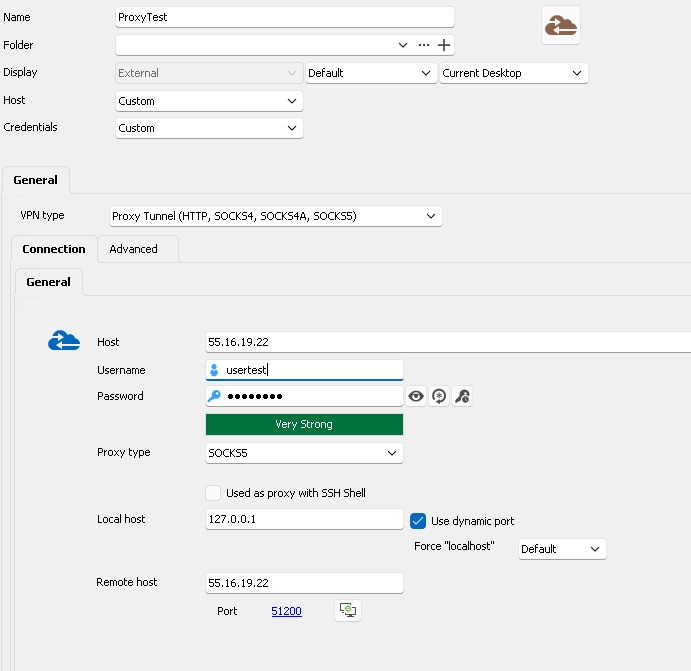
proxy1.jpg
Hello,
I send you an email to schedule a session and have a look at this together.
Best regards,
Patrick Ouimet