Templates "mandatory properties" not working on Custom Field 1
Templates "mandatory properties" not working on Custom Field 1

Hi
I have the following folder template, with the following template settings: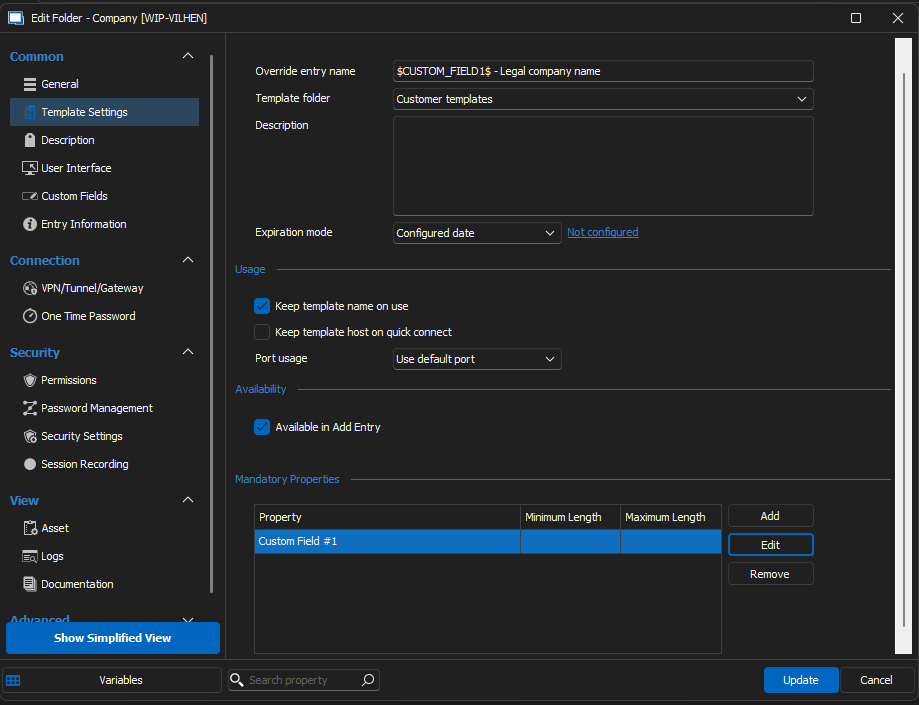
When I create af folde based on this template I can Press OK without changing any settings.
Regards Lars
Remote Desktop Manager connected with Devolutions Server running newest versions.
------------------------Signature------------------------
Sorry if any of above sounds harsh or provoking, it is NOT meant as such, but I have Asperger's and don't always know.
My intentions is always to be friendly.
-------------------------------------------------------------
da912c33-e567-4c7f-aec5-255288236c19.png
All Comments (4)
Hello Lars,
Could you explain the behaviour or the expected result?
Is it that you can or can't press ok without any change?
Best regards,
Patrick Ouimet
Yes, I have had Host (Asset) and Tags to be required, and both, upon clicking Add, tells me that I have to put in a value, and takes me to where the value is.
A related issue is, if I have prepopulated with a short note about what to type (Tested with Host (asset)), when clicking Add, it thinks there has been entered data and allows the add. Where I would have expected that it would still block me from adding because the field has not changed.
RDM 2023.3.36
DVLS as datasource, newest build
Regards Lars
Remote Desktop Manager connected with Devolutions Server running newest versions.
------------------------Signature------------------------
Sorry if any of above sounds harsh or provoking, it is NOT meant as such, but I have Asperger's and don't always know.
My intentions is always to be friendly.
-------------------------------------------------------------
Hello Lars,
Thank you for this feedback.
I can reproduce this on my side.
I will open a case and let you know when I have news.
Best regards,
Patrick Ouimet
Hello Lars,
This will be fixed on version 2024.1.
This version should be available in March.
Best regards,
Patrick Ouimet