SSH-Session > "Hide toolbar" - How do I get back my toolbar?
SSH-Session > "Hide toolbar" - How do I get back my toolbar?
0 vote

Hi,
if i hide the toolbar from an ssh-session using the context menue "hide toolbar", how do I get back my toolbar in this running session?
Best regards,
Daniek
All Comments (8)
Hello,
This is not currently possible. I've moved your thread to the feature request forum, and have opened a ticket to add a way to show the toolbar when it's hidden.
Regards,
Hubert Mireault
Can you also consider add show/hide macro button?
@wangjasonsz: Just to be sure I understand, you would want to add a button in the toolbar to show/hide the macro bar?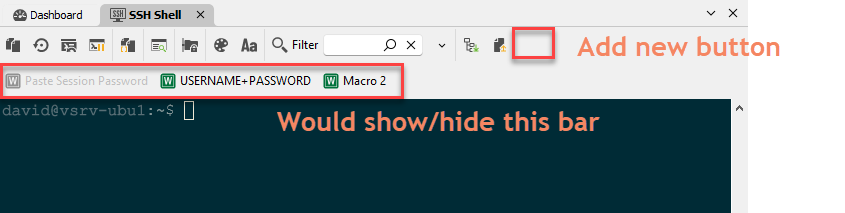
Is this correct?
Regards,
Hubert Mireault
4089cd05-757a-43f6-b207-8bf2108cbd58.png
Hi,
Yes please, thanks for considering this.
Thanks for the confirmation, I've added this request to our ticket.
Regards,
Hubert Mireault
Hello,
We've added buttons to toggle the visibility of available toolbars (although for macro and monitoring, you will still need to enable their visibility in the entry first). You will also be able to toggle the visibility of the main toolbar through the contextual menu available in the entry's header. This should be available for the next 2024 version.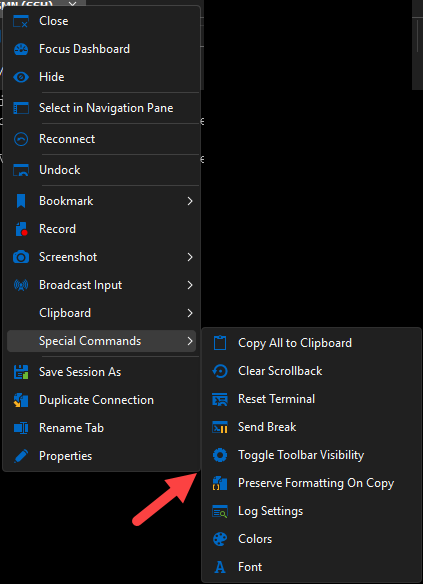
Regards,
Jafran Majeau
182812cd-9d6c-432c-a36c-7851b2eb9d9b.png
How about Macro tool bar?
Hello,
For the Macro and Monitoring toolbars, there will be a button available in the main toolbar to toggle both of their visibility on and off (separately).
Regards,
Jafran Majeau