Azure Bastion TCP Tunnel fallback connection

Hi,
if this is not a bug and I only understood this feature wrong, please feel free to close this report.
The scenario is as follows.
- the RDP entry VPN setting is set to "Always Connect" and type "Azure Bastion (TCP Tunnel)"
- The VPN connection fails (can be any issue, like failed authentication, etc.)
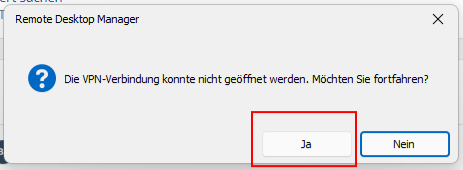
- you click "proceed" on the popup
- the connection will be established without VPN
The problem is, this direct connection attempt uses the high port on which the bastion tcp tunnel would have been established, which obviously does not work.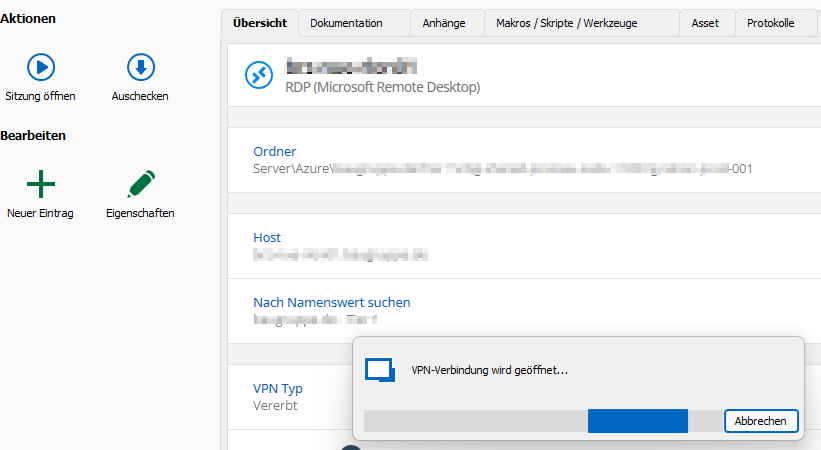

Kind Regards,
Nicolas
dcd29818-8d9c-4337-93ee-2d381e7ba1b5.png
fa804fbf-7e47-46f1-9f68-d40fb58ffb5d.png
57867322-255d-4941-b769-838aa2ce4854.png
All Comments (7)
Here the Debugger information. Maybe it is only necessary to discard the dynamic port.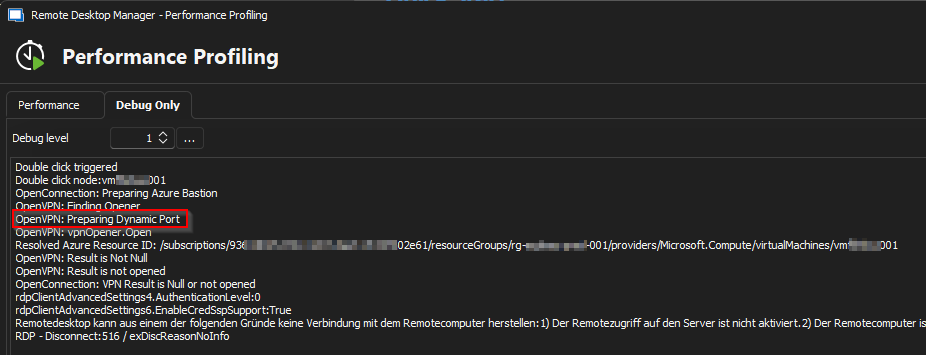
c4f5eb2c-58da-4c5b-b748-21460d8e854a.png
Hello
Thanks for the feedback.
if this is not a bug and I only understood this feature wrong
I'm not sure. Is there a scenario where your hosts are available both locally and over Azure Bastion? I would guess you would be using the "Use entry name as Azure resource ID" option. If that's the case, then this could be a bug.
A workaround in the meantime might be to use the RD Gateway connection mode instead of TCP tunnel.
Please let me know if something isn't clear or you have further questions
Kind regards,
Richard Markievicz
Hello Richard,
you are correct, this is an edge case coming from the fact that we are currently migrating from direct RDP connect to Azure Bastion as gateway, as this is now available and functioning with the "Use entry name as Azure resource ID" option.
There are scenarios, where the connect fails (missing az cli / powershell token, missing read permissions on bastion or vm resource, etc.), where I do not want to get a support request from the engineer.
Using the TCP Tunnel is already a workaround for the RD Gateway as some authentication tokens are to long and do not work :D
I would consider this a bug but with low priority as the use cases are really rare.
Hi Nicolas
Sorry for the delay on this; I had to consult with the RDM Windows team about what's expected here (I'm the maintainer of the Azure Bastion integration but not a part of their team directly).
This is clearly a bug - if the VPN fails, and you choose to connect anyway; there's no way it will work if it still tries to use the local address and ephemeral port of the tunnel. I was wondering if something was wrong specifically with the Azure Bastion VPN type but actually the same issue manifests if I use (for example) an SSH tunnel (although in that case, there's no prompt to try the connection anyway if the tunnel fails - you're SOL at that point).
I've raised this as an issue internally but like you say - on our side it's likely to have a low priority too; such cases are indeed rare.
However I can propose a small quality-of-life improvement here (and it wasn't already available because I hadn't considered this use case): I could easily enable the "Connect (without VPN)" option in the entry dashboard (where currently, as per your screenshot, you only have the option to "Connect"). This would mean, if your connection fails because of this circumstance, you could simply choose "No" at the popup, and then use the "Connect (without VPN)" button to establish the connection.
Would it be helpful?
Please, let me know if something isn't clear or you have further questions
Thanks and kind regards,
Richard Markievicz
Hi Richard,
thank you for proposing an alternative solution, but from our point of view it is not worth it changing the software, for such an edge case. I will try to use "Ask for connection to connect" in the meantime and inform our engineers.
The bug itself has a low priority, but is maybe relatively quick to fix (depends on where and how final connection port is set and handed over to the actual RDP connect), so I am counting on it, to find its way into your sprint :D
Kind Regards,
Nicolas
Hi Nicolas
I've actually gone ahead and added the "Connect without VPN" option; on my side it was just toggling one flag. Even if it's not useful in your case it might help someone else in the future, now that I understand this scenario.
The actual fix for the issue is simple in the Azure Bastion case but I hesitate to add specialization here (the code that opens the VPN and connection is generic, and quite complicated). Since we also have this issue with other "tunnel" connections (e.g. SSH Tunnel) I'm in discussion with the RDM team about the proper fix. We are working on that.
Please, let me know if something isn't clear or you have further questions
Thanks and kind regards,
Richard Markievicz
Hello,
We've made an internal fix for this issue, which will be included in version 2024.2.9.0.
Please let us know if there's anything else we can do for you.
Regards
Jonathan Del Signore