Variables not resolved

Hi
There multiple places where variable resolution is lacking.
Folder property when editing an entry: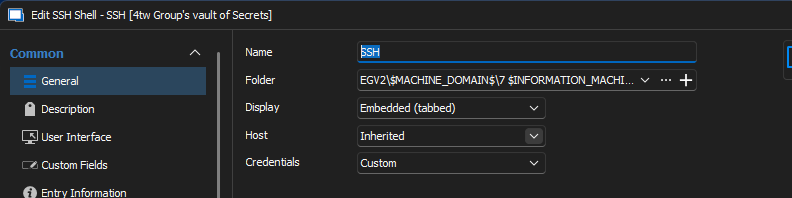
When a SSH entry is set to "Inherited" in the Host property, the Server-Folder parent's Host is set to: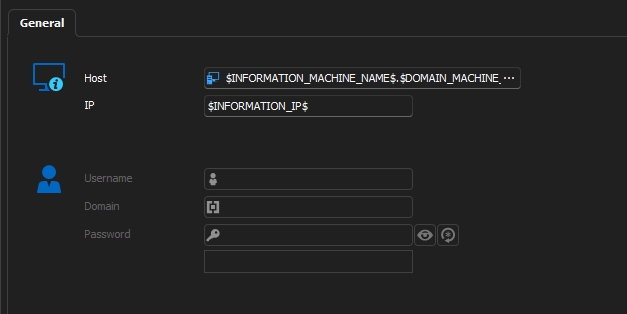
and I connect I see: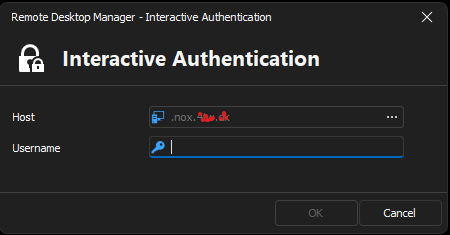
But is should be NUC.nox.xxxxx
Plus when searching for eg NUC and the property name, is a variable, it isn't found in a search: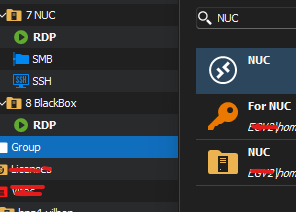
The entry 7 NUC is not found, because it's actual Name is:
But if I search for the variable it is found but isn't resolved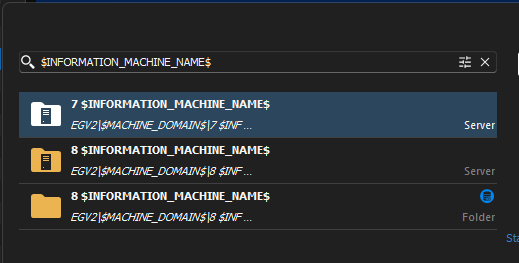
There might be more :), but I will start with this, and hope that you will dedicate some resources into engenerring/fix this problem.
We had an issue at work where a colleague couldn't find what he should because of the search issue, so it is in risk of being a deal breaker if this isn't sorted.
Otherwise we have to enter different information several times, and when you support variables, is shouldn't be nessesary.
Regard Lars
Remote Desktop Manager connected with Devolutions Server running newest versions.
------------------------Signature------------------------
Sorry if any of above sounds harsh or provoking, it is NOT meant as such, but I have Asperger's and don't always know.
My intentions is always to be friendly.
-------------------------------------------------------------
159d3bda-e7be-49c5-8038-f1199e0ee27f.png
2974c20e-e88a-4281-bcea-73909b0ed0d6.png
c9adb002-df0b-4449-ad2a-f07dc5cbe79b.png
056d7eec-d6bf-4cf5-a132-f671db788bda.png
d1e9684d-c0b9-4622-b6b1-3661a3cb96c3.png
369b3354-3721-45c2-af6a-eaad2d55dcc3.png
All Comments (11)
Hello Lars,
Thank you for reaching out to us regarding this,
I would appreciate your assistance with the following inquiries:
- Could you please specify the version of RDM you are currently using?
- What type of data source are you using?
That being said, I've been able to reproduce the behavior you described with the Quick Search and the Folder field in the entry Properties, I will need to discuss this with our development to see what the expected behavior would be in this case.
I will also perform some additional tests regarding the "Inherited Host" issue.
Let me know
Best regards,
Samuel Dery
Hi
Oh, yes, sorry, I will!
Using RDM 2023.3.33 if I remeber correctly, but I will try and upgrade it, as I believe that is a few versions behind.
My data source is DVLS v. 2023.3.13.0
Regard Lars
Remote Desktop Manager connected with Devolutions Server running newest versions.
------------------------Signature------------------------
Sorry if any of above sounds harsh or provoking, it is NOT meant as such, but I have Asperger's and don't always know.
My intentions is always to be friendly.
-------------------------------------------------------------
Just updated RDM to .36 at a quick glanse, it seams to be same issues.
Remote Desktop Manager connected with Devolutions Server running newest versions.
------------------------Signature------------------------
Sorry if any of above sounds harsh or provoking, it is NOT meant as such, but I have Asperger's and don't always know.
My intentions is always to be friendly.
-------------------------------------------------------------
Hello,
Thank you for your reply,
Could you provide me with a screenshot of your "Assets" -> "Network" section of both the "Folder" and the "SSH Shell" entry "Properties"? I will send you a private message so that you can send me the screenshots without having to blur the fields,
Best regards,
Samuel Dery
Hi
I have sent you 2 direct messages :)
/Lars
Remote Desktop Manager connected with Devolutions Server running newest versions.
------------------------Signature------------------------
Sorry if any of above sounds harsh or provoking, it is NOT meant as such, but I have Asperger's and don't always know.
My intentions is always to be friendly.
-------------------------------------------------------------
Found a few more places.
Tab group name: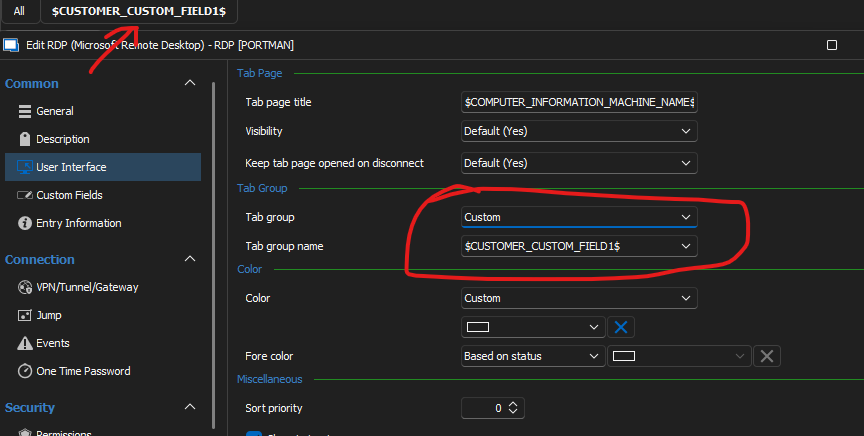
Folder name: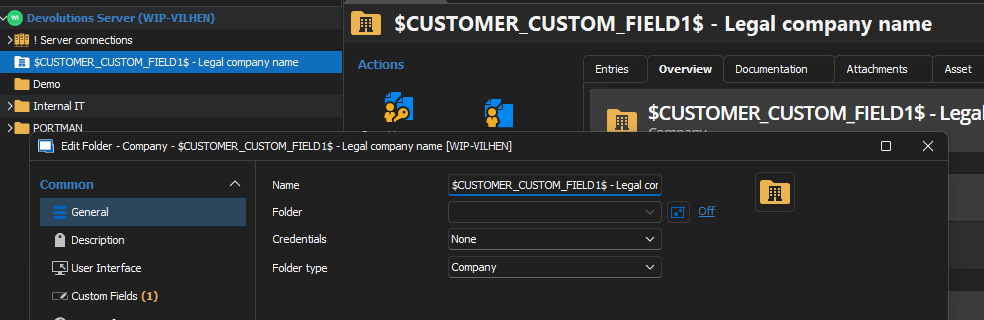
One note about this though, If I use CUSTOM_FIELD1 it works, so this is probably a slightly different issue.
/Lars
Remote Desktop Manager connected with Devolutions Server running newest versions.
------------------------Signature------------------------
Sorry if any of above sounds harsh or provoking, it is NOT meant as such, but I have Asperger's and don't always know.
My intentions is always to be friendly.
-------------------------------------------------------------
c6cf401d-289a-4602-880d-5bb041cc9ad4.png
96f54510-81a2-4bd7-a802-5d8640a58fbf.png
Hello,
Thank you for your replies,
I wanted to inform you that I've received your additional screenshots and will be doing some additional testings regarding your initial issue.
Regarding your concerns about the variables not being resolved when viewing the entry Properties, I can confirm that this would be the expected behavior after discussing this with our development team, If the variables was resolved when accessing the Properties when updating the entry Properties, the variable would be saved as resolved and replaced hopefully this clarifies why we have the current behavior.
Your issue with the Quick Search is however not the expected behavior, and I will open a case with our development regarding this,
Best regards,
Samuel Dery
Hello,
We've identified the issue with the Quick Search and fixed it. You can expect the quick search to properly resolve variables and display them. This change will take effect as early as the next version is released.
For your other screenshots, I think the only issue here is understanding how the "Folder" sub-section of our variables work. Essentially, when using any variables in the Folder sub-section, we look at all parent folders of the current entry, and we use the first folder of the same type as the prefix used in the variable name to resolve information.
A quick example would be to see the following image: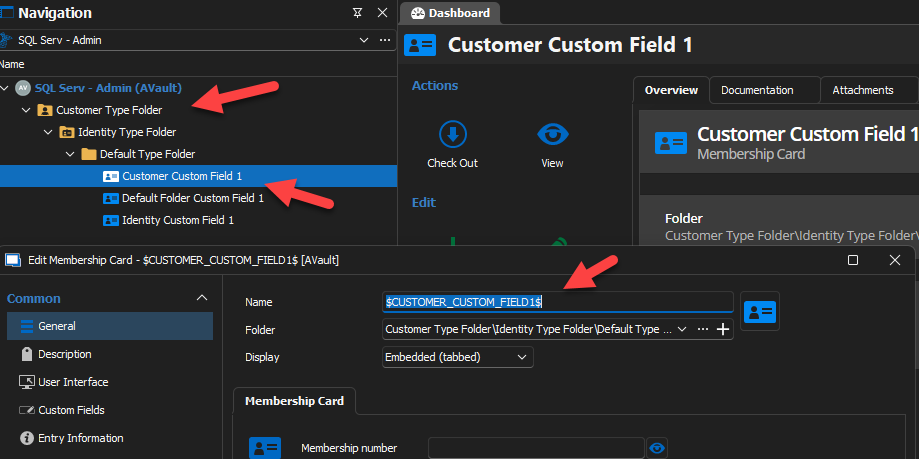
In the case above, every entry is at the deepest level in the folder. Their names are all $PREFIX_CUSTOM_FIELD1$ (where PREFIX is replaced by either CUSTOMER, IDENTITY or FOLDER). Each parent folder name also represents the type of folder they are. As you can see, all variables resolve properly in this case.
For your SSH case, the issue is essentially that you are resolving a "current session" variable as inherited. The $INFORMATION_MACHINE_NAME$ variable might be inputted in the parent folder, but it is transferred to the SSH session as is, so it then attempts to resolve the Machine Name located in the Assets of the SSH (which I'm assuming is empty). For variables, we made the Folders distinction so that you can target parent information using those instead. For your particular case, it would be best to set the host in the field as variables targeting the parent rather than set it to inherited. (For your SSH, this would likely be $COMPUTER_INFORMATION_MACHINE_NAME$.$DOMAIN_MACHINE_DOMAIN$.etc to be set in the host, rather than have it inherited). If you have several entries in the folder in question, you can use a batch edit.
I'm hoping this solves your issues (and again, the Quick Search will be fixed next version).
Regards,
Jafran Majeau
c11caaf0-9536-4071-9e1d-e2d7fe778cce.png
Hi
Sorry for the late response!
The quick search has been solved now, thank you!
Yes, Regarding the SSH, I thought the resolved value was passed down, but knowing it is the variables, it works now!
Regarding the Tab group name, I can see that I mixed up Customer og Company, so that it also resolved!
So yes I think that all of the above is resolved. Thank you so much!
Found another place, where I believe the variables should be resolved, and that's the "Want to restore last opened connections":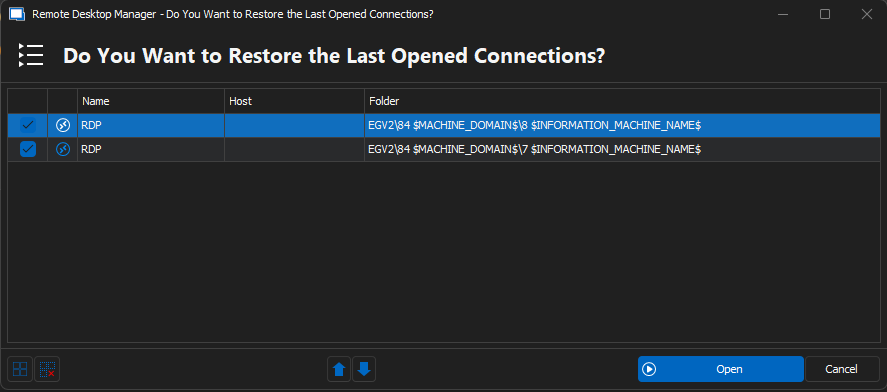
Regards Lars
Remote Desktop Manager connected with Devolutions Server running newest versions.
------------------------Signature------------------------
Sorry if any of above sounds harsh or provoking, it is NOT meant as such, but I have Asperger's and don't always know.
My intentions is always to be friendly.
-------------------------------------------------------------
4891c8b7-c966-4135-aadd-c3cd6ec6ded6.png
Hello,
I've opened a new ticket to investigate this issue, and will update this thread when we have more information.
Regards,
Jafran Majeau
Hello,
We've fixed the variable resolving for the folder path in the "Last Opened Connections" window. This should take effect in the upcoming 2024 version.
Regards,
Jafran Majeau