Macbook M3 Pro - Remote Desktop laggy

Hello,
I recently switched from an M1 Pro to an M3 Pro and every time I'm inside a Windows Server, I get a huge lag in every task I run.
The servers are performing normally, for example, after clicking to open a folder, I see the folder appear but drag. Sometimes I have to wait almost 1s for my task to be visible.
This only happens with Remote desktop Manager, if I use the official Microsoft one it works perfectly and I don't have this lag.
Is it something to do with the application's graphics settings?
Thank you
All Comments (15)
Hi,
Could you send us a video of the action you're doing so we can see what is causing the lag and try to replicate it.
Best Regard,
Gabriel Dufresne
Thank you for your reply.
We're talking about corporate servers and I can't make a video.
Even in terms of image/text quality in the external RDP app, I have much better quality than inside RDM with the window in Embedded.
I have all the default settings, what is your recommendation on this point?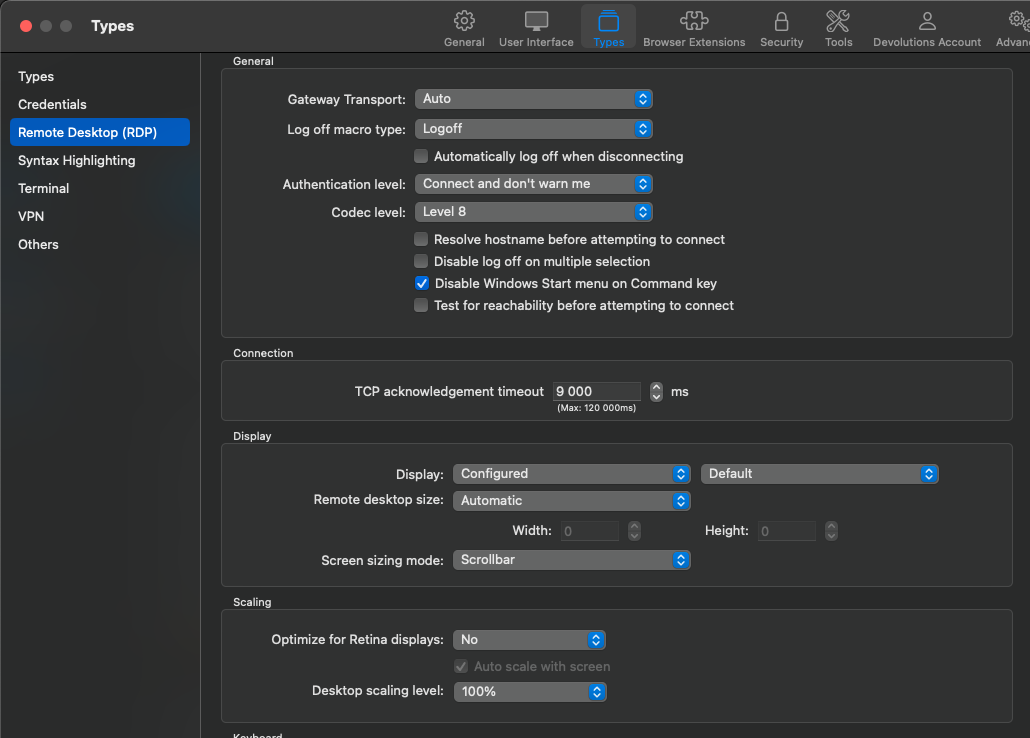
Screenshot2024-01-11 at 10.14.35.png
Hello
The issue is quite strange; fundamentally there shouldn't be a difference between your results on an M1 or an M3 Mac. There are intrinsics that might have different performance characteristics between the two machines but I'd consider it unlikely so let's try and rule out other problems first.
Just to confirm - and sorry if this is stating the obvious - but the only change on your side is the machine hardware? For example, you're using the built-in display and haven't switched to a high resolution external display, got a different mouse, something like that?
You should get the best performance with the Codec Level 8 (as you have), and the "Rendering Engine" set to "Metal" in Settings > Types > Others. On the RDP tab (in your screenshot) do you have Sandboxing activated (it's at the bottom, in the "Advanced" section)?
Can you let me know how you have the Display options configured in the MS RDP app?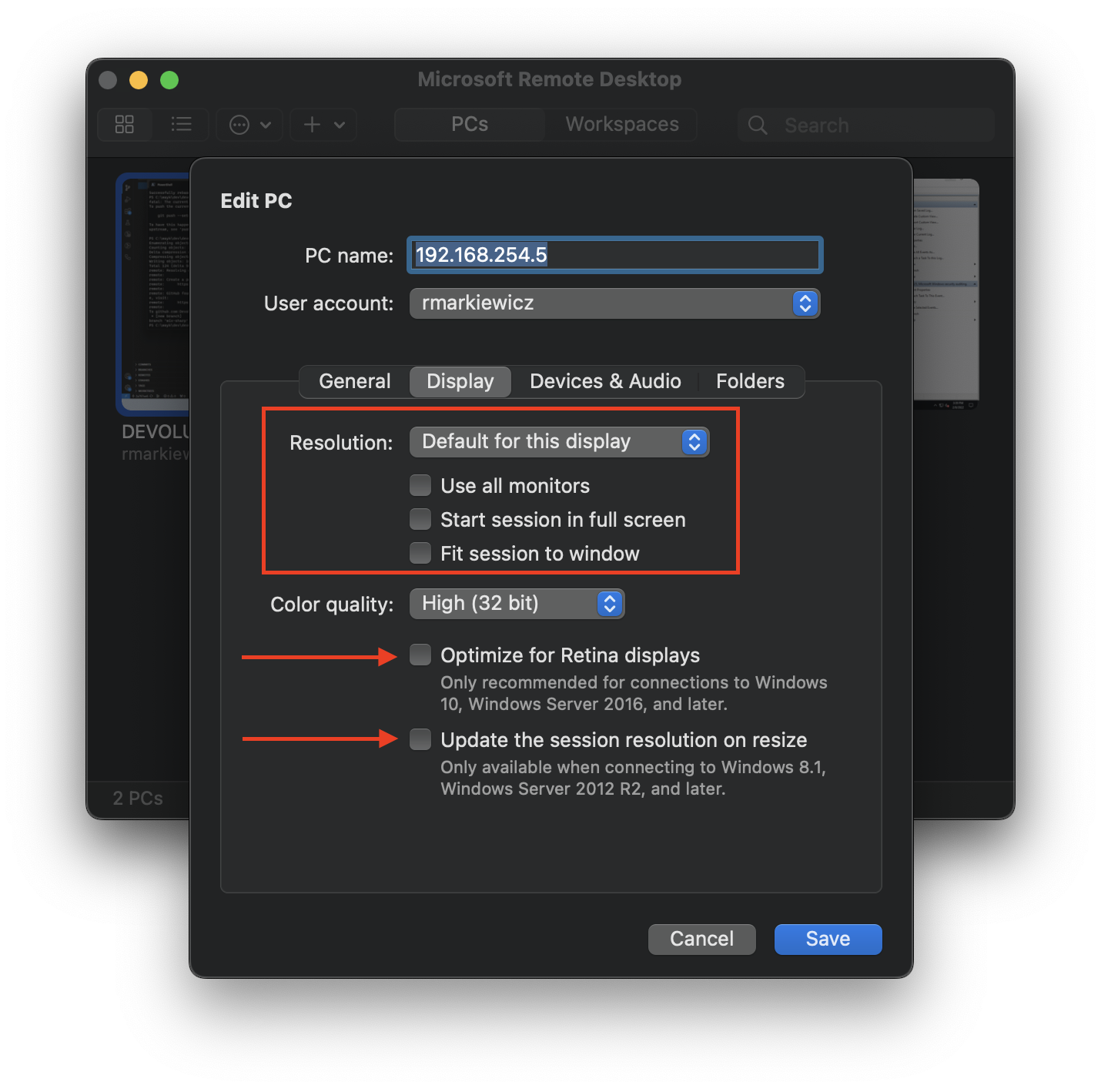
It would be good to ensure we are making an apples-to-apples comparison. What you have in your RDM settings should be more or less equivalent to my screenshot of the MS RDP app above.
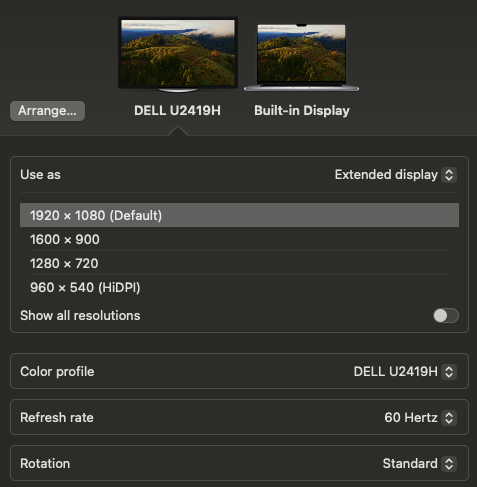
What are the Display settings on your Mac? Assuming you're using the built-in display, what scaling option do you have selected? If you're using an external display, what resolution is configured?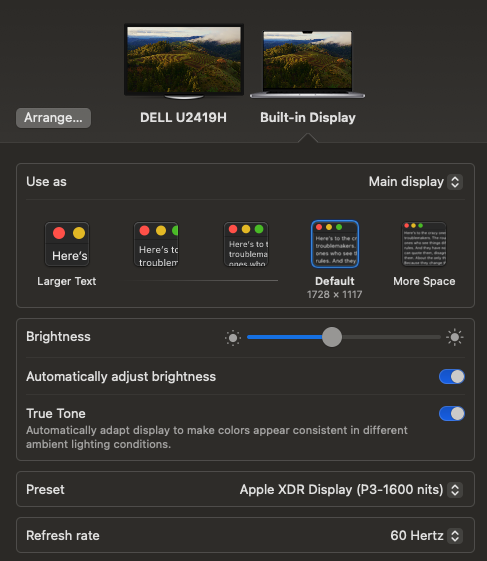
Finally, in RDM, on one of the affected RDP sessions, can you share the configuration of both "Local Resources" and "Experience"?
Please, do let me know know if something isn't clear or you have additional questions.
Thanks and kind regards,
Richard Markievicz
Screenshot 2024-01-11 at 12.18.58.png
Screenshot 2024-01-11 at 12.18.51.png
Screenshot 2024-01-11 at 12.12.48.png
Hello Richard,
Thank you for your answer.
My monitor/keyboard/mouse are the same, I just changed the Mac.
I have all the default settings.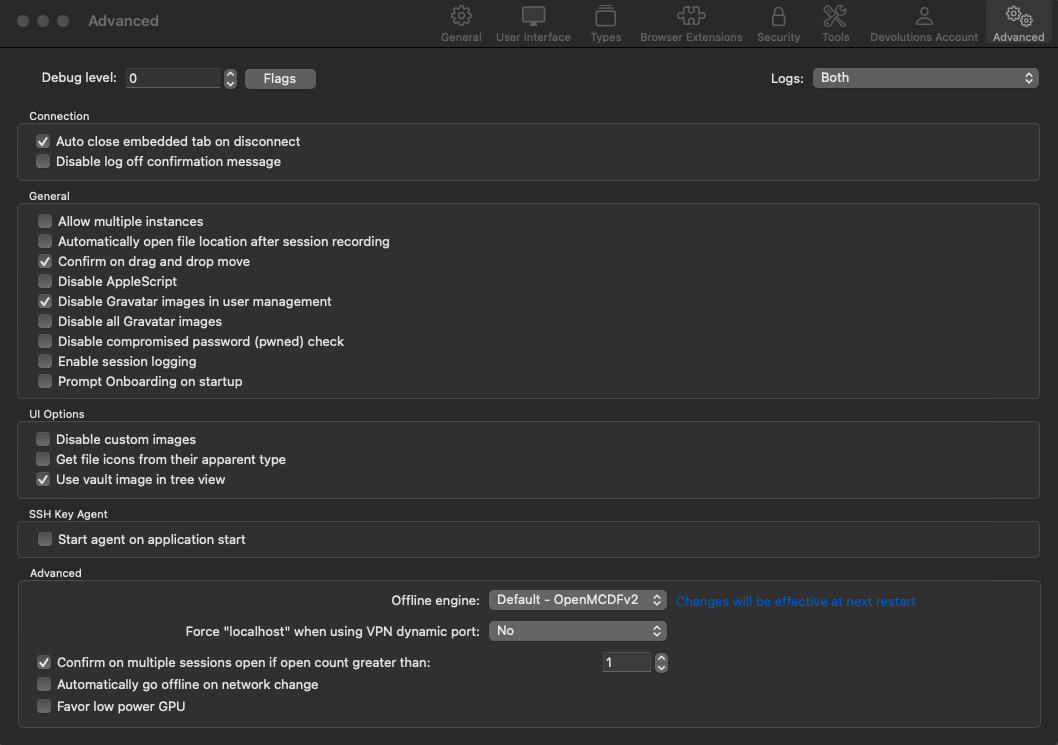
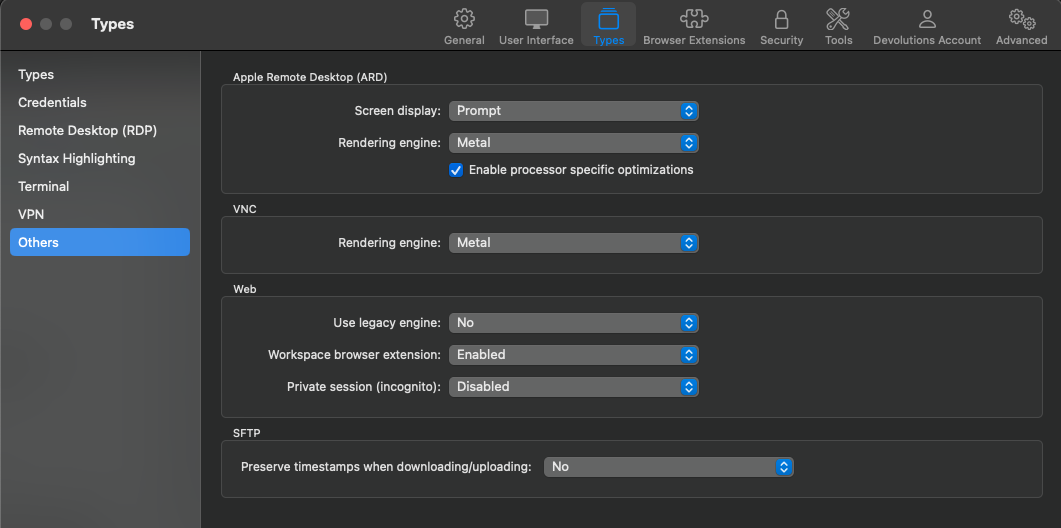
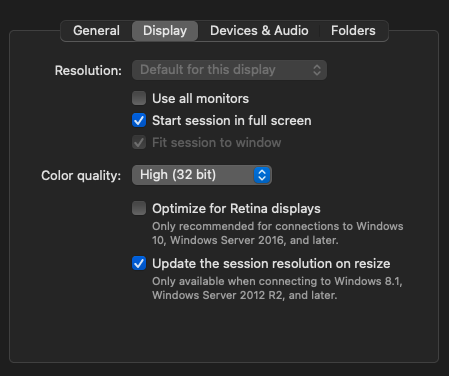
I'm using 2 external monitors directly: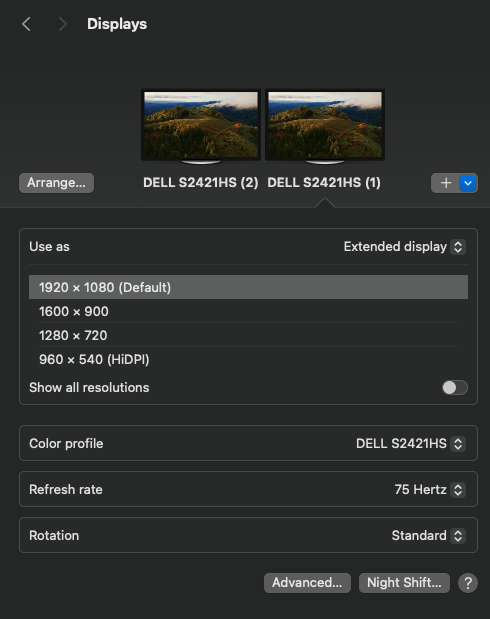
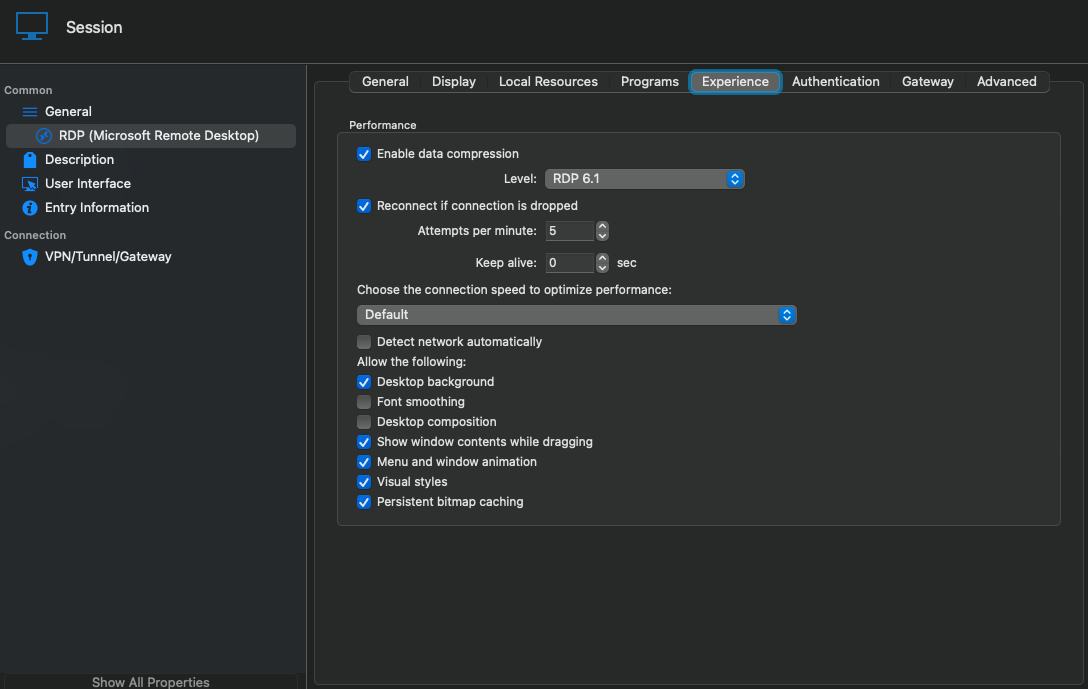
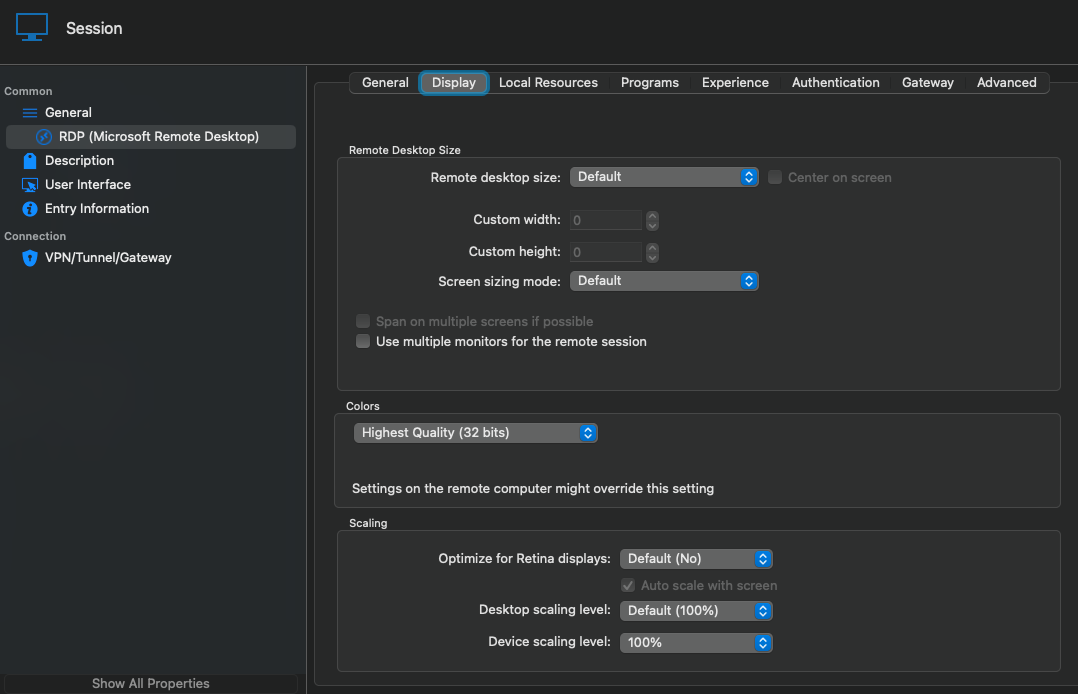
Thank you in advance.
Screenshot2024-01-11 at 17.38.01.png
Screenshot2024-01-11 at 17.37.52.png
Screenshot2024-01-11 at 17.33.41.png
Screenshot2024-01-11 at 17.31.09.png
Screenshot2024-01-11 at 17.27.10.png
giNXyCB.png
Hello
Thanks for the update.
I do continue to find it strange that you noticed a performance drop by only switching to an updated Mac; but like I said, let's try to rule out the basics first.
First, in the RDP "Experience" tab, check the "Detect network automatically" option. This is the default in MS RDP (and indeed, I don't think they even expose the traditional options anymore). I don't expect it to make much difference (are you connecting to these hosts over the LAN or WAN?).
Your MS RDP is set to match the host resolution to your own ("Update the session resolution on resize"). In RDM, you have the screen sizing mode set to "Scrollbar". Try changing that to "Dynamic resolution". I'm wondering if, for some reason with your current settings, the RDP client is requesting an abnormally high screen resolution (which can certainly cause performance issues). This setting will make the server resolution match your own.
Please let me know if you have a question or something isn't clear
Kind regards,
Richard Markievicz
Hi,
Thank you for your help.
With these changes "Detect network automatically" and "Dynamic resolution" it has improved a lot and is identical to the official MS one.
One question: is it possible to apply "Detect network automatically" globally?
Thank you
Hello
Thanks for the update. I'm not sure why things are different versus your other Mac; but since these represent the best settings and it seems to resolve things for you then I doubt we need to dig further.
I believe you can apply the experience settings to multiple connections at once by using the batch edit function. Unfortunately there's no global toggle for that.
I will suggest to the RDM team that they make "Detect network automatically" the default going forward, because it matches the MS RDP defaults.
Please, let me know if something isn't clear or you have any questions
Kind regards
Richard Markievicz
It's all, thank you!
The problem has not been solved. I still get lag in RDP sessions even after changing the above parameters.
I tried installing RDM inside the Windows 11 VM I have in Parallels and it works without any problems.
On the mac, I've completely uninstalled RDM and re-downloaded the latest version, but it hasn't solve the problem.
Hi Miguel
Ok, I'm sorry to hear that.
Two things:
- Can you try temporarily switching to the OpenGL renderer and tell me if you observe a difference? (Settings > Types > Remote Desktop (RDP) > Advanced > "Rendering Engine")
- Following this link, can you generate a session log and send it to me? Launch the session and reproduce the issue (e.g drag a few windows around, that kind of thing). You can send to me by PM or to support@devolutions.net (mention this thread so it finds its way to me).
Please, let me know if something isn't clear or you have any questions
Kind regards
Richard Markievicz
Hi Miguel
I'm responding to your PM here for visibility.
The logs only show what is happening at the protocol level. It was important to check that the latest, most performant codec is being negotiated (it is).
If things are a lot better with OpenGL, then I'd suggest that as a workaround. Although deprecated by Apple sometime ago it remains part of the OS and is unlikely to be removed in the near future.
I'll notify the RDM Mac team about this, I know there is work going on with the metal rendering engine currently.
There is one more combination of settings that might be interesting: switch back to Metal for the rendering engine, and check the "Use unified memory" option in the same section.
Please, let me know if something isn't clear or you have any questions
Kind regards
Richard Markievicz
Hi,
I set up Metal with "Use unified memory" and I can tell you that my Macbook crashed completely, twice, as soon as I tried to open an RDP connection.
It crashed to the point where the screen went black and I had to do a forced shutdown in power button.
Archive.zip
Hi Miguel
Ok, I do apologize for the inconvenience.
In that case, stick with OpenGL for now. Does the performance in that case approximate the Microsoft RDP client?
Please, let me know if something isn't clear or you have any questions
Kind regards
Richard Markievicz
Hi,
"Does the performance in that case approximate the Microsoft RDP client?"
Yes, everything is fine and normal for now.
Hello,
We have released a new version of RDM Mac (2023.3.13.4) and "Detect network automatically" is now applied by default to all our RDP Session.
If there's anything else, don't hesitate to ask.
Best regards,
Michel Lambert