Improve proxy entries usage and add support variables for remote port.
Improve proxy entries usage and add support variables for remote port.
0 vote

Hello,
We are using DPS server version 2023.3.13.0 and RDM version 2023.3.35.0 but the proxy entries were terrible in 2023.2 version as well.
We would like to create a single proxy tunnel entry that represents an internal proxy server and then use that entry for multiple Web and SSH entries to use. There are multiple issues we face when attempting to do so. Typically, when you add the proxy settings to a browser, it needs only the proxy server and proxy port, but the RDM entry requires remote/local host/port which make the proxy entry usable only for specific site. There is no clear documentation on how to achieve such scenario either, which makes this process very frustrating. Below is a brief list of everything we encountered so far.
- Local host/port fields - I haven't reached a point where I can confirm what this fields are actually doing. From the scare's documentation available, it appears that this is the host/port that needs to be used in the actual web entry latter on. However, selecting the option to use Dynamic local port prevent me from saving the entry with the following error message "local host port is required". This appears to be a problem only when creating a new proxy entry and doesn't seem to be a problem when updating the entry to use the default port.
- Devolutions support suggested to use $HOST$ variable for remote host, however the entry fails to save if we leave the default remote port. We need remote port to be a variable too since our web entries use various ports. Using the Default remote port during creation and when updating the entry always results in the same error message "The remote Port is required"
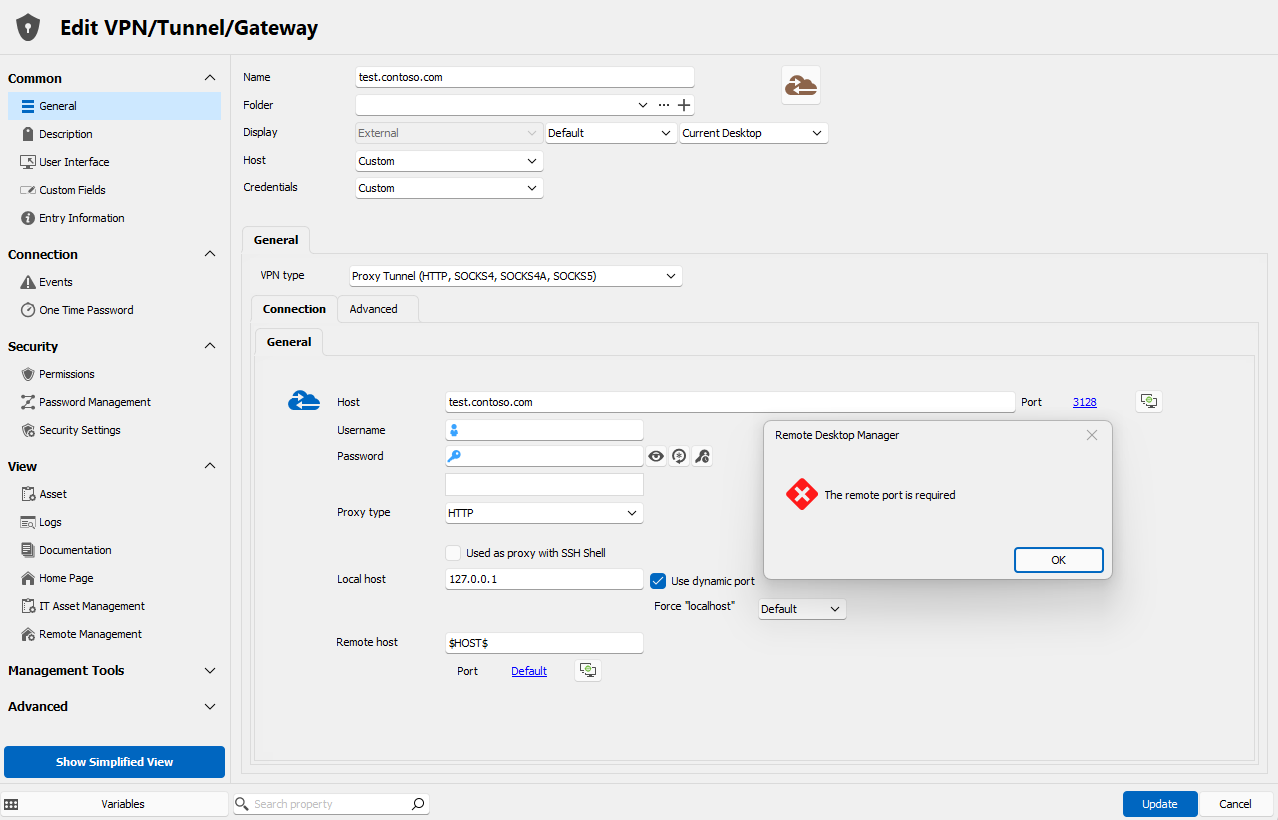
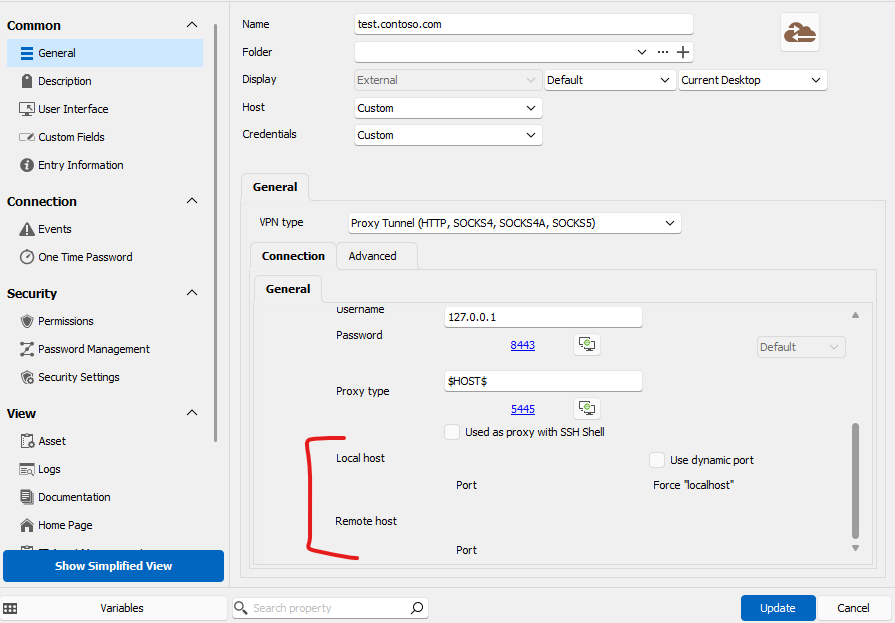
- This is a cosmetic issue but annoying as well. When attempting to select the option to "use Dynamic port" the whole layout of the fields messes up and become unclear what am I editing. This happens when the edit window is opened on a small screen. stretching it on large screen fixes the layout.
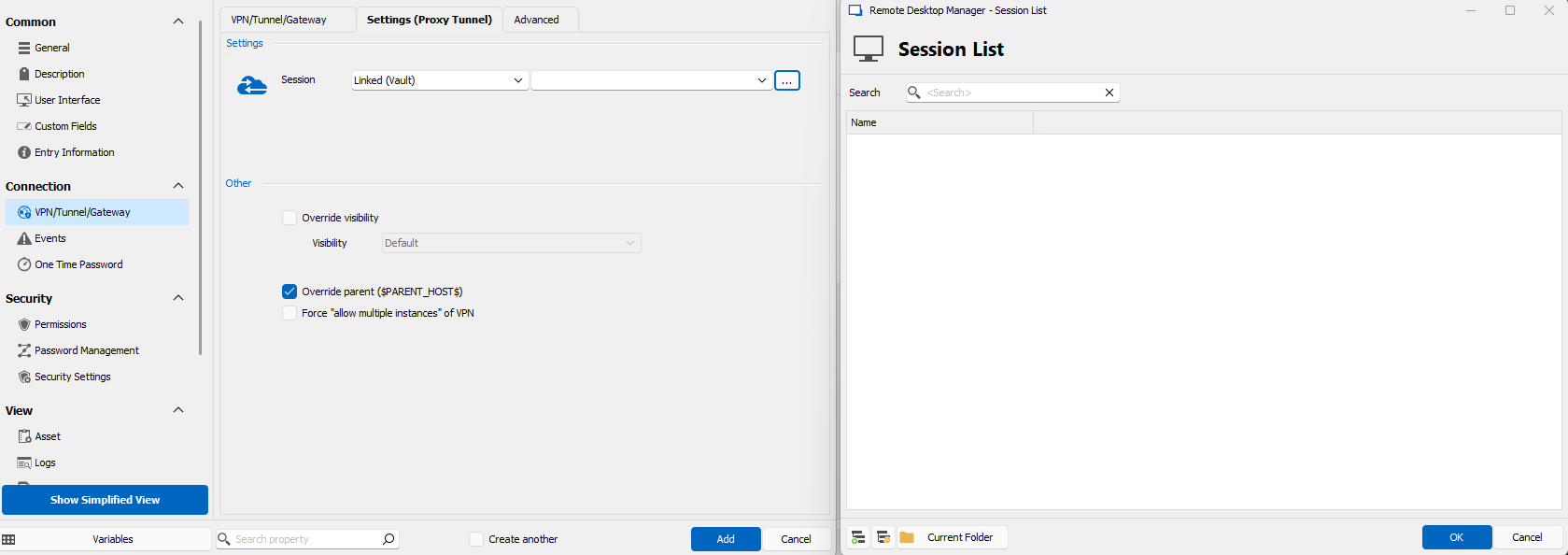
- There is also no way to select the newly created proxy tunnel entry in any of the web or SSH entries because the drop-down options are empty making the selection of the newly created proxy tunnel entry impossible.
All of the issues above were valid for 2023.2.x version we used previously.
Point 3 and 4 above appear to be just application bugs which weren't discovered since probalby not many people tried to figure out how the proxy entry works, but 1 and 2 do need some clarification or feature for dynamic port variable.
Thanks!
Screenshot 2024-01-10 102720.png
Screenshot 2024-01-10 102127.png
Screenshot 2024-01-10 101514.png
All Comments (10)
Hello,
Thank you for the detailed post. I'll go over your points in order.
1. The local host and port fields should not be required when using the Proxy Tunnel entry with Website entries. We have made changes in our upcoming 2024.1 version to allow configuring the Proxy Tunnel entry in either Port Forward, SSH Shell or Website mode. In your case, you will need to select the Website mode, which will not require the local/remote host configuration, only the Host and credentials, like so: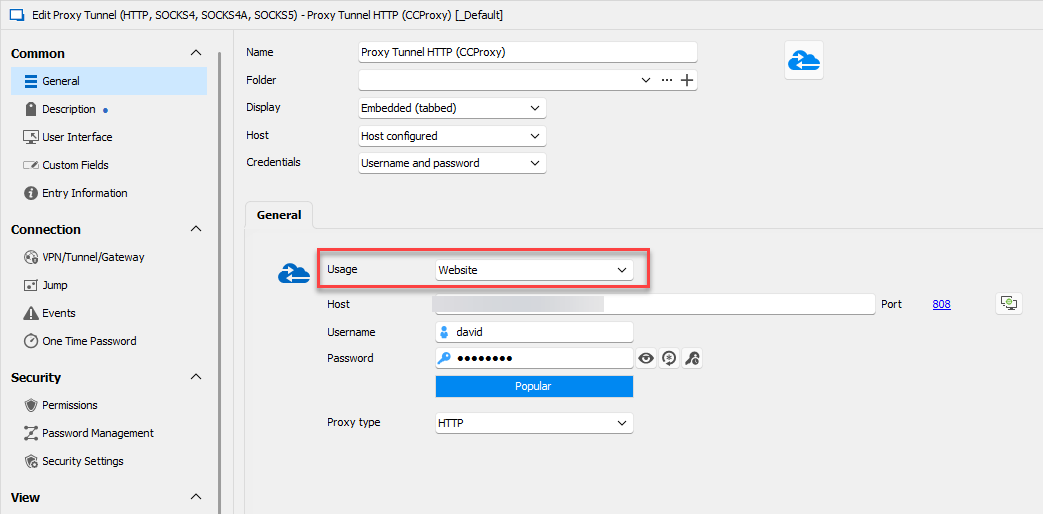
From there, you can then configure your Website entries to use that Proxy Tunnel, and these websites should connect by using the Proxy Tunnel successfully. You can configure the proxy tunnel through the VPN/Tunnel/Gateway tab, select the mode "Proxy tunnel", then select it from there.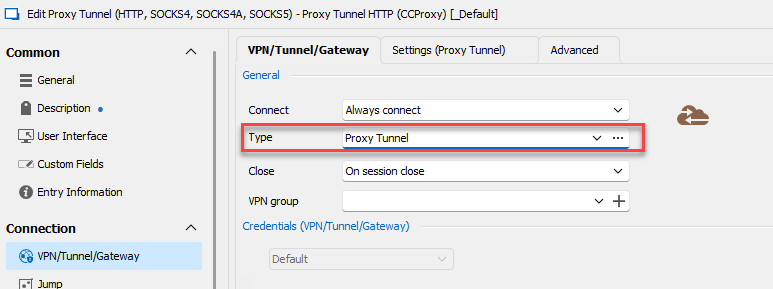
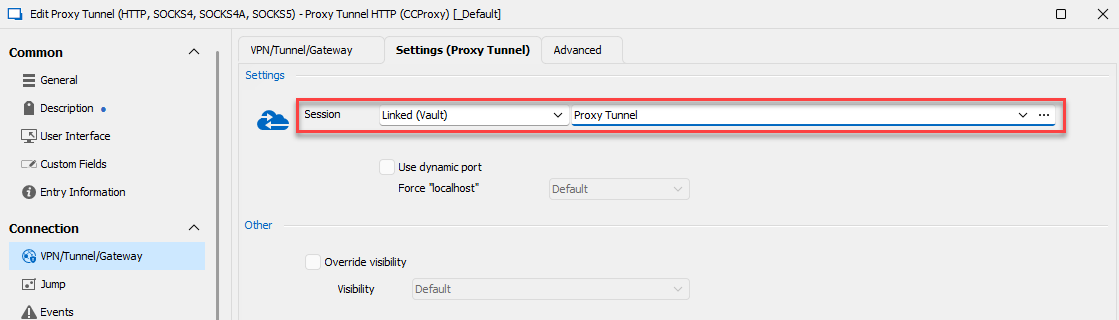
As a note, this will only work if you're using Edge or Chrome as the embedded browser, this is not supported on Internet Explorer.
2. This case should be fixed with the changes made in the first point, as these fields should not be necessary nor available for a Proxy Tunnel used for Website entries.
3. Similarly, this case should also be fixed with the changes made in the first point, as the "use dynamic port" will not be there in that mode, only for the Port Forward mode. I've also tested the setting in the Port Forward mode and it doesn't occur on my end, so it looks to be fixed in our upcoming 2024.1 release as well.
4. We were able to reproduce this issue and we have opened a ticket. From my tests, it doesn't occur on our internal 2024.1 build, so I think it's also possible this will simply be fixed once we release 2024.1.
I hope that I've covered everything and that these changes will work for you. Let me know if I've missed something or if I didn't address one of your points.
Regards,
Hubert Mireault
15ae7a40-8598-4d98-8a3b-36e10df02e3b.png
9add0727-93f9-4e08-8045-f3b151e29df2.png
ef5fffc7-93f7-453d-afc4-12cb75f3ed5c.png
Hello,
This must be completely new in 2024.1 since my screenshots were taken by editing the Proxy tunnel entry.
The General tab I see do not have option "Usage" to choose "Website".
What other options do we have?
Version 2024.a is not publicly available on your websites and probably won't be approved to deploy at our environment right away.
Thanks!
Hello,
Our current planned release time frame for 2024.1 is end of February/beginning of March, with a beta releasing a little before that. So as you say, this is not currently available.
Unfortunately in 2023.3 and prior, the proxy tunnel entry doesn't inject its settings in Website entries, so linking to it in the VPN/Tunnel/Gateway tab will not work. Your only alternative is to enter the proxy information directly in the proxy tab of a Website entry configured to use Google Chrome: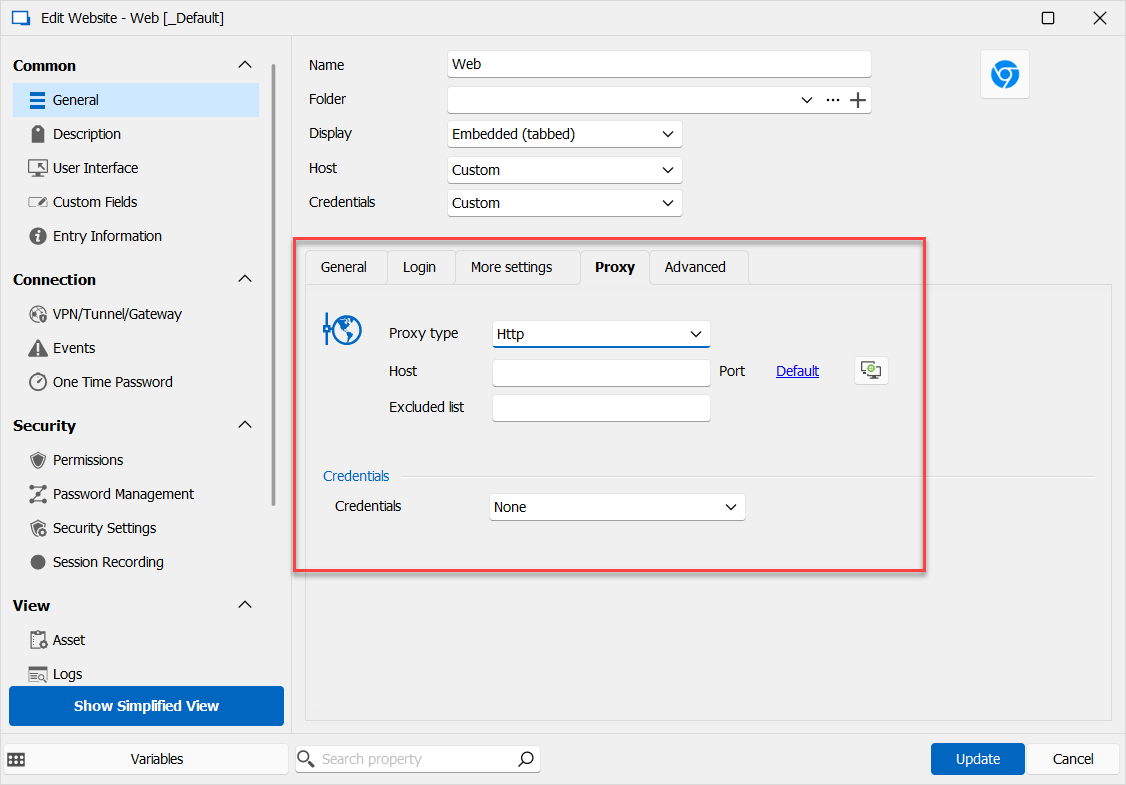
From there, only the proxy's host and credentials should be required. Can you test this out and see if this works for you? I understand this is less convenient than the solution coming in 2024.1, but it's not possible for us to bring these changes to 2023.3.
Regards,
Hubert Mireault
2e7d789a-7ba8-4a27-86c2-d12ff4875fc3.png
Thank you for your reply. I will look into modifying individual web entries and decide if we are going that route or wait until the 2024.1 release is out.
Hello,
Our company upgraded to DPS 2024.2.3.0 and RDM 2024.2.8.0.
Web entries are working as expected with dedicated proxy tunnel entry.
However, SSH entries still do not work as expected.
Is there an updated guide how to setup the Proxy tunnel entry to allow SSH Shell entry to use it?
Thanks!
Stan
Hello ,
Could you please describe the error that appears?
Also, have you tried using the same entry but selecting SSH Shell instead of Website?
regards,
SSH Shell Entry is set to use the following VPN settings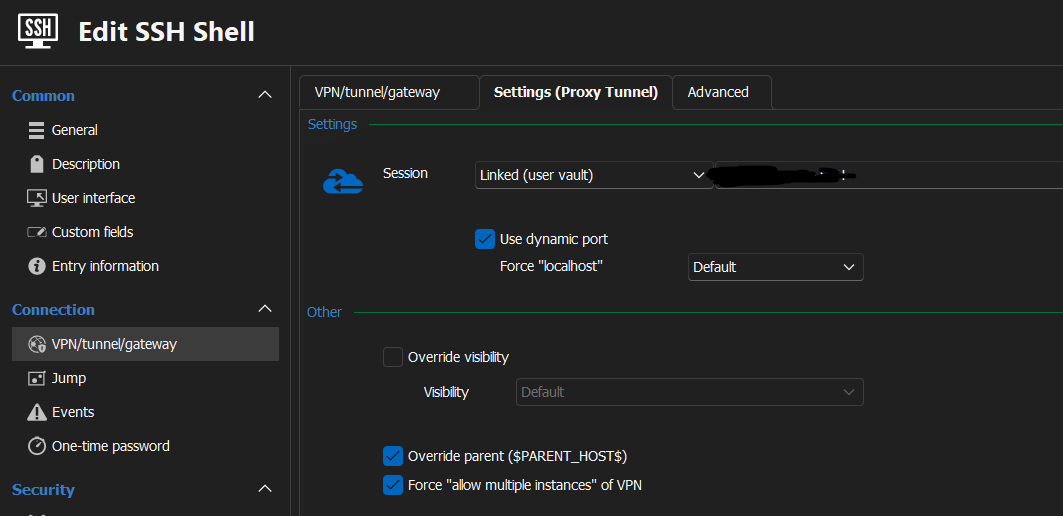
In the case the Proxy Tunnel Entry is set to SSH Shell I get the following error message.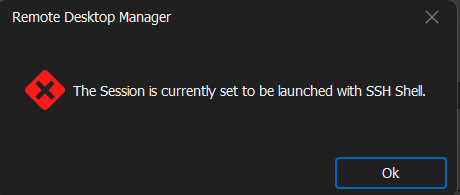
If Proxy Tunnel Entry is set to Web or Port Forward, I get the following error message: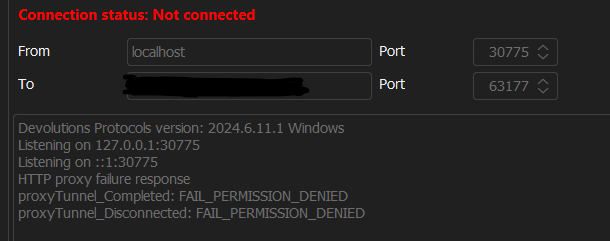
0321266e-03d1-4080-a455-615ec9217b36.png
c63c55a4-9e73-4cb0-a5ca-21411a9cdf3a.png
62297009-26e4-472e-84bc-ee4a1d66e8b2.png
Hello ,
could you try to create ssh tunnel session ? follow instructions : https://docs.devolutions.net/rdm/mac/kb/rdm-windows/how-to-articles/setup-ssh-tunnel/#create-an-ssh-tunnel
Thank you
Michel Audi
appreciate the suggestions, but the results are the same.
Hello,
I would like to discuss this issue with you. I am going to open a ticket for it, and we will schedule a meeting together, when we will fix this issue we will post the solution here .
Thank you
Michel Audi