Bitwarden Could not create SSL/TLS secure channel.

Hi,
I get an Error when i try to connect to my Bitwarden - only inside RDM
All apps, Android, Linuix, Windows and the webinterface accept the cert and work perfectly fine.
I even checkd the RDM Setting "ignore application certificate errors"
PasswordManagerAccess.Common.NetworkErrorException: Network error has occurred ---> System.Net.Http.HttpRequestException: An error occurred while sending the request. ---> System.Net.WebException: The request was aborted: Could not create SSL/TLS secure channel.
This message is mcuh longer but doesn't contain any useful information, for example WHAT the real problem for this TLS connection is!
This happened since i moved my Vaultwarden instance to a different Docker host. Before taht move it worked perfectly fine in RDM also.
Is there some kind of Cert cache inside RDM i could delete?
Can you please help me?
Regards
Peter
All Comments (9)
Hello Peter,
Thank you for reaching out to us regarding this,
- Could you please specify the version of RDM you are currently using?
- What type of data source are you using?
That being said, I'm also wondering if you could provide us with a screenshot of this error message?
Let me know,
Best regards,
Samuel Dery
I use MSSQL as my Datasource - but why is this important for an cert issue?
My Version is
2023.1.1.5 on Kubuntu - here it's working perfectly as always
2023.3.35.0 64-bit on Windows10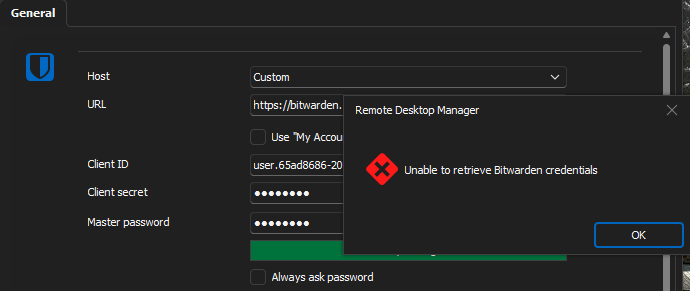
This is from my application log
PasswordManagerAccess.Common.NetworkErrorException: Network error has occurred ---> System.Net.Http.HttpRequestException: An error occurred while sending the request. ---> System.Net.WebException: The request was aborted: Could not create SSL/TLS secure channel.
at System.Net.HttpWebRequest.EndGetRequestStream(IAsyncResult asyncResult, TransportContext& context)
at System.Net.Http.HttpClientHandler.GetRequestStreamCallback(IAsyncResult ar)
--- End of inner exception stack trace ---
at System.Runtime.ExceptionServices.ExceptionDispatchInfo.Throw()
at PasswordManagerAccess.Common.RestTransport.MakeRequest[TContent](Uri uri, HttpMethod method, HttpContent content, IReadOnlyDictionary`2 headers, IReadOnlyDictionary`2 cookies, Int32 maxRedirectCount, RestResponse`1 allocatedResult)
--- End of inner exception stack trace ---
at PasswordManagerAccess.Bitwarden.Client.LoginCliApi(String clientId, String clientSecret, String deviceId, RestClient rest)
at PasswordManagerAccess.Bitwarden.Client.OpenVaultCliApi(String clientId, String clientSecret, String password, String deviceId, String baseUrl, IRestTransport transport)
at PasswordManagerAccess.Bitwarden.Vault.Open(ClientInfoCliApi clientInfo, String baseUrl)
at Devolutions.RemoteDesktopManager.Managers.BitwardenManager.InitializeAPIKey(String clientId, String clientSecret, String password, String customUrl, Boolean isSilent)
------------------------ extended stack ------------------------
at Devolutions.RemoteDesktopManager.Managers.LogManager.LogError(Exception e)
at Devolutions.RemoteDesktopManager.Managers.BitwardenManager.InitializeAPIKey(String clientId, String clientSecret, String password, String customUrl, Boolean isSilent)
at Devolutions.RemoteDesktopManager.Frames.CredentialSettings.FreCredentialResolverBitwardenSettings.BrowseCredentials()
at DevExpress.XtraEditors.Repository.RepositoryItemButtonEdit.RaiseButtonClick(ButtonPressedEventArgs e)
at DevExpress.XtraEditors.ButtonEdit.OnMouseUp(MouseEventArgs e)
at System.Windows.Forms.Control.WmMouseUp(Message& m, MouseButtons button, Int32 clicks)
at System.Windows.Forms.Control.WndProc(Message& m)
at DevExpress.XtraEditors.XtraControl.WndProc(Message& m)
at DevExpress.Utils.Controls.ControlBase.BaseWndProc(Message& m)
at DevExpress.XtraEditors.BaseControl.WndProc(Message& msg)
at DevExpress.XtraEditors.TextEdit.BaseEditWndProc(Message& msg)
at DevExpress.XtraEditors.TextEdit.AdvTextEditWorkingStrategy.WndProc(Message& msg)
at System.Windows.Forms.NativeWindow.Callback(IntPtr hWnd, Int32 msg, IntPtr wparam, IntPtr lparam)
at System.Windows.Forms.UnsafeNativeMethods.DispatchMessageW(MSG& msg)
at System.Windows.Forms.UnsafeNativeMethods.DispatchMessageW(MSG& msg)
at System.Windows.Forms.Application.ComponentManager.System.Windows.Forms.UnsafeNativeMethods.IMsoComponentManager.FPushMessageLoop(IntPtr dwComponentID, Int32 reason, Int32 pvLoopData)
at System.Windows.Forms.Application.ThreadContext.RunMessageLoopInner(Int32 reason, ApplicationContext context)
at System.Windows.Forms.Application.ThreadContext.RunMessageLoop(Int32 reason, ApplicationContext context)
at System.Windows.Forms.Form.ShowDialog(IWin32Window owner)
at Devolutions.RemoteDesktopManager.Managers.ActionManager.EditConnection(IConnectionSource source)
at Devolutions.RemoteDesktopManager.Managers.SessionMenuManager.MnuEditConnection_Click(Object sender, EventArgs e)
at DevExpress.XtraBars.BarItemLink.OnLinkClick()
at DevExpress.XtraBars.BarButtonItemLink.OnLinkAction(BarLinkAction action, Object actionArgs)
at DevExpress.XtraBars.ViewInfo.BarSelectionInfo.ClickLink(BarItemLink link)
at DevExpress.XtraBars.ViewInfo.BarSelectionInfo.UnPressLink(BarItemLink link)
at DevExpress.XtraBars.Controls.CustomLinksControl.OnMouseUp(MouseEventArgs e)
at System.Windows.Forms.Control.WmMouseUp(Message& m, MouseButtons button, Int32 clicks)
at System.Windows.Forms.Control.WndProc(Message& m)
at DevExpress.XtraEditors.XtraControl.WndProc(Message& m)
at DevExpress.XtraBars.Controls.CustomControl.WndProc(Message& msg)
at System.Windows.Forms.NativeWindow.Callback(IntPtr hWnd, Int32 msg, IntPtr wparam, IntPtr lparam)
at System.Windows.Forms.UnsafeNativeMethods.DispatchMessageW(MSG& msg)
at System.Windows.Forms.UnsafeNativeMethods.DispatchMessageW(MSG& msg)
at System.Windows.Forms.Application.ComponentManager.System.Windows.Forms.UnsafeNativeMethods.IMsoComponentManager.FPushMessageLoop(IntPtr dwComponentID, Int32 reason, Int32 pvLoopData)
at System.Windows.Forms.Application.ThreadContext.RunMessageLoopInner(Int32 reason, ApplicationContext context)
at System.Windows.Forms.Application.ThreadContext.RunMessageLoop(Int32 reason, ApplicationContext context)
at Devolutions.RemoteDesktopManager.Program.Main(String[] args)
rdm.png
Hello,
It seems the issue based on your message is caused by a change in your Bitwarden vault.
Have you attempted to create a new Bitwarden entry in RDM ?
Best regards,
Hello,
Sorry to jump in. I might completely be wrong but could it be possible that only tls1.3 is enabled and this is not supported in .NET Framework 4.8:
https://stackoverflow.com/questions/64212994/net-4-8-tls-1-3-issue-on-windows-10
Regards
David Hervieux
Thank you very much! that was it!
For others who might want to test ist:curl https://your.url -svo /dev/null --tls-max 1.2Something like this is bad:
* OpenSSL/3.0.10: error:0A00042E:SSL routines::tlsv1 alert protocol version
* Closing connection
Hello Peter,
Thank you for the confirmation!
Hopefully, this will be helpful for any others who may encounter the same issue.
Best regards,
Samuel Dery
Hi Samuel,
What about users that use Bitwarden's servers and not self hosted?
There is no possibility for us to change the TLS mode on them.
Will you release a patch for the Bitwarden connectors allowing us to configure the request as TLS 1.2?
Hello,
Our upcoming major release, RDM 2024.1, will be using .NET 8 and not .Net Framework 4.8. This should fix the issue, as .NET 8 supports TLS 1.3, and you will not need to change any configuration on the Bitwarden side.
Regards,
Hubert Mireault
Thanks for your answer Hubert, that's even better!