Trayicon and favorites

Hi
I have just activated the trayicon, and set my settings like this: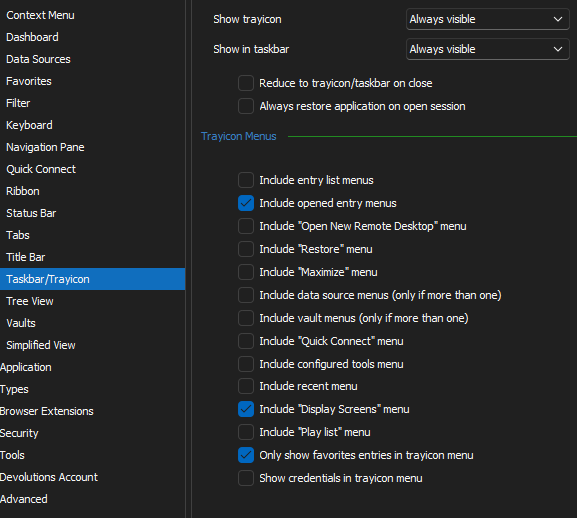
But when I right-click my try icon I only see: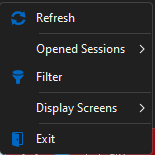
And I have favorites: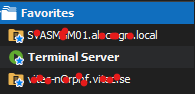
My data source is DVLS 2023.3.8.0 2023.3.13.0 and RDM is 2023.3.35.0 64-bit
Regards Lars
Remote Desktop Manager connected with Devolutions Server running newest versions.
------------------------Signature------------------------
Sorry if any of above sounds harsh or provoking, it is NOT meant as such, but I have Asperger's and don't always know.
My intentions is always to be friendly.
-------------------------------------------------------------
8a2d85ed-89bc-4848-a7c8-4095a9cb4f87.png
5221f7e8-34aa-4050-8020-969e69f08042.png
d17fe5af-98d3-4664-9618-cf3e94422f10.png
All Comments (12)
Try to restart RDM, it looks like it might be required (worked for me).
I will report the bug to either fix without having to restart RDM or notify Changes will only be applied after an application restart when checking/unchecking Only show favorites entries in trayicon menu
Best regards,
Stéfane Lavergne
What! I tested again and it works for me without a restart. Odd, what is going on?
Please do let me know if it works with the restart while we investigate further.
Best regards,
Stéfane Lavergne
OK I got it, it's a combination of check boxes that make it fail, I had them all checked and the favorites are displayed.
We will investigate further and fix this.
Best regards,
Stéfane Lavergne
Ahh, yes. Apparently the "Include entry list menus" need to be active for it to work.
I don't know what that checkbox does, but for me it is a working workaround.
Remote Desktop Manager connected with Devolutions Server running newest versions.
------------------------Signature------------------------
Sorry if any of above sounds harsh or provoking, it is NOT meant as such, but I have Asperger's and don't always know.
My intentions is always to be friendly.
-------------------------------------------------------------
Hello,
Yes, the "Include entry list menus" allow you to display the entries in the trayicon, and then the favorites option can filter those. There is indeed an issue of clarity here. We will look into it.
Regards,
Jafran Majeau
Perfect.
Now where I it works I have found another issue.
In my user vault I have marked the following as favorite: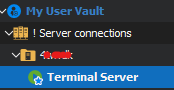
When I want to select it, I can't see the entry itself: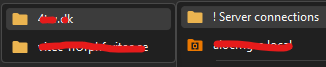
The entry from a shared vault works fine:
/Lars
Remote Desktop Manager connected with Devolutions Server running newest versions.
------------------------Signature------------------------
Sorry if any of above sounds harsh or provoking, it is NOT meant as such, but I have Asperger's and don't always know.
My intentions is always to be friendly.
-------------------------------------------------------------
50a6d075-589f-4b9e-8ebd-3defb1c42b52.png
b36e5d76-e6e3-43b8-b146-7b788919653b.png
fb37c7fc-f36d-46dd-a6a6-f94bb57e6b91.png
Hello,
We don't display the User Vault content in the tray icon. That said, I can see in your screenshot, that the session you are referring to is launched. While the session is launched, it will be displayed in the Opened Sessions section, even if it was launched from the User Vault. 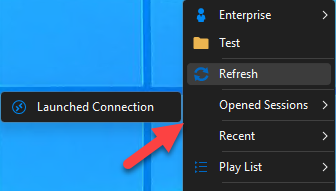
Regards,
Jafran Majeau
9c3ca396-7229-47f7-a65a-20db3421447d.png
Hi
Thank you for you reply.
Regarding that the connection already is launched, the yes you are correct, but I was primarily going to use it to initiate the connection.
Regarding the design decision not to show User vault items the 2 things:
1: Why show the folders as they are useless, I can't even click it and get redirected to the folder in tha navigation pane?
2: Could this be converted to a setting, so user vault items can be shown?
Lastly, can you elaborate on the design decision not to include user vault items? - So I can understand why?
Regards Lars
Remote Desktop Manager connected with Devolutions Server running newest versions.
------------------------Signature------------------------
Sorry if any of above sounds harsh or provoking, it is NOT meant as such, but I have Asperger's and don't always know.
My intentions is always to be friendly.
-------------------------------------------------------------
Hello Lars,
Thanks for the feedback and questions.
The reason why the User Vault is not shown in the trayicon at the moment, is because there's no good way to show the current shared vault as well as the user vault without being confusing in this context. We could add an option to show only the user vault, but at the moment I don't think we'll add an option to show both at once. From what you described though, this isn't exactly what you need anyway.
In the case of having checked the "only show favorites entries in trayicon menu" box, I think it would be logical to show all the entries contained within the favorites, whether they are in the current shared vault, a different shared vault, or the user vault. It would be more in line with the way the Favorites tab in RDM works. I don't see a confusion issue here, as the Favorites tab was always presented with the entries from the shared vault and the user vault mixed together. It would make sense for the tray menu to reflect that when that particular setting is enabled.
For the folder click, we could investigate to see if we can make them select the folder in the tree.
Do you think this solution would work for your use case?
Regards,
Hubert Mireault
Hi
Yes, it actually just expected that list to be replicated to systray icon.
For me it makes more sense that the fav'ed items is directly shown instead of nested in it's real folder structure.
Personally for me I don't know if I will fav folders, but as long as it is possible to fav a folder, I would expect it to work from the systray, but if it's a big thing I'm not gonna push for it :)
/Lars
Remote Desktop Manager connected with Devolutions Server running newest versions.
------------------------Signature------------------------
Sorry if any of above sounds harsh or provoking, it is NOT meant as such, but I have Asperger's and don't always know.
My intentions is always to be friendly.
-------------------------------------------------------------
Thanks for the feedback. I've opened a ticket for this and we will post back here once we have an update.
Regards,
Hubert Mireault
Hello,
We've improved the TrayIcon to also display user vaults entries when using the "Favorites only" mode. Selecting an empty folder will also navigate to said folder in the tree view. This should be available for the upcoming 2024 version.
Regards,
Jafran Majeau