Is there any way to Speed Up the AD Synchronizers?

Howdy,
I run RDM from my laptop and have it sync with our domain. When I run a sync, it generally takes 10-15 minutes to complete. This seems crazy to me so I'm wondering how it works and if there's any way to speed it up.
I have the Synchronizer setup with the following info:
- Mode: Custom
- Domain Machine: my Domain Controller
- Filter: (operatingSystem=*windows server*)
When I run the comparable PowerShell command, I get the results in under 20 seconds
get-adcomputer -server "domain controller" -filter "objectClass -eq 'Computer' -and Operatingsystem -like '*windows server*'"
I know that RDM then has to compare those results to my existing list so it doesn't add duplicates and removes old machines, but I wouldn't think that should take 15 minutes... When I check Task Manager, RDM is using 0-1% CPU and the network is doing next-to-nothing so I'm not sure where the delay is coming from.
Thanks.
All Comments (13)
Hello,
I believe the synchronizer's speed, typically taking 45 minutes to an hour, might not be adjustable. However, to be thorough, I'll double-check with our developers if there's a possibility to speed it up.
Best regards,
Carl Marien
AD Syncs don't take 45 minutes to an hour. If I install RDM on a server in my domain, the AD sync seems to take under 5 minutes. If I install RDM on my laptop, the AD Sync takes 10-20 minutes.
All the AD Sync is doing is reading in a list of servers from the Domain and then checking to see if they exist or not in my Data Source. Since pulling the list of servers only takes 30 seconds (via PowerShell), I would think an AD Sync should be able to run in just a few minutes regardless of where it runs from.
Hello,
Upon consulting with our development team, it appears that there's no current method to make the AD syncs faster.
However, I noticed something in your command that might be affecting performance.
You're using two filters, while in RDM, typically only one filter is employed, which could be considerably slower.
I recommend trying the followingcommand : `(&(objectClass=computer)(operatingSystem=*windows server*))`. This might help improve the process.
Please give this a try and let me know how it works out.
Best regards,
Carl Marien
Does the AD sync have a log file somewhere that I can review to see what it's doing at each time and how long it's taking to do each part? Read data, compare data, write data, etc?
Hello,
If the Debug is enabled in the option then the AD Sync will log several activities.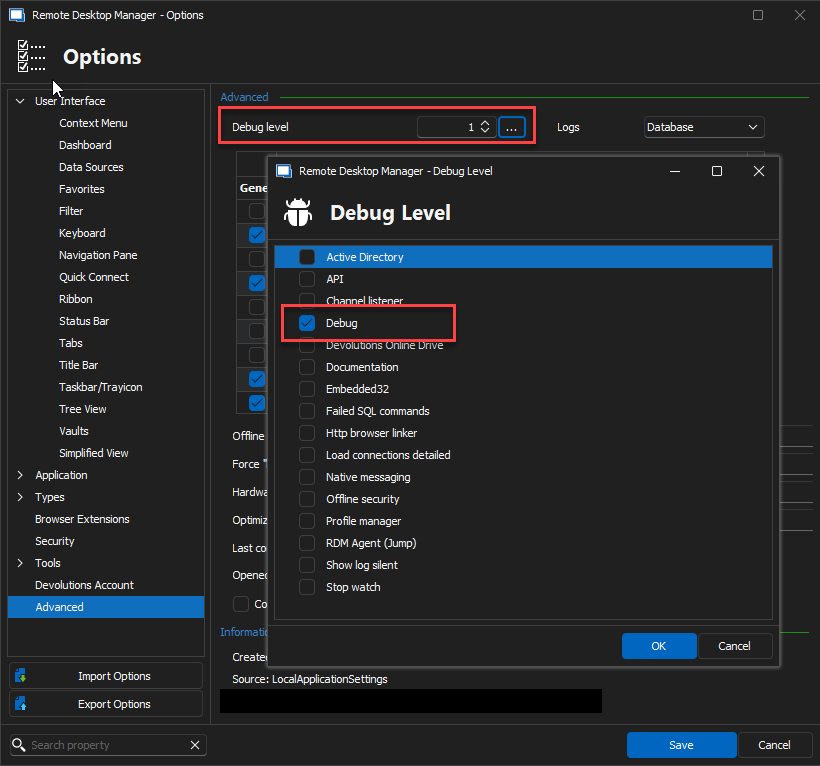
Best regards,
Carl Marien
image.png
I enabled that option and ran a sync. Where would I find the information that it logged? The only thing I see under the Log tab within the synchronizer is which items it added and removed but nothing about the actual running of the sync.
Thanks.
Hello,
To use the profiler in RDM, please follow these steps:
1. Click on 'Help' in RDM.
2. Select 'Profiler'.
3. Choose the 'Debug only' tab.
4. Replicate the issue you are encountering.
5. After these steps, send us the logs that are generated.
Best regards,
Carl Marien
Forgot to come update this post.
The output from the Profiler shows that the initial query to get the list of computers runs within a few seconds or starting the sync. A few minutes later it runs a second query to get AD Groups for some reason. There's nothing logged in between the two queries so I don't know what it's doing. Another few minutes later, it writes out log info for every server that it found. That takes a while depending on how many servers it found.
Unfortunately, the Profile window doesn't have any timestamps so there's no way to see which steps happened at which times to get a total or anything like that. I've also had RDM freeze up towards the end of a sync and I had to kill it from Task Manager. Not sure why that sometimes happens either.
Hello,
Thank you for providing the necessary details. I have forwarded your issue to our development team. They will investigate and work
towards a workaround or a fix.
I will keep you updated and reach out if any further questions arise during the process.
Best regards,
Carl Marien
HI, I'd still like to figure out why a simple AD sync takes 10-15+ minutes. Is anyone from Devolutions available to work on this together?
The log shows that RDM pull the list of servers within a minute so what is it doing the rest of the time? It really puts a damper on my day when I have to stop what I'm doing and wait 15 minutes to get an updated list of servers that I need.
Thanks.
Hello,
I've requested an update from the developer. I'll keep you informed about any progress.
Best regards,
Carl Marien
I saw the update about IDs getting added to each item during a sync. I was hoping that this would make syncs a lot faster since you could simple Read the list from the server, compare the IDs there to the IDs in RDM, add the new ones, remove the old ones, and be done in a minute or two tops. Maybe that'd the next step? :)
Thanks for checking on it.
Hello,
We're going to be adding additional performance profiling soon (hopefully next minor version), so we will get back to you when this is available and it will help us analyze what calls exactly are slow. In our environment we weren't able to identify anything out of the ordinary so I'm hoping with these additional logs, we will be able to pinpoint the issue and make a fix.
Regards,
Hubert Mireault