RDM Command line entry $PASSWORD$ variable

Dear Support
we are using RDM with a PAM that store our password (SecretServer).
I want to Run an external program putting in the command line the password grabbed from the PAM. I need to run the tool es different account using run as feature already integrated in RDM.
I've made some test with keepass that support -pw: option in the entry "Edit command line (external application)".
If I use
keepass ............ -pw:$PASSWORD$
it doesent work.
So I've tried to use Parameters but with the same issue.
There is a way to grab the password from Vault and use it in the command line?
L.
All Comments (5)
Hello L,
Thank you for contacting us on that matter!
Could you please confirm if the issue you are facing in your test is the fact that the $PASSWORD$ variable is not being resolved?
If so, you will need to make sure that the option "Allow password in variable" option is checked under the "Security Settings" section of your Command Line (External Application) entry.
Please note that if you are using an advanced data source, the option "Allow password variables for all entries, found under Administration -> System Settings -> Password Policy -> Advanced must also be checked.
Best regards,
James Lafleur
Hi ,
thank you for your reply. I can confirm that:
- In the Command line entry "Allow password in variable" is enable
2. In Administration - System setting - Allow password variable for all entries and Allow password Variable in macros are enables.
The password is stored in our Delinea SecretServer and we are coollecting secret using RDM.
I've tried but still I cannot open Keepass using password:
Run
"C:\Program Files\KeePass Password Safe 2\KeePass.exe"
Arguments
c:\kbdx\mykmbx.kdbx" -keyfile c:\kmbx\mykey -pw:$PASSWORD$
Hello Luca,
Could you confirm the Allow password in variable is also enabled in the Secret Server entry that is linked to your Command line entry? It must be enabled in both entries.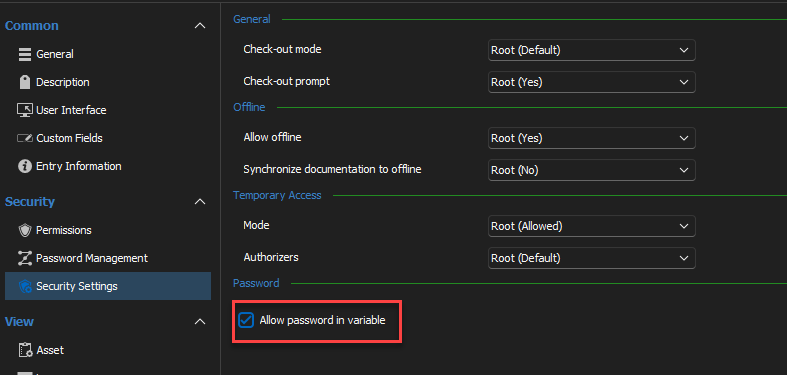
Best regards,
Richard Boisvert
cca74e74-c453-4c8d-96d8-3e6074dfaba4.png
yep it works.
I didn't know that the allow password has to be enabled also on the PAM link entry.
Thx!
L.
Hello Luca,
I'm glad to hear that it fixed the issue!
Best regards,
Richard Boisvert