older SSH connections stopped working

I stumble over more and more SSH connections that I didn't use for a while and which suddenly don't work anymore: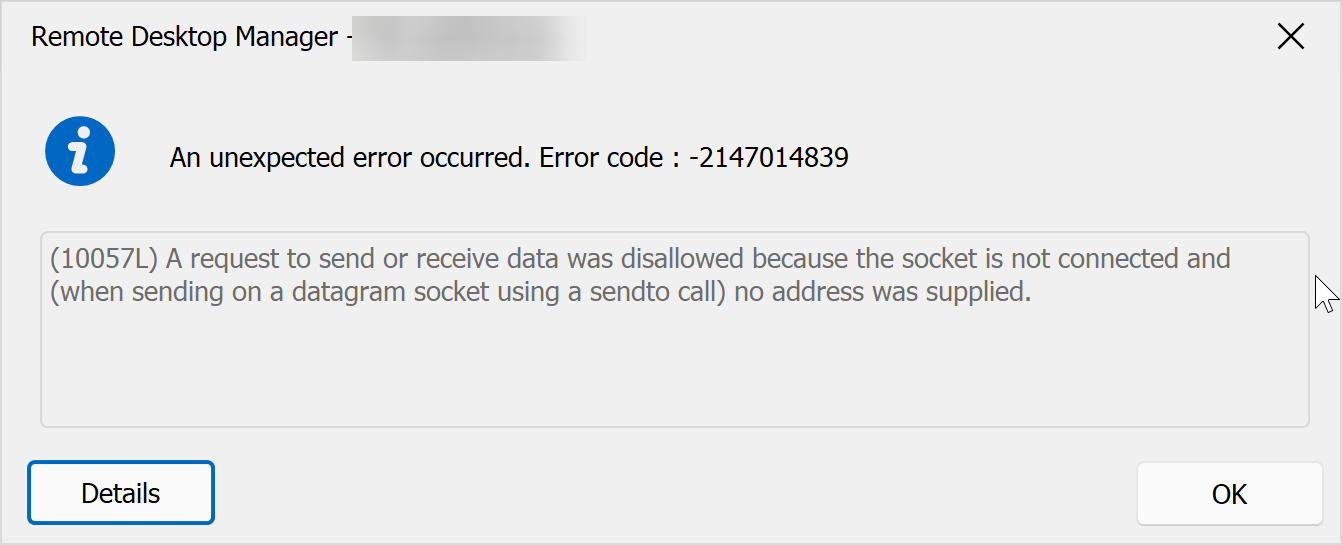
connecting with other ssh clients (WSL ubuntu for example) works. This doesn't happen with all SSH sessions.
b8af222e-f576-4d82-8dec-8eb7548f8365.png
All Comments (16)
Hello perler,
Thank you for reaching out to us regarding this matter.
To better assist you, could you please provide the following information:
1. What version of RDM are you currently using and what type of data sources are being used?
2. Do the servers where the data sources are located have a different proxy or firewall configuration?
3. Are any SSH keys being used in these entries?
Best Regards,
Patrick Ouimet
- latest
- no, all the same
- yes, in all of the entries
I suspect a bit, that you changed the cipher compatibility over the years, how can I investigate?
Hello,
Do you notice any changes in the properties of the entry in terms of what's available or if anything may be misconfigured ?
Otherwise, is anything particular logged when you enable the logs in the properties and set it to verbose 3 ?
Best regards,
These are old entries, so, no, I don't see what's changed or not, didn't look at them for months.
Strangely, on another notebook, the same entries work. Need to check when back on vacation and in front of the notebook with the problem.
Hello Perler,
Thank you for your swift reply!
In that case, we will wait for your return from vacation.
Best regards,
James Lafleur
not much:
[8 Jan 2024 09:14:54] Devolutions Protocols version: 2023.12.8.1 Windows

[8 Jan 2024 09:14:54] Terminal font: Courier New [Courier New, fixed=True]

[8 Jan 2024 09:14:54] Starting SSH, verbose level: 3

[8 Jan 2024 09:14:54] Setting up connection

[8 Jan 2024 09:14:54] Connecting to port: 22 (IP any)

[8 Jan 2024 09:14:56] SSH Error reading raw input
[(10057L) A request to send or receive data was disallowed because the socket is not connected and (when sending on a datagram socket using a sendto call) no address was supplied.]

[8 Jan 2024 09:14:56] SSH Error sending raw output
[(10057L) A request to send or receive data was disallowed because the socket is not connected and (when sending on a datagram socket using a sendto call) no address was supplied.]

[8 Jan 2024 09:14:56] Disconnection in progress

[8 Jan 2024 09:14:56] Bytes sent: 0, Bytes received: 0

[8 Jan 2024 09:14:56] Packets sent: 0, Packets received: 0

[8 Jan 2024 09:14:56] Kex completed: 0

[8 Jan 2024 09:14:56] Disconnecting
but:
$ nmap -p 22 ***********
Starting Nmap 7.80 ( https://nmap.org ) at 2024-01-08 09:16 CET
Nmap scan report for ***********
Host is up (0.031s latency).
Other addresses for *********** (not scanned): *********::
rDNS record for ********* : ************

PORT   STATE SERVICE
22/tcp open  ssh

Nmap done: 1 IP address (1 host up) scanned in 0.16 seconds
Hello Perler,
You said that the connection worked on another computer in that case would it be possible to create a portable installation of rdm ?
Here are the steps.
1. to follow: Download the .zip file from this link: https://remotedesktopmanager.com/home/thankyou/rdmbin
2. Create a new folder on your Desktop.
3. Extract the contents of the .zip file into the folder you created in step #2.
4. Navigate to this folder after extracting the .zip file and run "remotedesktopmanager.exe."
5. Connect to your data source.
This test will help us determine whether the issue is related to your local installation of RDM.
Best regards,
Carl Marien
it's the same problem
Hello Perler,
For diagnostic purposes, could you please attempt to recreate the problematic entry and see if the issue persists?
Additionally, to assist us in accurately replicating your issue, could you provide an estimate of the version of rdm you were using when the problematic entry was created?
Best regards,
Carl Marien
the recreated entry doesn't connect as well. I think it's a cypher problem, the host on the other side is not under our control, so we don't really know what they are doing. But.. a virigin ubuntu connects, so maybe you should just emulate the used/accepted cyphers here and be done with it?
the entry is at least 4 years old, so they may use some older cyphers..
Hello,
Thank you for providing that clarification. I will consult with our engineers to determine if this could be causing the issue.
I will keep you updated on our findings.
Best regards,
Carl Marien
Hello Perler,
Based on the logs you have send, the error seems to occur during the TCP connection.
Therefore, it's important to check the usual TCP connection issues: firewall settings, accuracy of the host address and port, DNS, etc.
Additionally, could you please check if this issue occurs when using other applications?
Best regards,
Carl Marien
please read the thread. everything is in there :) (other apps work)
Hello,
We would like to do a remote session with you, if possible, so that we can have a look at your issue.
Would it be possible for you to do such a session?
Best regards,
Carl Marien
please open a support case and let's arrange it there..
Hello,
I have forwarded a support session link to your email.
Best regards,
Carl Marien