Automatically reconnect on reboot

Hello, I am looking for a way to always keep the RDP connection active, sometimes the RDPs reboot, and I must reconnect (because the software running requires webGL and the machines don't have GPUs).
Have been trying different methods suggested on the forum to no avail. I have the 'reconnect if connection is dropped' in the experience tab enabled.
"Is online" enabled and set to automatic.
As soon as I reboot the server - it disconnects and seemingly never attempts to reconnect.
Appreciate any suggestions.
All Comments (7)
Hello tomajx,
Thank you for contacting us on that matter.
Which version of RDM and what type of data sources are you currently using?
Could you tell me if you tried the "Keep-Alive" option in the entry properties?
Could you try this behaviour with MSTSC and see if you have the same result?
Best regards,
Patrick Ouimet
Thank you for the response Patrick, I am using the Free version 2023.3.35.0 64bit
Data source I am using for this machine is RDP (Microsoft Remote Desktop)
Now I have set the 'keep-alive' to 20sec, but right after I click reboot on the rdp - the window just goes blank and it never comes back.
I am not sure about the MSTSC, could you please elaborate on how to enable it?
Thank you
Hello tomajx,
Thank you for your feedback.
To clarify, I am referring to MSTSC, which is a Remote Desktop Protocol (RDP) used on Windows. I would like to know if this can be configured on the Windows side. If it is possible to configure it on Windows, it would be helpful for us to investigate the issue from our end.
Best regards,
Patrick Ouimet
Yes, it is possible to configure whatever is needed, should it be done on the computer that I am connecting to, or the one with RDM installed? If you could point me to some article on what exactly needs to be done I could set everything up.
Appreciate it.
Hello,
Have you tried the mouse jiggler feature in RDM version 2023.3 ?
This will allow you to keep your RDM connections connected.
You can set it globally from File > Options > Types > Sessions > Remote Desktop
Or individually by modifying the properties of an RDP entry and going under the "Experience" tab.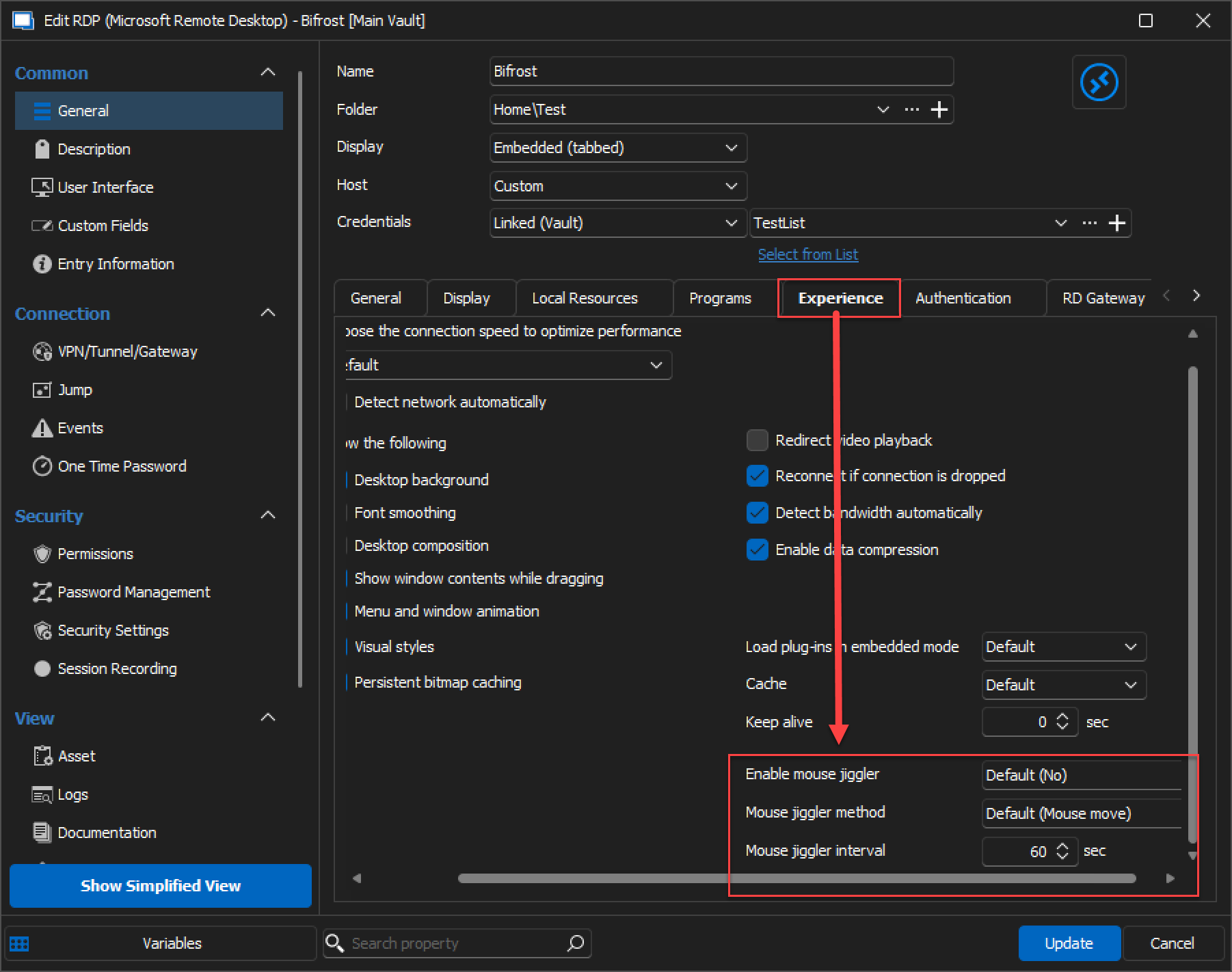
Best regards,
image_2023-12-27_153316003.png
Hello,
Have you tried the mouse jiggler feature in RDM version 2023.3 ?
This will allow you to keep your RDM connections connected.
You can set it globally from File > Options > Types > Sessions > Remote Desktop
Or individually by modifying the properties of an RDP entry and going under the "Experience" tab.
Best regards Thank you for the response Zachary, I have tried to enable mouse jiggler now, with no avail. I am not sure if we are on the same page though, at least it seems like this setting should keep the connection alive while the computer is actually turned on if I understand correctly.
And what I am looking for is to keep it alive, and try to reconnect automatically when the computer is restarting( right now it just diconnects on reboot). Maybe it would be possible to set up some kind of automatic script to reconnect every minute if the session is disconnected?
Appreciate it.
Hello,
Thank you for your swift reply!
According to the information I have gathered on that matter, it is not possible to do precisely what you are looking for. An alternative would be to enable the option "Keep tab page opened on disconnect" and simply click on the "Reconnect" button when your remote machine reboots.
This option can be found in the properties of your RP entry, under the "User Interface" section: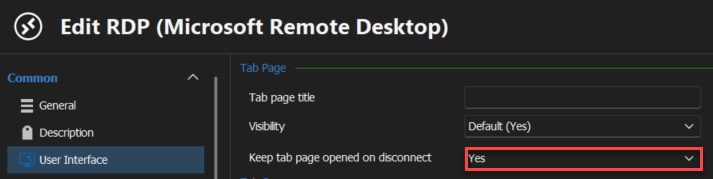
Best regards,
James Lafleur
6599e67d-b031-4428-9fb8-c1db1e84efda.png