Long start up time

Hi,
The startup time for RDM from click RDM icon to choose Data source it takes 1 minute and 31 seconds the first time RDM is started on the computer after reboot.
If I close RDM and start it agent, it takes under 10 seconds.
Remote Desktop Manager 2023.3.31.0
Data source Microsoft Azure SQL
Windows 11 23H2
All Comments (10)
Hello acetico,
Thank you for contacting us on that matter.
Could you tell me if you are using any Azure virtual machine?
How many entries do you have per vault with your SQL Azure?
How many vaults?
Are you using any MFA to log in?
Best regards,
Patrick Ouimet
This is from a local computer.
We have around 32 000 entry’s a cross 464 vaults.
The vault with most entry’s has 2596.
Ther is not any MFA in this process.
To be clear, the time I am referring to is from I click on the icon to the chose data source apers.
Hello acetico,
Could you tell me if you have the same behaviour with SSMS?
Best regards,
Patrick Ouimet
That takes 35 seconds
Hello,
You mentioned that:
To be clear, the time I am referring to is from I click on the icon to the chose data source apers.
I'd like to know if you set your Azure data source as default if the connection is faster ?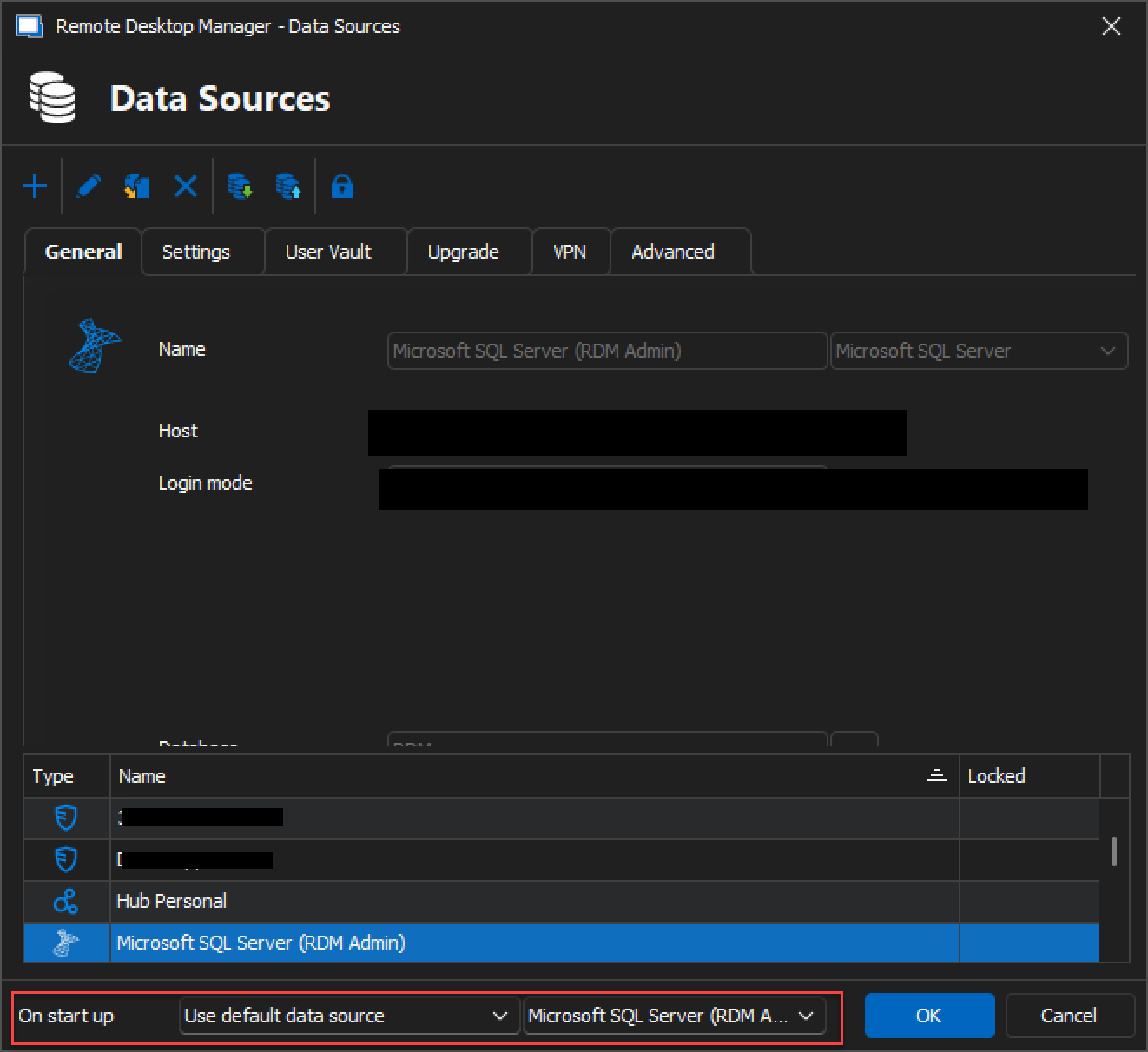
Best regards,
image_2023-12-27_154222469.png
image_2023-12-27_154213873.png
No, it isn’t faster to set it to use default data source.
When you are asked to chouse data source in the startup process, has it then done any connection to the data source?
Hello,
The connection to the data source is only established when the data source is selected.
In RDM, go to Help > Profiler to display the profiler window, set the Profiler level to 2049 under the Performance tab, and move the window aside.
Press CTRL + F5 to bypass the cache and retrieve the data directly from your Azure SQL.
There will be several lines that populate in the Profiler; please copy that information (icon bottom right) and provide us with the information. It will tell us what call is taking more time to complete: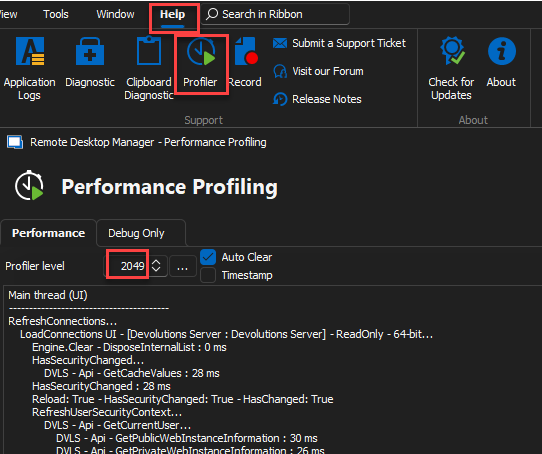
Best regards,
Richard Boisvert
b62c61c8-9301-432d-88f2-3861f615322c.png
Hi,
The info you requested.
The data source needs fine tuning also, but this problem is the time it takes form RDM is started to the data source is selected, so this shod not be a data source problem.
Main thread (UI)
----------------------------------------
RefreshConnections...
LoadConnections UI - [Microsoft Azure SQL : xxxxxx] - ReadOnly - 64-bit...
Engine.Clear - DisposeInternalList : 0 ms
HasSecurityChanged...
ConnectionManager.RefreshDataSourceSettings...
GetDataSourceSettings : 15 ms
ConnectionManager.RefreshDataSourceSettings : 15 ms
HasSecurityChanged : 24 ms
Reload: True - HasSecurityChanged: True - HasChanged: True
Engine.Clear - DisposeInternalList - ClearRoot : 0 ms
LoadConnectionsFromDataSource...
GetDataSourceSettings : 12 ms
GetConnections...
Database.GetConnections...
ReadConnections...
Reading connections from database : 13 ms - Run count : 0 - Count : 75
ReadConnections : 28 ms
DecryptAndDeserializeConnections...
DecryptData : 0 ms - Count : 75
DeserializeData : 1 ms - Count : 75
DecryptAndDeserializeConnections : 1 ms
Database.GetConnections : 30 ms
GetConnections : 30 ms
LoadConnectionsFromDataSource : 838 ms
Load connection overrides...
Has changes : 14 ms
Load connection overrides : 14 ms
LoadConnections [Microsoft Azure SQL : xxxxxx - Global Vault] - ReadOnly - 64-bit : 576 ms
RefreshRepositories : 1 ms
FavoriteManager.LoadFolders : 64 ms
LoadConnections UI - [Microsoft Azure SQL : xxxxxx] - ReadOnly - 64-bit : 1884 ms
RefreshConnections : 1884 ms
Connection States: Refresh : 20 ms
TreeView.LoadConnectionList...
BeginUpdate...
PreCreateGroups : 0 ms - Run count : 1
BeginUpdate : 3 ms
TreeView.LoadConnectionList : 4 ms
Load Expand States...
Expanded: 8 - Nodes : 34
Nodes...
Expand : 0 ms - Run count : 1
Collapse : 0 ms - Run count : 1
Nodes : 0 ms
Load Expand States : 0 ms
SelectionChanged - Default...
RootDashboardOverviewManager.LoadRootDashboardOverView - Quick Load : 2337 ms
SelectionChanged - Default : 2345 ms
Thread : 11
----------------------------------------
11 - Sync to Offline : 5 ms - Count : 34
11 - Sync to Offline : 8 ms - Count : 33
11 - Sync to Offline : 20 ms
Thread : 12
----------------------------------------
12 - OfflineManager.SaveMeta...
12 - Expiration : 528 ms
12 - OfflineManager.SaveMeta : 528 ms
Thread : 24
----------------------------------------
24 - OfflineManager.SaveMeta...
24 - SaveSecurityInfo...
24 - xxxxxx-xxxxxx-xxxxxxx-xxxxxxxx
24 - SaveSecurityInfo : 131 ms
24 - Repository : 3 ms
24 - Expiration : 109 ms
24 - DataSourceSettings : 105 ms
24 - OfflineManager.SaveMeta : 351 ms
24 - OfflineManager.SaveMeta...
24 - Expiration : 15 ms
24 - OfflineManager.SaveMeta : 17 ms
Thread : 25
----------------------------------------
25 - OfflineManager.SaveMeta...
25 - SaveSecurityInfo...
25 - xxxxxx-xxxxxx-xxxxxxx-xxxxxxxx
25 - SaveSecurityInfo : 22 ms
25 - Repository : 4 ms
25 - Expiration : 492 ms
25 - DataSourceSettings : 40 ms
25 - OfflineManager.SaveMeta : 572 ms
25 - RootDashboardOverviewManager.LoadRootDashboardOverViewAsync - Full Load : 231 ms
Thread : 26
----------------------------------------
26 - OfflineManager.SaveMeta...
26 - SaveSecurityInfo...
26 - xxxxxx-xxxxxx-xxxxxxx-xxxxxxxx
26 - SaveSecurityInfo : 137 ms
26 - Repository : 3 ms
26 - Expiration : 62 ms
26 - DataSourceSettings : 108 ms
26 - OfflineManager.SaveMeta : 312 ms
Hello,
Thank you for your swift reply!
According to this log, connecting to your SQL Azure takes about 12 seconds. Do you happen to be working through a VPN?
The fact that restarting RDM allows you to connect faster seems to be because a cache has already been created.
Best regards,
James Lafleur
Yes I am working through a VPN.
If I understood you correctly, RDM does not attempt to connect to the database until you have selected a data source when “on startup: Prompt for data source” is selected as I have.
Then the fact that I'm connected via VPN shouldn't have anything to do with the time it takes to start RDM up and coms to select data source.