ISL Light Integration

I found a few old posts about ISL Light, and the following integration guide from ISL Online: https://help.islonline.com/134814/741793
When I tried to follow the instructions, there was no ISL Light AlwaysOn Import anymore.
I went with the ISL Light Plugin, and added it like described. When I used "Remote Support "New Session code)" as Mode, it asked me for the path of ISLLight.exe, which I provided. After launching the entry, I get the session code and it seems fine. When I selece ISL AlwaysOne computer, I cant select the computer below. Even if I hit refresh, it won't show me any computers in the list.
Am I doing something wrong, or what is needed, that I can select the PCs from the list.
Is it still possible to import AlwaysOne Entries?
Thanks and cheers
Patrick
All Comments (10)
Hello Patrick,
Thank you for your reply,
I see, I believe what you're looking for is under "File" -> "Import" -> 'Sessions" then the "ISL AlwaysOn" option.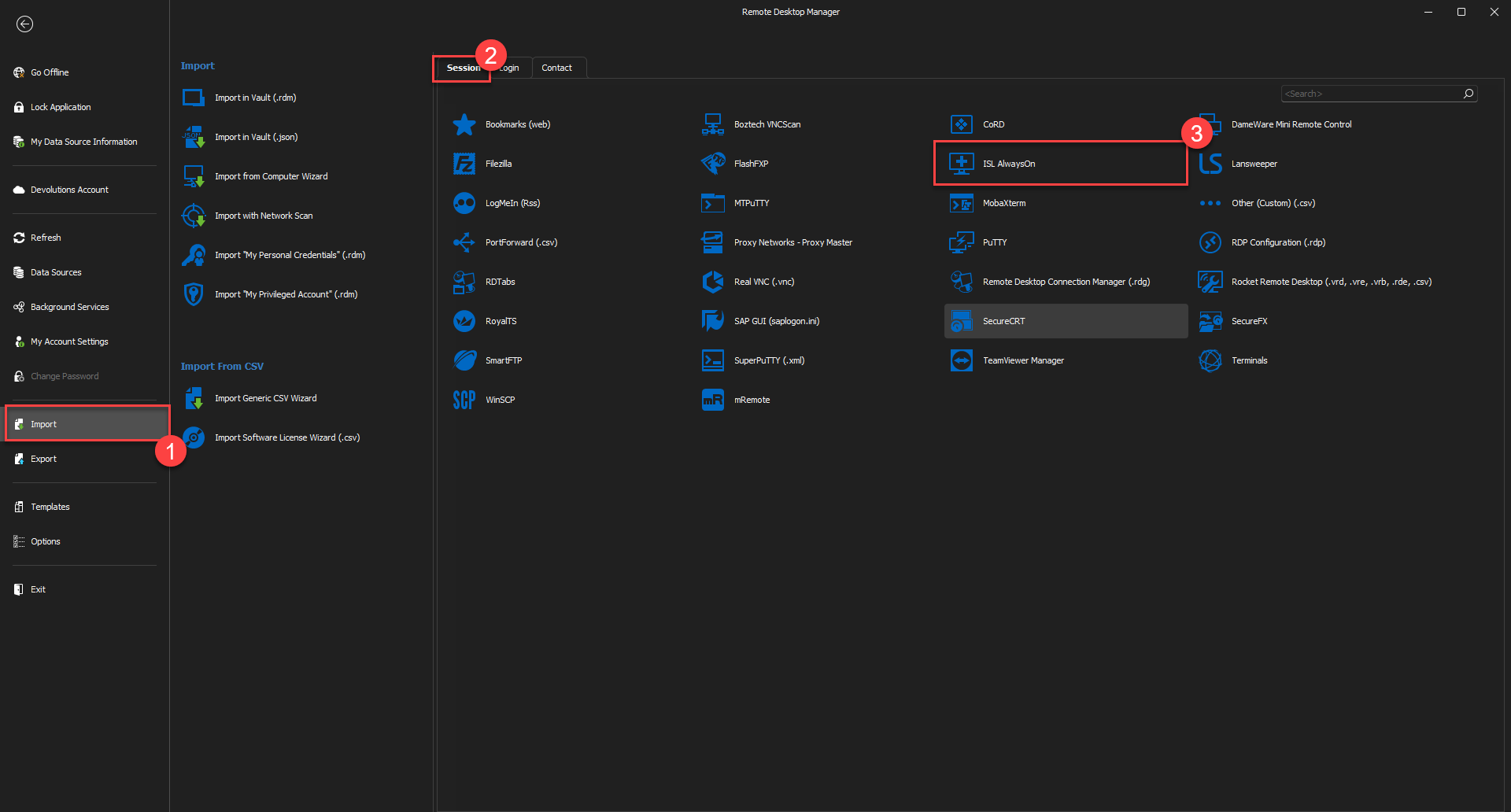
Let me know if this helps,
Best regards,
Samuel Dery
a6544fcd-c4b1-4210-ba59-5dd341e136eb.png
Thanks Samuel
That helps with the import, but I still can't select any machines from the account.
When I select ISL AlwaysOne computer, I cant select the computer below. Even if I hit refresh, it won't show me any computers in the list. 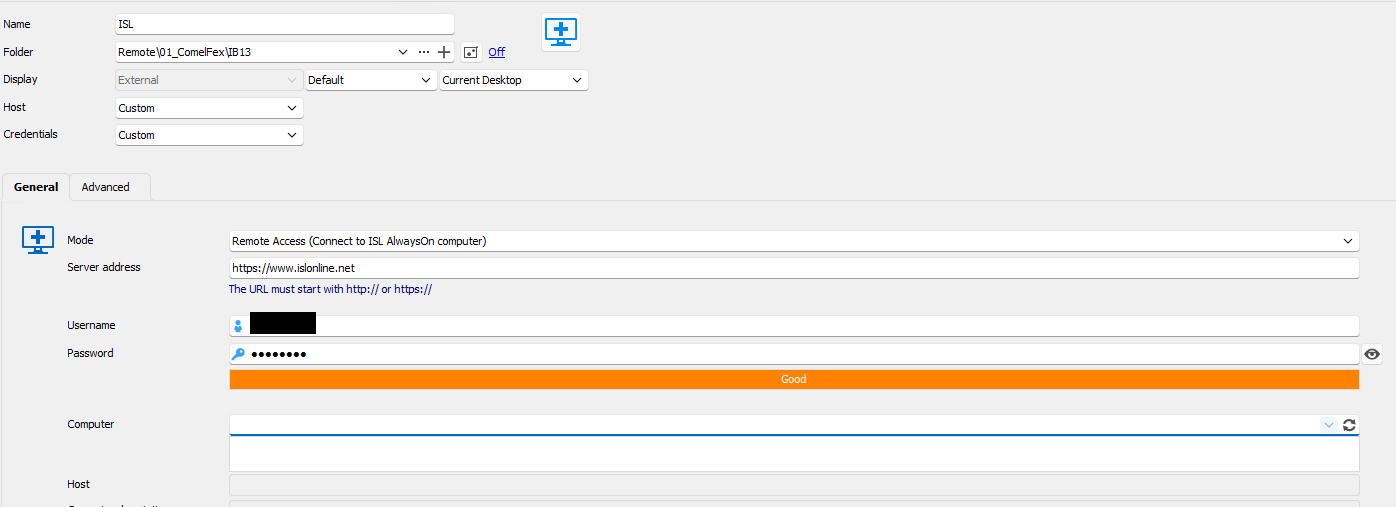
20-12-_2023_19-41-16.png
Hello,
Thank you for your reply,
Does it work as expected if you type the computer name manually in this field?
Let me know,
Best regards,
Samuel Dery
hi Samuel
No it does not work at all. I can't save the entry, even when I enter the name manually. I think the integration for AlwaysOn is broken at the moment.
Cheers
Patrick
Hello Patrick,
Thank you for your reply,
I see, could you confirm which version of RDM you're currently on and which type of data source you are using?
Let me know,
Best regards,
Samuel Dery
Hi Samuel
It Version 2023.3.24 with DVLS as Datasource.
Best regards
Patrick
Hello Patrick,
Thank you for your reply,
I see, could you update to the latest version 2023.3.34.0 which can be downloaded from here: https://devolutions.net/remote-desktop-manager/home/thankyou/rdmsetup/
Let me know if the problem persists with the latest version,
Best regards,
Samuel Dery
Still the same. Also with .35
You can test it yourself, do a trial account install a alwayson client and try it.
Hello Patrick,
I will do some tests and let you know the result as soon as possible.
Thank you!
Best regards,
Maxim Robert
Hello,
Thanks for your patience!
Could you try adjusting the "Mode" settings to Remote Support (New session code) for ISL Light Entry, then click update. Once you've made these changes, follow the instructions specified in Step 5 of the ISL Help topic with RDM.
Help Topic: https://help.islonline.com/134814/741793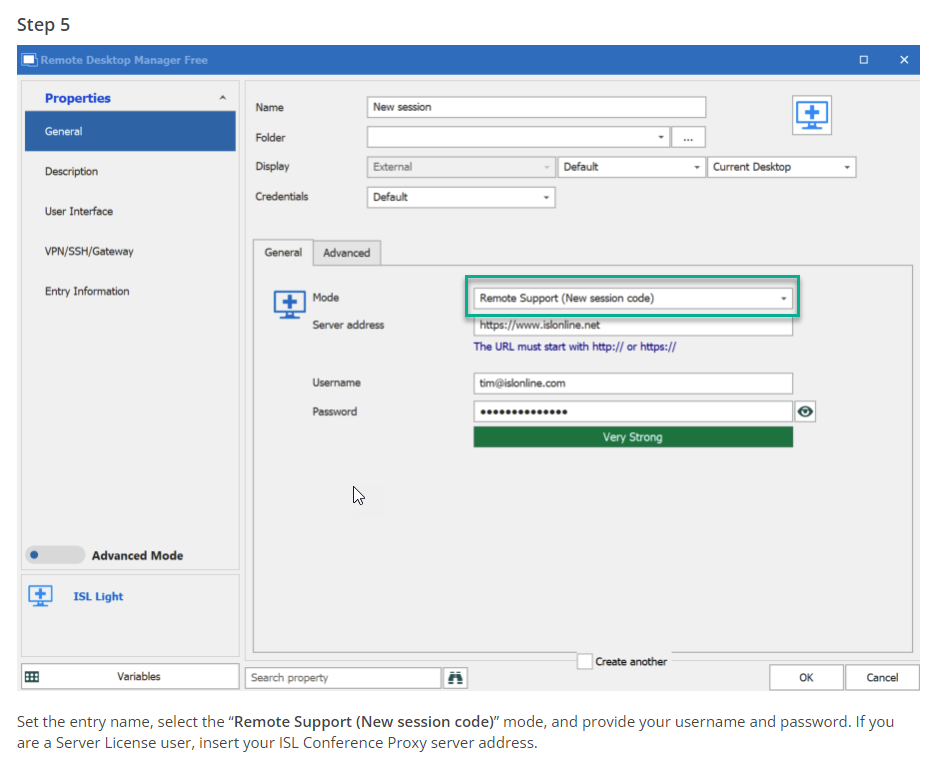
Please inform me if the problem persists.
Best regards,
Maxim Robert
2024-01-08_08-32-28.png