Unable to Connect to your Data Source

This started happening today. I get the same issue on different computers and I can't access any of my stuff. RDM is up to date. 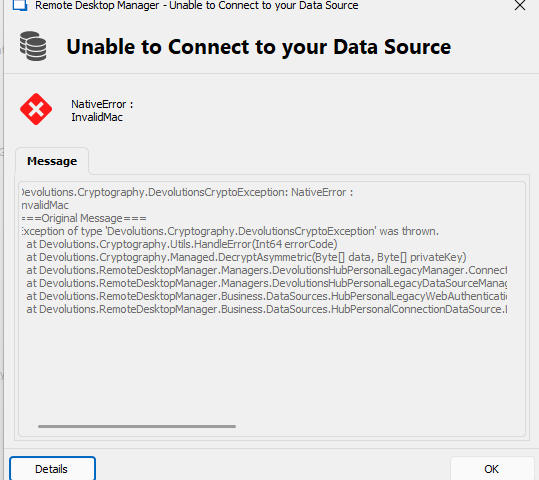
Screenshot 2023-12-19 103006.png
All Comments (8)
Hello,
What version of RDM are you running? Could you make sure that you are running the latest release? You can download RDM 2023.3.33.0 here
https://devolutions.net/remote-desktop-manager/home/download/
Best regards,
Jeff Dagenais
2023.3.33.0 64-bit
Hello,
Are you able to connect on https://hub.devolutions.com via a browser like Chrome or Firefox as example?
Best regards,
Jeff Dagenais
Hello,
Are you able to connect on https://hub.devolutions.com via a browser like Chrome or Firefox as example?
Best regards,
Yeah, I can log in here. And I can see all the devices I normally see in the application.
Hello Kelly,
Thank you for your reply.
I see. From the web interface, if you go into the "Properties" of the "Root" folder, do you have credentials currently saved inside the root?
If so, could you try the following: Create a new Username/Password type entry and save the same credentials in there. Once done, go back to your Root folder "Properties" and change the "Credentials" field from custom to "Linked" and point to the Username/Password entry we just created.
With this complete, restart RDM and validate if you still encounter this error.
Let me know.
Best regards,
Samuel Dery
Hello Kelly,
Thank you for your reply.
I see. From the web interface, if you go into the "Properties" of the "Root" folder, do you have credentials currently saved inside the root?
If so, could you try the following: Create a new Username/Password type entry and save the same credentials in there. Once done, go back to your Root folder "Properties" and change the "Credentials" field from custom to "Linked" and point to the Username/Password entry we just created.
With this complete, restart RDM and validate if you still encounter this error.
Let me know.
Best regards,
Hi Samuel,
I'm still getting the same error after following those instructions. Is there anything else I can try?
Hello,
Out of curiosity, if you delete the Hub Personal under File > Data Sources in RDM and then add it back, does this resolve the issue ?
Best regards,
Hello,
Out of curiosity, if you delete the Hub Personal under File > Data Sources in RDM and then add it back, does this resolve the issue ?
Best regards,
This worked! Thank you!