Display mode - Bug or By design ?

Hi
I have set in settings that my RDP sessions displaymode should be undocked. (And it works great!)
Now I have 1 RDP entry which I would like to open docked, but it seams that "Settings" Display mode is priority 1
So even if I set a Local specific setting "Settings" still win.
NOTE: The connection is in my private vault, can try with a shared vault entry if it makes sense.
RDM: Version 2023.3.32.0
DS: DVLS 2023.3.8.0
OS: Win11
So is this a bug or is it by design that, what you put in settings is "The ruler of them all" :) ?
If by design, would it be possible to specify Display Size when right clicking on root and selecting Local specific settings?
/Lars
Remote Desktop Manager connected with Devolutions Server running newest versions.
------------------------Signature------------------------
Sorry if any of above sounds harsh or provoking, it is NOT meant as such, but I have Asperger's and don't always know.
My intentions is always to be friendly.
-------------------------------------------------------------
All Comments (9)
Just did another test, so maybe the Local specific settings directly on root is the culprint?
I tried to set settings to Configured, then in Local specific, on root, set that it should open undocked. but the entry I tried with was set to External, and the connections opened as external.
So the Local specific settings do not work, on root at least?
Because the Local specific setting I set directly on the entry I want to open docked, opened docked, but with wrong screen size, as I still have screen size set in Settings.
AND if I go to File -> My Account Settings -> Local Specific Settings list it is entry, the list is empty despite having 2 places I have set Local specific settings: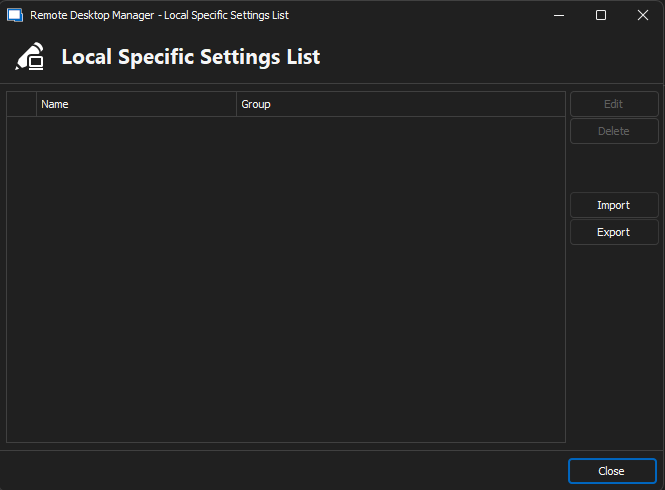
/Lars
Remote Desktop Manager connected with Devolutions Server running newest versions.
------------------------Signature------------------------
Sorry if any of above sounds harsh or provoking, it is NOT meant as such, but I have Asperger's and don't always know.
My intentions is always to be friendly.
-------------------------------------------------------------
53589293-8d07-4b9b-a8c9-ac2d417fbf07.png
I have also tested from a shared vault same behavior.
Remote Desktop Manager connected with Devolutions Server running newest versions.
------------------------Signature------------------------
Sorry if any of above sounds harsh or provoking, it is NOT meant as such, but I have Asperger's and don't always know.
My intentions is always to be friendly.
-------------------------------------------------------------
Hello,
Just to be sure, is there anything in your User Specific Settings ?
I've tried reproducing the issue on RDM 2023.2.32.0 and couldn't get the behaviour you described.
Best regards,
Hi
Sorry for late respones!
Under "My Account Settings" the "User Specific Settings List" is empty.
In My User Vault I don't have "User Specific Settings".
In my test vault, no, there is no "User Specific Settings" either.
Regards, Lars
Remote Desktop Manager connected with Devolutions Server running newest versions.
------------------------Signature------------------------
Sorry if any of above sounds harsh or provoking, it is NOT meant as such, but I have Asperger's and don't always know.
My intentions is always to be friendly.
-------------------------------------------------------------
We have the same with RDP Embedded/external.
If you in settings sett RDP to Embedded, the user and local settings is not working.
But if you right on the entry and chose to connect external manually ant it works for that time.
This has been this way for at list many years.
Hi
Sorry for late respones!
Under "My Account Settings" the "User Specific Settings List" is empty.
In My User Vault I don't have "User Specific Settings".
In my test vault, no, there is no "User Specific Settings" either.
Regards, Lars
Hello nOrphf,
I was wondering if you'd be open to me opening a case on your behalf so that I can email you a link to schedule a remote session ?
I believe this could help us get to the bottom of this issue you're currently experiencing.
Best regards,
We have the same with RDP Embedded/external.
If you in settings sett RDP to Embedded, the user and local settings is not working.
But if you right on the entry and chose to connect external manually ant it works for that time.
This has been this way for at list many years.
Hello acetico
This doesn't seem to be the same issue as mentioned by nOrphf above, however I'd like to know what your RDM version is.
It seems to me the issue could be explained by a configuration, but I'd also like to be sure regarding which version you're using to best know how we can proceed to resolve your RDM problem.
Best regards,
Hi
Sorry for late respones!
Under "My Account Settings" the "User Specific Settings List" is empty.
In My User Vault I don't have "User Specific Settings".
In my test vault, no, there is no "User Specific Settings" either.
Regards, Lars
Hello nOrphf,
I was wondering if you'd be open to me opening a case on your behalf so that I can email you a link to schedule a remote session ?
I believe this could help us get to the bottom of this issue you're currently experiencing.
Best regards,
Yes, absolutely, always happy to help 👍
/Lars
Remote Desktop Manager connected with Devolutions Server running newest versions.
------------------------Signature------------------------
Sorry if any of above sounds harsh or provoking, it is NOT meant as such, but I have Asperger's and don't always know.
My intentions is always to be friendly.
-------------------------------------------------------------
Yes, absolutely, always happy to help 👍
/Lars
Hello,
Perfect !
A ticket has been opened, and a link has been sent to your email inbox to schedule the remote session.
Best regards,