No enterprise license found after update

Hello, after the latest update, I no longer have access to my Vault. Instead of "Vault," the text reads "No Enterprise license found."
I am only using the free license. After completely uninstalling with Revo Uninstaller and rolling back to version 3.24.0, everything is working as usual again.
Is this a known bug?
Regards,
Max
All Comments (19)
Me to, so there must be a bug anywhere in current version...
Experienced the same problem after the latest update.
There is also no license visible under Administration/License
If you enter the serial number it shows license not supported.
Regards
Same problem here. I have uninstalled the Enterprise version, but downloading the 'free' version just installs the Enterprise version again.
Downloading version 2023.3.31.0 from https://devolutions.net/remote-desktop-manager/home/previousversions/free/ fixed the problem though.
Same problem here. I have uninstalled the Enterprise version, but downloading the 'free' version just installs the Enterprise version again.
Downloading version 2023.3.31.0 from https://devolutions.net/remote-desktop-manager/home/previousversions/free/ fixed the problem though.
Thank you, I didn't see the link. I'm glad I'm not the only one with the issue :D
Same here, went back to 2023.2.35.0 and it works..
Same problem here. I have uninstalled the Enterprise version, but downloading the 'free' version just installs the Enterprise version again.
Downloading version 2023.3.31.0 from https://devolutions.net/remote-desktop-manager/home/previousversions/free/ fixed the problem though.
Thanks you very much for this link. I almost had a heart attack when all my hosts disappeared from the app. it looks, Devolutions does not like free users. :-)
Hello,
Thank you all of you for reporting this issue.
A ticket has already been opened internally for this issue.
In the meantime, the workaround is to uninstall version 2023.3.32 and install version 2023.3.31.
We will post it here once the fix will be released.
Thank you for your patience.
Best regards,
Érica Poirier
Hi all,
This issue is on me.
Last week I pushed a few optimization changes to the release branch. Unfortunately my implementation of our "short lived" cache had a design flaw. Was this tested before release? Yes, of course. Then why didn't this issue surface during the tests? Well, unless your system (OS) has been running 24+ days, you won't/shouldn't have the issue.
A new build is currently being done and will be sent to acceptance testing and released as soon as possible.
Sorry for the inconvenience.
Fun quote that illustrates this issue.
There are 2 hard problems in computer science: cache invalidation, naming things, and off-by-1 errors. -- Leon Bambrick
Stéfane Lavergne
Thanks Stefane for letting us know.
If possible, can you please update us in this thread after the fix was tested and accepted so we know we can upgrade back to latest version again?
Personally, I reverted to 2023.3.31 (previous version) to fix this issue for now.
Thanks so much!
Hello Sagi,
Thanks for your feedback!
We will post it here once the fix will be released.
Thank you for your patience.
Best regards,
Maxim Robert
Hi all,
2023.3.33 of RDM is out and will fix the problem about the "No enterprise license" issue in 2023.3.32.
Thank you everyone for your patience and the feedback you gave us.
Best regards,
Maxim Robert
The upgrade is showing version 3.32, not 3.33. How can I make sure to download and install 3.33 ?
Thanks.
Sagi
Hello,
You can use this link below to download the version 2023.3.33:
https://cdn.devolutions.net/download/Setup.RemoteDesktopManager.2023.3.33.0.exe
If you have any other questions, feel free to let us know.
Best regards,
Maxim Robert
Thanks much. I upgraded (from 3.31 to 3.33) and it worked.
Sagi
Hi all
I'm having a *similar* problem.
I have have the free version for my home lab, and updated to the .32 version yesterday evening, all seemed to be working fine.
Today I got the message on startup the the 'Enterprise Licence was not found'.
Logged into the portal to retrieve my key, it's apparently not valid even though it expires on 01/01/2025.
I've updated to .33 and where I would normally see the VM's listed on the left hand panel of dashboard, I just see a few icons, most of which are greyed out as in the image below.
I can howver, use the search bar to finf the VM's, but it's painful. I have even reverted to 2023.5.25.0 with the same results.
Thank you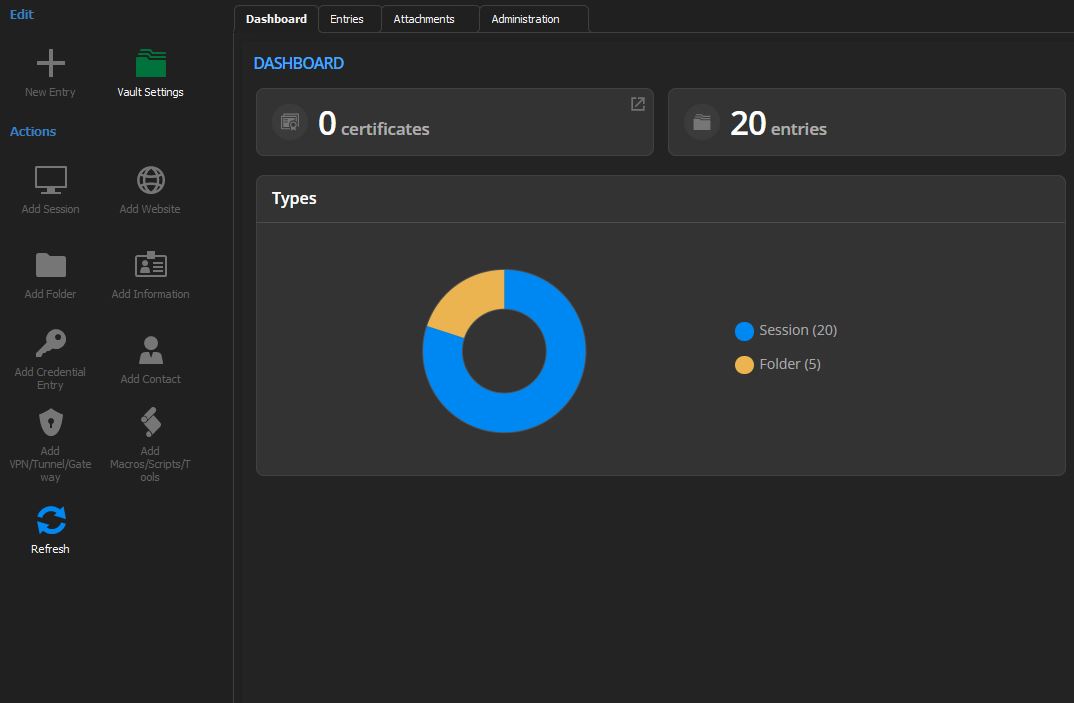
rdm.JPG
Reset layout seems to have fixed the 'missing' VM's. Still not sure if my licence is valid though.
Hello colin2,
I would like to open a ticket with you about your issue. Would it be okay with you?
Please let me know.
Best regards,
Maxim Robert
Maxim Robert
Hello colin2,
I would like to open a ticket with you about your issue. Would it be okay with you?
Please let me know.
Best regards,
Maxim Robert
Sure
How do we proceed, however, it does seem to be working fine.
Hello Colin2,
Thanks for the feedback!
I opened an internal ticket to have a look and everything is working fine.
Best regards,
Maxim Robert
Maxim Robert