SSH to Azure Linux VM via bastion works erraticaly.

Hi,
I recently managed to configure RDM to connect to an Azure Linux box through the Azure bastion thanks to some messages I found here. I log to the bastion and then use an SSH key to log to the server.
I have two PCs connected to the same Devolution account and thus sharing configuration.
After a few weeks of perfect operations I started to have issues connecting to the boxes, BUT the issues were not on both my PCs simulanesouly. One would connect fine and not the other one. Still they share the same account and settings.... I thought the probelm was on the Microsoft side.Problem would appear and disapear without reason.
Since a few days both PCs do not connect anymore. I tried rebooting of course, installing the latest version as I saw some improvements where made around the bastion support.... no difference.
When trying to log it seems to start fine, the screen goes black, and then I get this error message in French even though my RDM is in English (but on a French OS)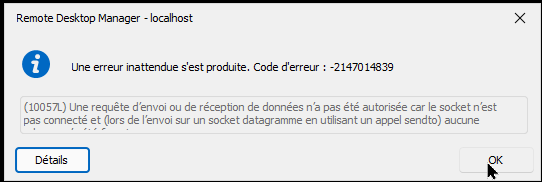
I emptied the RDM logs and tried again to catch the exact errors there..... they remain empty. This error does not end up in the logs.
Any idea where I should look? I am totally puzzled there.
Thanks
Blaise
72f76130-ccd3-4ebc-a694-3e2b06fcd36c.png
All Comments (8)
Hello blaise1,
I sent you an email and opened a case to investigate further.
Best regards,
Patrick Ouimet
Hello
I'm sorry to hear about the issue. Although there were updates to the Bastion integration recently, nothing has changed in the part that actually establishes the tunnel to the Bastion host.
Before troubleshooting further, are you able to tell me if you can successfully open a tunnel to the Bastion using the `az` CLI? Specifically, the command is `az network bastion tunnel` (documentation). If the Bastion tunnel starts correctly, are you able to connect with SSH by pointing RDM to the local IP address and port of the tunnel?
Please let me know if you have any questions or something isn't clear.
Thanks and kind regards,
Richard Markievicz
Hi,
Should I answer to the mail or in this forum?
About versions, I usualy upgrade as soon as the popup appears that informs me a new version is available.
As explained, the problem used to come and go, not at the same time on my two PC, but became (almost) permanent recently. It did not happen after an upgrade but after I had been using 2023.3.22.0 happlyly for a while. I upgraded to 2023.3.32.0 hoping it would solve my problem but it did not.
I put "almost" in brackets because suddenly this morning it started workgin again, even hough I did not change anything in the configuration or even reboot any of my 2 PCs. It works with both versions as I did not upgrade both machines yet.
When it does not work in RDM I can still use tehe Azure CLI to connect (I would be in big trouble if not....) in two ways:
- Open a tunnel and connect my SCP or SSH client to port 127.90.0.1:2222
az network bastion tunnel --name "xxxx" --resource-group "xxxx" --target-resource-id "/subscriptions/xxxxxx" --resource-port "22" --port "2222"
- Open the Azure embedded SSH client with
az network bastion ssh --name "xxxxx" --resource-group "xxxx" --target-resource-id "/subscriptions/xxxx" --auth-type "AAD"
Hello
Thanks for the information. Sorry for any confusion with my colleague and mine crossed responses: you should probably just answer on the forum, since any internal ticket will probably come to me in anyway. So this way is a little more direct.
I wanted to check that the standalone tunnel was working well, we have seen intermittent issues in the past with users in certain regions, where Microsoft was rolling out changes and it caused instability. But it does sound like this is not the case.
Internally, RDM is basically doing the same thing as the `az` CLI - we open a websocket connection to the Bastion, then tunnel the traffic through a local port. I would say that most users of the Bastion integration in RDM are using RDP and SSH is not as well tested, but it should be fundamentally the same.
In terms of troubleshooting, I'm interested in what the application logs tell us.
Perhaps you could try this:
- In "Help", open the "Profiler" and switch to the "Debug Only" tab
- Set the "Debug level" to "1"
- Leave the profiler window open
- Now, try to recreate the issue
- Once you've reproduced the problem, go back to the profiler window
- Either copy the output into a PM to myself, or use the "Send Trace to Support" button (you should mention this forum thread in the message so the information gets routed properly)
Please let me know if something isn't clear or you have further questions
Kind regards,
Richard Markievicz
Hi,
To be honnest my feeling is that the problem is on the Microsoft side... but it is only a feeling.
I was about to answer that I can't do your test as it now works.... but you are lucky, it doesn't work anymore on my main PC, but it works on my sedondary PC.We are in this strange situation where the same Devolution account yields two different results on two different machines.
Could this be linked to some authorisation token? I logged on both machines, could one machine use for some reason a cached token generated for the other one and stored in the shared safe?
Here is the profile output with sensitive data obfuscated.
Double click triggered
Double click node:PROD Konakart 01
OpenConnection: Preparing Azure Bastion
OpenVPN: Finding Opener
OpenVPN: Preparing Dynamic Port
OpenVPN: vpnOpener.Open
Resolved Azure Resource ID: /subscriptions/5f5cc21c-fc29-4xxxxxxxxxxxxxxxxxxxxxx8af7ff/resourceGroups/zuc-10xxxxxxxxrver/providers/Microsoft.Compute/virtualMachines/zuxxxxxxx-01
Debug[2023-12-13T10:05:48]: AZB Tunnel 0d378268-05x7ab63e to zuc-pf-prod-abast-euw initializing
OpenVPN: Result is Not Null
OpenVPN: Calling AfterVPNOpen
OpenVPN: Returning result
Info[2023-12-13T10:05:48]: AZB Tunnel 0d3xxxxxxxxxxxxxxxxxxxxx2da7ab63e listening at 127.0.0.1:26684
Une erreur inattendue s'est produite. Code d'erreur : -2147014839
(10057L) Une requête d’envoi ou de réception de données n’a pas été autorisée car le socket n’est pas connecté et (lors de l’envoi sur un socket datagramme en utilisant un appel sendto) aucune adresse n’a été fournie.
DEBUG - Closing VPN Result Type:EmbededConnectionResult
DEBUG - Closing VPN IsClosed:True
DEBUG - Closing VPN Process is null:false
DEBUG - Closing VPN Process.HasExited:False
DEBUG - Closing VPN Stack:
à Devolutions.RemoteDesktopManager.Managers.OpenedConnectionManager.UpdateOpenedConnections()
à Devolutions.RemoteDesktopManager.Managers.EmbeddedViewManager.Close(IFormConnectionContainer childForm, CloseConnectionMode closeConnectionMode)
à Devolutions.RemoteDesktopManager.Frames.Embedded.FreEmbeddedView.Close()
à Devolutions.RemoteDesktopManager.Frames.Embedded.FreEmbeddedNativeSshShell.Disconnecting()
à Devolutions.RemoteDesktopManager.Managers.EmbeddedViewManager.Close(IFormConnectionContainer childForm, CloseConnectionMode closeConnectionMode)
à Devolutions.RemoteDesktopManager.Frames.Embedded.FreEmbeddedView.Close()
à Devolutions.RemoteDesktopManager.Frames.Embedded.FreEmbeddedNativeSshShell.Terminal_Disconnected(Object sender, EventArgs e)
à Devolutions.Protocols.XtermSsh.OnDisconnected()
à System.RuntimeMethodHandle.InvokeMethod(Object target, Object[] arguments, Signature sig, Boolean constructor)
à System.Reflection.RuntimeMethodInfo.UnsafeInvokeInternal(Object obj, Object[] parameters, Object[] arguments)
à System.Delegate.DynamicInvokeImpl(Object[] args)
à System.Windows.Forms.Control.InvokeMarshaledCallbackDo(ThreadMethodEntry tme)
à System.Windows.Forms.Control.InvokeMarshaledCallbackHelper(Object obj)
à System.Threading.ExecutionContext.RunInternal(ExecutionContext executionContext, ContextCallback callback, Object state, Boolean preserveSyncCtx)
à System.Threading.ExecutionContext.Run(ExecutionContext executionContext, ContextCallback callback, Object state, Boolean preserveSyncCtx)
à System.Threading.ExecutionContext.Run(ExecutionContext executionContext, ContextCallback callback, Object state)
à System.Windows.Forms.Control.InvokeMarshaledCallback(ThreadMethodEntry tme)
à System.Windows.Forms.Control.InvokeMarshaledCallbacks()
à System.Windows.Forms.Control.WndProc(Message& m)
à System.Windows.Forms.Form.WndProc(Message& m)
à System.Windows.Forms.NativeWindow.Callback(IntPtr hWnd, Int32 msg, IntPtr wparam, IntPtr lparam)
à System.Windows.Forms.UnsafeNativeMethods.DispatchMessageW(MSG& msg)
à System.Windows.Forms.UnsafeNativeMethods.DispatchMessageW(MSG& msg)
à System.Windows.Forms.Application.ComponentManager.System.Windows.Forms.UnsafeNativeMethods.IMsoComponentManager.FPushMessageLoop(IntPtr dwComponentID, Int32 reason, Int32 pvLoopData)
à System.Windows.Forms.Application.ThreadContext.RunMessageLoopInner(Int32 reason, ApplicationContext context)
à System.Windows.Forms.Application.ThreadContext.RunMessageLoop(Int32 reason, ApplicationContext context)
à Devolutions.RemoteDesktopManager.Program.Main(String[] args)
Debug[2023-12-13T10:06:02]: AZB Tunnel 0d378268xxxxxxxxxxxxxxxxxxxxxa7ab63e uninitializing
Hello again
Thanks for the information, I have an idea about the problem. Is there a possibility that this is caused by differences or changing network configurations on your machines?
For the SSH Shell, the default IP protocol is "Any", which, depending on your setup, might try and use IPv6. This won't play nicely with the local socket we're using for the tunnel.
In the SSH session, can you try changing "Advanced > Internet protocol" to "IPv4" and let me know if it fixes things?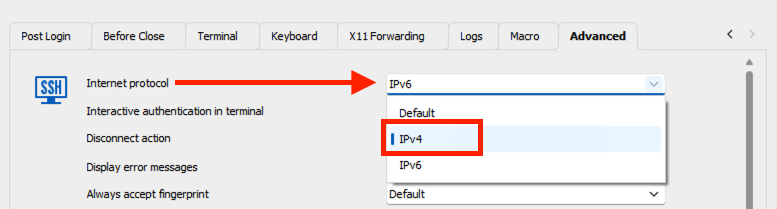
Please let me know if you have any questions or something isn't clear
Thanks and kind regards,
Richard Markievicz
Screenshot 2023-12-13 at 10.26.07.png
Hi,
Problem Solved! Thanks a lot.
This is not the first time I have issues with IPV6 with various software and I usually disable it. In fact it is disabled on some of my connections, mostly wifi, and still active on some others as it is the Windows default.Mybe this is why I got this apparently erratic behavior.
Yours
Blaise
Hi
Thanks for the update! Yes; if IPv6 is enabled on some of your networks this could cause the problem intermittently. Depending on what network is used to establish the connection.
I'm glad we were able to determine the issue.
Please do not hesitate if you have further questions or comments.
Thanks and kind regards,
Richard Markievicz