Passwords in Column-Chooser and Clipboard-Functionality
Passwords in Column-Chooser and Clipboard-Functionality
0 vote

Hello,
we have over 2000 entries in our passwords vault, and would really like to clean it up. One of the features me and my colleagues really miss, is the show of password in column chooser, for instance when viewing folder in the tree, then on the right side tab "Entries". They all complain that in Keepass, our previous solution, one could see if password was "old", and then appropriately go and change it. Now, we have to view each entry, which isn't practical or efficient.
And what I mean is really view all passwords, as in show them all, not hidden.
As for the safety, you could build in that this feature is non-persistent over RDM-restart. As in, on the next RDM start, passwords are hidden (dotted) again, but the column remains.
Additionally, it would be really cool if one could double click the username and password respectively to put it into clipboard. That would make couple of clicks less when copying both entries.
Please consider this.
Thanks
All Comments (2)
Hello,
Thank you for the requests.
Unfortunately, for now we won't be adding a password column in the column chooser. This would come with a lot of risks, as well as performance issues on some of our datasources like Hub since RDM would need to resolve every password individually. I would recommend instead using the Password Analyzer report, or the Entry Security Analyzer report, depending on what you need. I understand it's not the same as what you're used to in other applications like KeePass, but at the moment it's what we can offer.
For your other point about copying the credentials, could you give us more information about how you're storing your entries and how you're copying the credentials? Are you using two different entries, one for the username and one for the password, or is it stored in the same one?
We currently have a feature to configure the "credential entry action", which is what happens if you double click on a credential. Right now you can configure it to "Copy password" for example and it should copy the password.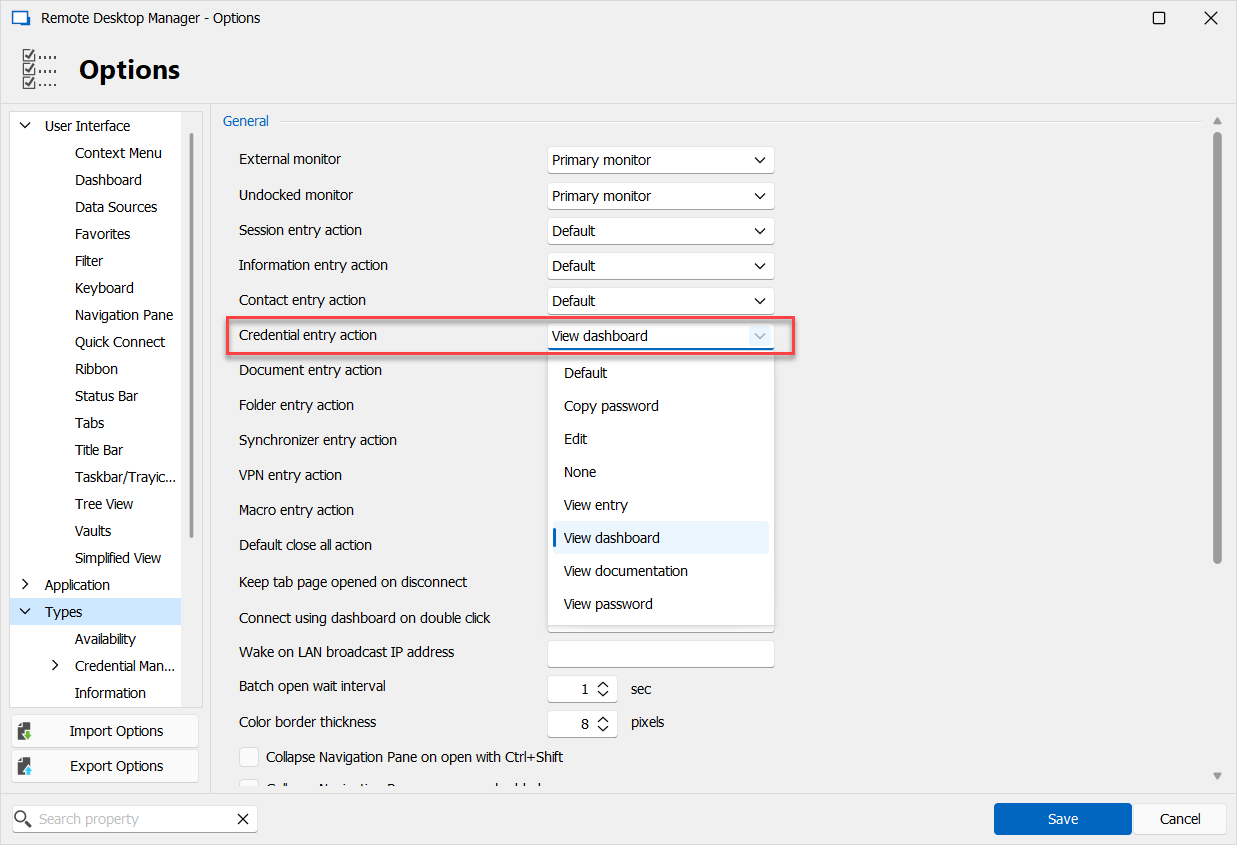
If this is what you're looking for, we could always add an option for "Copy username & password" which will mimic the button in the dashboard that does this.
Maybe I misunderstand your scenario though, let me know if that is the case.
Regards,
Hubert Mireault
26383201-71b0-4128-915e-e142574c33ae.png
OK, I understand. In that case, the copy/paste with a double click is less useful. Good to know I can change the behaviour of the credential entry action, however, it is not usable when compared to the double click functionality of Keepass, which many found useful. But Devolutions Software does have many other advantages, so there's that.
Anyway, thanks for the answer.