SQL error during migration to new server

Hello,
I'm using this article: https://docs.devolutions.net/kb/remote-desktop-manager/how-to-articles/sql-server-database-migration/#solution-2-bacpac to migrate our SQL datasource to a new server.
old server is Server 2012R2 running SQL server 2012
new server is Server 2022 running SQL server 2022
both are VM's on the same ESXi cluster
RDM client version 2023.3.24
While attempting to perform the step "Export Data-tier application" I receive the following error. Not sure how to make this work. Any help would be appreciated.
So, 2 questions:
- any idea why I'm getting this SQL error?
- can I just backup the DB and restore on the new server? I did try this but, when I tried to connect to it, said login failed (which I get because there's no users defined in the Security\\Logins area).
TITLE: Microsoft SQL Server Management Studio
------------------------------
One or more unsupported elements were found in the schema used as part of a data package.
Error SQL71564: Table Table: [dbo].[NotifierGroupToNotifier] does not have a clustered index. Clustered indexes are required for inserting data in this version of SQL Server.
Error SQL71564: Table Table: [dbo].[UserInfoHistory_Archive] does not have a clustered index. Clustered indexes are required for inserting data in this version of SQL Server.
Error SQL71564: Table Table: [dbo].[ConnectionLog_Archive] does not have a clustered index. Clustered indexes are required for inserting data in this version of SQL Server.
Error SQL71564: Table Table: [dbo].[UserBehaviorAnalyticsNotificationAcknowledger] does not have a clustered index. Clustered indexes are required for inserting data in this version of SQL Server.
Error SQL71564: Element User: [TEMPLE\AcronisBU] has an unsupported property AuthenticationType set and is not supported when used as part of a data package.
Error SQL71564: Element Login: [TEMPLE\AcronisBU] has an unsupported property IsMappedToWindowsLogin set and is not supported when used as part of a data package.
(Microsoft.SqlServer.Dac)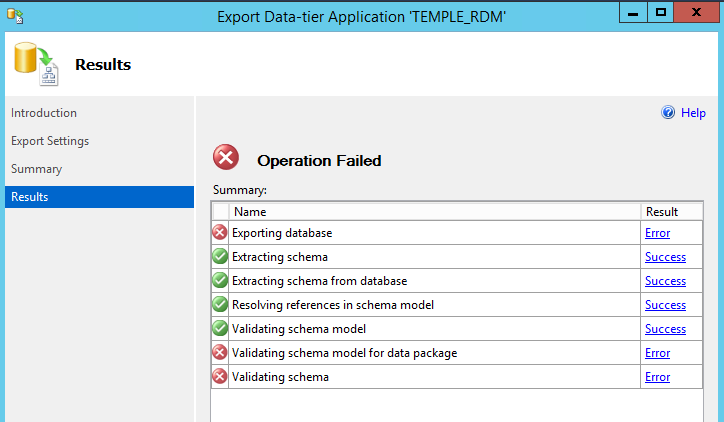
f1671a50-aa90-4991-903a-23da6940dd04.png
All Comments (3)
Hello,
When doing the full backup and restore operation, you should be able to connect with a sysadmin account like the sa account, and then use the Fix SQL Login button on each account to create them in the Security/Login section.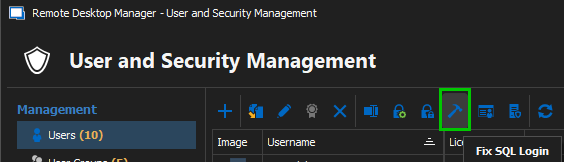
I will check with the developer team for the other error regarding the BACPAC method and get back to you.
Best regards,
Érica Poirier
5c7cdc8d-493d-4cab-95c8-cce066a5984a.png
Good Morning Erica and Devolutions Support,
I was able to get the Data Migration Assistant to complete successfully by running it from the NEW server and fixing a few minor issues. For posterity here's the connectivity issues I had to fix. None of these is rocket science but, here they are:
- Turn off Windows Firewall on old server
- Make sure that the file share has Read/Write permissions for Authenticated Users
- Make sure the NEW SQL server can utilize SQL logins
I was then able to log in to the new datasource.
Hello,
That's great news !
We're very glad to read that this allowed you to fix the issue !
Best regards,